12 Essential Shopify Apps for 2026 (Tested Picks That Grow Your Store)

If you install only a handful of Shopify apps in 2026, make them these twelve: Oxify Cart Drawer, Klaviyo, Judge.me, PageFly, TinyIMG, Omnisend, Shopify Inbox, ReConvert, Recharge, Loox, Smile.io, and AfterShip. Together they cover the eight jobs that actually move revenue - converting carts, raising average order value, growing email and SMS, building trust with reviews, speeding up your store, bringing customers back, answering pre-sale questions, and ending "where's my order?" tickets - and nine of the twelve have a real free tier you can prove out before paying a cent.
In a hurry? Jump to: App comparison table · What Shopify now does free · The 12 apps · Stack by store stage · How we picked · FAQ
The Shopify App Store now lists nearly 18,000 apps - up more than 50% in a single year - and that is exactly the problem. Most merchants fall into one of two traps. The old trap: bolting on too many apps, which slows the storefront and quietly bleeds conversion. The new trap: paying monthly for jobs Shopify now does free, because the platform has spent the last two years absorbing whole app categories - AI product descriptions, bundles, subscriptions, workflow automation, even paid acquisition. After installing and living with these tools across dozens of stores, this is the lean stack we keep coming back to: one app per job, every one earning its keep, plus a clear list of the jobs you should no longer buy an app for at all.
The essential Shopify apps at a glance
Here is the full list with category, current pricing, free-tier status, and Shopify App Store rating so you can scan it in ten seconds before reading the details. Every figure was re-verified against the live App Store listings in July 2026.
| App | Job | Paid from | Free tier? | Rating |
|---|---|---|---|---|
| Oxify Cart Drawer | Cart conversion & upsells | $9.99/mo | 14-day trial | 5/5 |
| Klaviyo | Email & SMS | $20/mo | Yes (250 profiles) | 4.7/5 |
| Judge.me | Reviews | $15/mo | Free forever | 5/5 |
| PageFly | Page builder | $24/mo | Yes (1 page) | 4.9/5 |
| TinyIMG | Speed & SEO | $14/mo | Yes (50 images/mo) | 5/5 |
| Omnisend | Email & SMS | $16/mo | Yes (250 contacts) | 4.8/5 |
| Shopify Inbox | Live chat + AI agent | Free | Free | 4.7/5 |
| ReConvert | Post-purchase upsell | $4.99/mo | Trial only | 4.8/5 |
| Recharge | Subscriptions | $25/mo (new merchants) | No | 4.8/5 |
| Loox | Photo reviews | $49.99/mo | Yes (Beginner) | 4.9/5 |
| Smile.io | Loyalty & rewards | $15/mo | Yes (200 orders/mo) | 4.9/5 |
| AfterShip | Order tracking | $11/mo | Yes (50 shipments) | 4.6/5 |
Prices are the publicly listed entry tiers as of July 2026 and can change; check each app's Shopify listing before installing.
What makes a Shopify app essential in 2026
Every app here clears three bars. Skip anything that misses one.
- It directly impacts revenue. Not nice-to-have features - apps that lift conversion, raise average order value, or grow customer lifetime value. Everything else is secondary.
- It runs without babysitting. The best apps work in the background. Set them up once, review monthly, and they keep earning. You should not need a developer or a weekly ritual.
- It beats the built-in. With Shopify absorbing more features every quarter, an app now has to be clearly better than whatever Shopify ships free - deeper automation, richer widgets, real revenue mechanics - or it does not deserve a slot.
Three Shopify app shifts to know going into late 2026
First, AI is now baked into the apps you already run rather than living in separate "AI apps" - Shopify Inbox ships a free AI sales associate trained on your catalog and policies, Klaviyo does send-time optimization and predictive recommendations, Loox generates AI review summaries, and PageFly now meters AI page generation with credits. Second, Shopify keeps swallowing app categories whole - bundles, subscriptions, basic email, site search, and workflow automation are all first-party now, which is why this guide opens with what not to buy. Third, speed and Core Web Vitals are conversion levers, not just SEO checkboxes - and with Shopify's own 2026 plan-price increase raising the baseline cost of running a store, a lean, fast app stack matters more than ever.
First: what you no longer need an app for in 2026
The cheapest app is the one you never install. Competitor lists still recommend paid apps for jobs Shopify now handles natively, so run through this checklist before you spend a cent in the App Store:
- AI product descriptions, image editing, and admin help - Shopify Magic and Sidekick. Magic generates product copy and edits product images right inside the editor, and Sidekick is a chat assistant in the admin that can answer questions, build segments, and even assemble Flow automations from a plain-English request. Both are included free on Shopify plans in 2026, which has effectively killed the standalone "AI description writer" app category.
- Basic email - Shopify Email. You get 10,000 free sends a month with branded templates, enough to run newsletters and simple campaigns while your list is small. You still graduate to Klaviyo or Omnisend for real automation and segmentation, but do not pay for a newsletter app on day one.
- Fixed product bundles - Shopify Bundles. Shopify's free first-party Bundles app covers straightforward "buy the set" bundles and multipacks with inventory tracked correctly. Paid bundle apps are only worth it once you need mix-and-match logic, tiered volume discounts, or bundle-specific pricing rules.
- Simple subscriptions - Shopify Subscriptions. Shopify's own free Subscriptions app handles subscribe-and-save basics: recurring discounts, customer-managed pauses and skips, and dunning emails. Most brands only outgrow it somewhere around 300-500 active subscribers - which is exactly when Recharge, below, starts earning its fee.
- Site search and recommendations - Shopify Search & Discovery. Free filters, synonyms, boosted products, and related-product recommendations. Dedicated search apps now only make sense for very large catalogs with merchandising teams.
- Workflow automation - Shopify Flow. Free on current plans, Flow tags customers, flags risky orders, sends restock alerts, and automates the busywork merchants used to buy task apps for.
- Customer acquisition - Shop Campaigns. Instead of another retargeting app, Shop Campaigns gets your store in front of shoppers across the Shop app and web, and you pay only when a net-new customer actually buys, at a maximum cost-per-acquisition you set yourself (Shopify suggests at least $20). Budget-capped, performance-priced acquisition with no app fee.
- Discounted shipping labels - Shopify Shipping. Buying USPS, UPS, or DHL labels at Shopify's negotiated rates happens right in the admin. A separate shipping app only pays off once you juggle multiple warehouses or complex carrier rules.
Notice the pattern: Shopify covers the basic version of each job. The twelve apps below earn their fee at the point where the built-in stops - deeper automation, richer widgets, real analytics, or revenue mechanics the native tools do not touch.
The 12 essential Shopify apps by category
The fastest way to build the right stack is to fill one slot per job rather than chasing app-store charts. Here are the twelve, grouped the way you would actually shop for them.
1. Oxify Cart Drawer - cart conversion and in-cart upsells
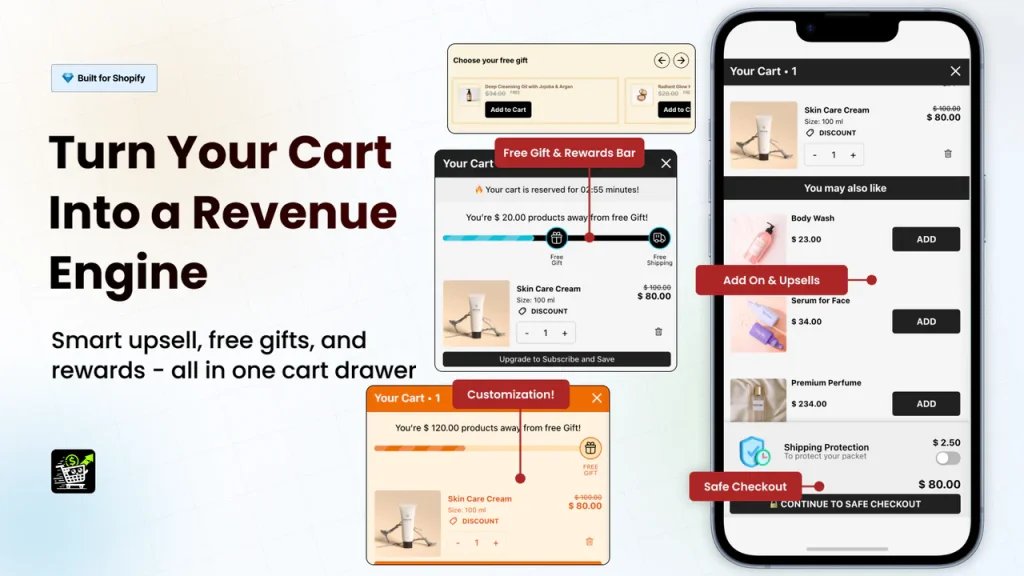
What it does: Replaces the default cart page with a slide-out drawer that keeps customers shopping, then upsells inside it.
Pricing: From $9.99/month for stores up to 100 monthly orders, scaling with order volume ($29.99 at 201-500 orders); 14-day free trial.
Rating: 5/5 (Built for Shopify certified).
Best for: Every store, especially if cart abandonment is hurting you.
Cart abandonment averages roughly 70% across ecommerce, and a big chunk of that is friction: a shopper adds an item, gets bounced to a separate cart page, loses momentum, and leaves. Oxify Cart Drawer & Upsells plugs the cheapest leak first - it shows the cart as a slide-out panel so shoppers never leave the page they are on, then layers in free-gift progress bars, frequently-bought-together bundles, and trust badges that nudge order value up. In 2026 it also added checkout, post-purchase, and thank-you-page upsells, so one app now covers the whole pre- and post-checkout offer surface. It moved from a free tier to order-based pricing this year, but at $9.99/month for a sub-100-order store, a single recovered cart typically pays the month's bill.
2. Klaviyo - email & SMS marketing
What it does: Turns customer data into automated revenue through email and SMS.
Pricing: Free up to 250 active profiles; email plans from $20/month, roughly $30/month at 1,000 profiles.
Rating: 4.7/5 (2,900+ reviews).
Best for: Stores doing roughly $10K+/month that are serious about retention.
Email remains the highest-ROI channel in ecommerce, and Klaviyo is how serious stores run it. Abandoned-cart, browse-abandonment, and post-purchase flows recover sales automatically, and its AI send-time optimization and predictive product blocks lift open and click rates without extra work. One billing note: since early 2025 Klaviyo prices on active profiles, not just the people you email, so list hygiene now directly controls your bill - suppress the profiles you never contact. If you are at or past five figures a month, Klaviyo usually pays for itself with the first flow you switch on. Smaller stores should weigh Omnisend below. See Klaviyo pricing.
3. Judge.me - reviews that convert
What it does: Collects and displays customer reviews to build trust.
Pricing: Forever Free plan; Awesome plan $15/month flat.
Rating: 5/5 (42,000+ reviews; 2025 Shopify Build Award winner).
Best for: Every single store, no exceptions.
Social proof is the cheapest conversion boost you can install, and Judge.me is the value king of the category. Its Forever Free plan is genuinely usable - unlimited review-request emails, unlimited reviews displayed, photo and video reviews, and SEO rich snippets - while the flat $15/month Awesome plan adds Q&A, automation, AI review features, and 130+ integrations with no order caps or scaling fees. Now past 42,000 five-star reviews of its own and a 2025 Shopify Build Award winner, it has earned the trust it helps you build. Sell visual products? Pair it with Loox below; everyone else can cover the reviews slot with Judge.me alone.
4. PageFly - page builder
What it does: Builds custom landing pages, product pages, and sections without code.
Pricing: Free plan (1 published slot, 10 AI credits); Builder plan from $24/month with A/B testing.
Rating: 4.9/5 (5,600+ reviews).
Best for: Stores that need custom pages beyond what their theme allows.
Themes are fine until you need a real landing page for a paid campaign, a high-converting product page, or a custom brand story. PageFly's drag-and-drop editor builds those without touching code, its 320+ templates mean you rarely start from a blank canvas, and in 2026 it added AI page generation - you describe the page, it drafts the layout, and each plan meters this with monthly AI credits. The free plan gives full feature access on a single published page - enough to test one landing page before committing - while the $24/month Builder tier adds five published slots and native A/B testing. Just do not over-build: heavy pages can drag your load time, so check speed after publishing.
5. TinyIMG - speed & SEO
What it does: Compresses images and fixes common technical SEO issues automatically.
Pricing: Free plan (50 image optimizations/month); paid from $14/month for 1,500.
Rating: 5/5 (2,200+ reviews; Built for Shopify certified).
Best for: Every store - speed and SEO matter for all of them.
Unoptimized images are the most common reason Shopify stores load slowly, and slow stores convert worse and rank lower. TinyIMG - listed as Tiny SEO Speed Image Optimizer on the App Store - compresses every image, converts to WebP, lazy-loads, and cleans up alt text, broken links, and meta tags in bulk: the boring SEO work that earns free traffic. It has also leaned into answer-engine optimization, tuning stores for AI search results as well as Google, which is where a growing share of 2026 traffic comes from. Its entry paid tier dropped to $14/month this year, making it one of the cheapest paid apps on this list. Install it, watch your Core Web Vitals improve, and mostly forget it is there.
Also Read: Best Android Apps in 2026 to Run Your Business On the Go
6. Omnisend - email & SMS for growing stores
What it does: Email marketing with popups, pre-built automations, and SMS on the Pro tier.
Pricing: Free up to 250 contacts (500 emails/month); Standard from $16/month; Pro from $59/month.
Rating: 4.8/5 (2,900+ reviews; Built for Shopify certified).
Best for: Newer and growing stores that want Klaviyo-style features at a lower entry price.
Omnisend is the smart pick for stores that want serious email and automation without Klaviyo's price curve. Pre-built flows, a friendlier editor, and a genuinely useful free plan make it fast to get revenue-driving automations live. One 2026 change to note: for accounts that subscribed on or after May 4, 2026, SMS lives on the Pro plan as a volume-priced add-on - from $0.007 per message, with no bundled credits - rather than being included across paid tiers as it was for legacy accounts. If text messaging is core to your strategy, price the Pro tier specifically before committing. Many stores happily run Omnisend for years; some graduate to Klaviyo as segmentation needs grow. Either way, never run a store without an app in this slot.
7. Shopify Inbox - free live chat with an AI sales associate
What it does: Adds live chat for customer service and pre-sale questions, now with a built-in AI agent.
Pricing: Free (built by Shopify).
Rating: 4.7/5 (5,400+ reviews).
Best for: Every store - it is free and it works.
Pre-sale questions are abandoned sales waiting to happen. Shopify Inbox lets shoppers ask "does this ship to me?" or "what size should I get?" right when they are deciding, and because Shopify builds it, it is free and natively integrated. The 2026 upgrade is significant: Inbox now ships an AI sales associate that learns your catalog and store policies, answers customers around the clock in its own words, personalizes replies for shoppers signed in with Shop, and gets sharper as you rate its chats. That turns free live chat into free 24/7 coverage. (Note: Shopify sunset chat inside the Shop app back in February 2025 - storefront chat, which is what matters here, is unaffected.) There is no reason not to have it on.
8. ReConvert - post-purchase upsell funnels
What it does: Adds one-click upsell offers after payment and turns the thank-you page into a sales channel.
Pricing: From $4.99/month (up to 50 orders); scales with order volume; free trial.
Rating: 4.8/5 (2,700+ reviews; Built for Shopify certified).
Best for: Any store that wants higher average order value with zero conversion risk.
The moment after payment is the safest place in ecommerce to make another offer: the customer has already bought, so nothing you show can break the original sale. ReConvert - now branded Upsell.com ReConvert - builds one-click post-purchase funnels and customized thank-you pages with AI-picked product recommendations, timers, and reorder blocks. Because the offer is accepted with a single tap and no re-entry of payment details, even modest take rates add meaningful revenue; a 3-5% lift in average order value is a realistic early result. At $4.99/month entry pricing it is the cheapest AOV experiment on this list. It pairs naturally with Oxify: Oxify works the cart before checkout, ReConvert works the customer after it.
9. Recharge - subscriptions for predictable revenue
What it does: Turns one-time purchases into recurring subscriptions with retention tooling.
Pricing: $25/month for new merchants up to 50 subscribers (no transaction fees); Starter $99/month + 1.49% + 19¢ per transaction beyond that.
Rating: 4.8/5 (2,900+ reviews; Built for Shopify certified).
Best for: Products customers buy repeatedly, once volume justifies it.
If you sell anything consumable - coffee, supplements, skincare, pet food - subscriptions turn one purchase into months of predictable revenue, and Recharge is the most mature platform for running them: customer portals, churn-prevention offers, failed-payment recovery, and serious analytics. The 2026 pricing works like this: merchants who installed after February 9, 2026 get a $25/month entry tier covering their first 50 active subscribers with no transaction fees; past that you move to the Starter plan at $99/month plus 1.49% + 19¢ on every subscription transaction. Those fees are real, so sequence it: start on Shopify's free built-in Subscriptions app, and graduate to Recharge around the 300-500 subscriber mark when you need prepaid plans, box-building, or churn tooling the native app lacks. For the right products, recurring revenue changes the entire economics of the store. View Recharge on the App Store.
10. Loox - photo reviews that sell
What it does: Collects and displays photo and video reviews in visual galleries.
Pricing: Free Beginner plan (until 500 total store orders); Convert plan $49.99/month with 300 monthly orders included.
Rating: 4.9/5 (8,700+ reviews; Built for Shopify certified).
Best for: Visual products - fashion, beauty, home decor.
For products people buy with their eyes, customer photos sell harder than star ratings alone. Loox automates photo-review requests (with discount incentives) and displays them in scrollable galleries and shoppable widgets that lift product-page conversion, with AI review summaries and syndication to Google, Meta, and TikTok on paid tiers. The free Beginner plan got meaningfully better in July 2026: Loox removed the old 100-per-month cap, so new stores can now send up to 2,000 review-request emails a month free until they pass 500 total orders. That makes testing visual social proof genuinely free. Past 500 orders you move to Convert at $49.99/month (300 orders included, then $50 per additional 300) - worth it for visual catalogs, overkill for everyone else, who should stay on Judge.me.
11. Smile.io - loyalty points, referrals, and VIP tiers
What it does: Runs a points, referral, and VIP program that brings customers back.
Pricing: Free up to 200 monthly orders; Essential $15/month; Standard $79/month; Growth $199/month with VIP tiers.
Rating: 4.9/5 (4,100+ reviews; Built for Shopify certified).
Best for: Stores with repeat-purchase potential that live or die on retention.
Acquiring a customer keeps getting more expensive; the stores that win in 2026 squeeze more orders out of the customers they already paid for. Smile.io is the most widely deployed loyalty app on Shopify, and its free plan - points and referrals for stores under 200 orders a month - is enough to launch a real program with zero risk. The $15/month Essential tier lifts you to 500 orders with a branded loyalty page and nudge prompts, and Growth at $199/month adds the VIP tiers that make your best customers spend more to keep status. Loyalty is the one slot on this list where doing nothing has an invisible cost: every repeat purchase your program would have generated quietly goes to whoever ran one. If your product gets bought more than once a year, fill this slot.
12. AfterShip - order tracking
What it does: Post-purchase tracking, branded tracking pages, and delivery notifications.
Pricing: Free up to 50 shipments/month; Essentials $11/month for 100 shipments.
Rating: 4.6/5 (Built for Shopify certified).
Best for: Any store tired of "where's my order?" tickets.
"Where's my order?" is the most common support ticket in ecommerce, and AfterShip eliminates most of them with branded tracking pages and proactive shipping notifications across 1,100+ carriers, plus AI-predicted delivery dates that head off the anxiety before it becomes an email. It also turns the post-purchase window - a moment of high engagement - into a chance to upsell and bring customers back. The Essentials tier ($11/month, 100 shipments) adds email and SMS notifications plus Klaviyo integration, while the free plan's 50 monthly shipments cover small stores out of the gate. Less support load, more repeat sales.
The right app stack for your store stage
You do not need all twelve on day one. Build the stack to match where your store is now, then add as you grow - and lean on Shopify's free built-ins (Email, Subscriptions, Bundles, Flow) to delay paid installs.
| Store stage | Start with | Add next |
|---|---|---|
| New store (under $5K/mo) | Judge.me, Shopify Inbox, TinyIMG, Omnisend (free tiers) + Shopify built-ins | Oxify Cart Drawer, ReConvert, AfterShip |
| Growing ($5K-$25K/mo) | Oxify, Omnisend or Klaviyo, Judge.me or Loox, TinyIMG, ReConvert, AfterShip | Smile.io Essential, PageFly for campaigns |
| Scaling ($25K+/mo) | Klaviyo, Oxify, Loox, Smile.io, PageFly, AfterShip | Recharge if consumable |
Notice the free-tier path for new stores: you can run reviews, live chat with an AI agent, image optimization, email, and even a loyalty program without spending a cent until revenue justifies the upgrade. That is the modern way to build a Shopify app stack - prove ROI on free plans and built-ins first, then pay only for what is already working.
Free vs paid: when to upgrade
Nine of the twelve apps here have a real free tier, and you should use it. The rule of thumb: stay free until the app's limit is the thing holding back revenue. Hit Omnisend's 250-contact cap because your list is growing? Upgrade. Pass Loox's 500-order Beginner threshold or Smile's 200-orders-a-month free cap? Upgrade. AfterShip's 50 shipments running out because orders are flowing? Upgrade. The only slots with no meaningful free tier - Oxify, ReConvert, and Recharge - are also the three that pay for themselves most directly, since each one exists purely to add revenue per order. And with Shopify's own 2026 price increase pushing the Basic plan to $39/month on monthly billing, app-budget discipline is not optional: do not pay for headroom you are not using, but do not let a $15/month cap throttle a flow that is earning hundreds.
Common mistakes to avoid
- Paying for what Shopify now does free. Audit your app list against the built-in section above. Merchants are still paying monthly for AI description writers, basic bundle apps, and simple subscription tools that Shopify absorbed into the platform.
- Installing too many apps. Every app adds scripts and weight. Stack more than a handful of conversion apps and your store slows down, which costs more sales than the apps recover. One app per job - and prefer Built for Shopify certified apps, which are vetted for performance.
- Setting and forgetting flows. Email and upsell apps need their automations actually switched on and reviewed monthly. An installed-but-unconfigured Klaviyo earns nothing, and an untrained Inbox AI agent answers in generic boilerplate.
- Ignoring speed. Test with Google PageSpeed Insights after each install. If an app tanks your load time, the conversion math rarely works in its favor.
- Paying before proving ROI. Start on free tiers and built-ins, confirm the app makes money, then upgrade.
How we picked these apps
We did not rank by App Store install counts. We mapped the eight jobs that actually move ecommerce revenue - cart conversion, upsells and AOV, email/SMS, reviews, speed and SEO, customer support, loyalty, and order tracking - then chose the best-in-class app for each, plus subscriptions and a page builder for stores that grow into them, and checked every category against what Shopify now bundles free before recommending a paid app at all. For every pick we installed the app on a live Shopify store, ran its core flow (cart drawer, a post-purchase offer, an abandoned-cart sequence, a review-request email, an image-compression pass), and re-tested storefront speed in PageSpeed Insights to confirm it did not erase its own gains. We re-verified every price, plan limit, rating, and free-tier detail against each vendor's official pricing page and live Shopify listing in July 2026, and caught the changes that stale lists miss: Oxify's move from a free tier to order-based pricing from $9.99, TinyIMG's cheaper $14 entry plan, Omnisend making SMS a Pro-plan add-on for accounts subscribed on or after May 4, 2026, Recharge's $25 tier applying to installs after February 9, 2026, Loox lifting its Beginner plan's email cap on July 15, 2026, and Shopify Inbox shipping its free AI sales associate. Where a precise figure was uncertain, we left it out rather than guess.
Related reading
Building out the rest of your toolkit? See our picks for the best AI apps for iPhone for product photos and marketing copy on the go, the best cloud storage and backup apps to keep your product photos and store exports safe, and - if you are a solo founder watching margins - the best budget tracking apps for Android to keep app subscriptions honest.
Bottom line
If you are starting from zero, work in this order: switch on Shopify's free built-ins first (Email, Search & Discovery, Bundles, Subscriptions, Flow), then install Shopify Inbox and Judge.me (free, instant trust and support with an AI agent answering around the clock), then TinyIMG for free speed and SEO, then Oxify Cart Drawer and ReConvert to plug the cart leak and lift order value, then an email app - Omnisend if you are small, Klaviyo once you are at scale. Add Loox, Smile.io, PageFly, AfterShip, and Recharge as your catalog and revenue call for them. Each of these earns its keep many times over when set up properly. Pick the slots you are missing, install one app at a time, measure the difference, and keep the stack lean - that is how an essential Shopify app stack actually grows a store in 2026.
Frequently Asked Questions
What are the most essential apps for a Shopify store in 2026?
The essential stack covers eight jobs: cart conversion (Oxify Cart Drawer), post-purchase upsells (ReConvert), email and SMS (Klaviyo or Omnisend), reviews (Judge.me or Loox), speed and SEO (TinyIMG), live chat (Shopify Inbox, now with a free AI sales associate), loyalty (Smile.io), and order tracking (AfterShip). Add subscriptions (Recharge) and a page builder (PageFly) as you scale. Filling one slot per job beats installing dozens of overlapping apps that slow your store down.
What do you no longer need a Shopify app for in 2026?
Shopify now covers several former app categories free: AI product descriptions and admin help (Shopify Magic and Sidekick), basic email campaigns (Shopify Email, 10,000 free sends a month), fixed product bundles (Shopify Bundles), simple subscribe-and-save (Shopify Subscriptions), site search and recommendations (Search & Discovery), workflow automation (Shopify Flow), discounted shipping labels (Shopify Shipping), and pay-per-customer acquisition (Shop Campaigns). Audit your app list against these before paying for anything - paid apps are only worth it where the built-in version stops.
How many apps should I install on my Shopify store?
Aim for one app per job rather than a fixed number - usually five to eight for most stores. Every app adds scripts that slow your storefront, and a slow store converts worse, so the goal is the smallest stack that covers conversion, email, reviews, speed, support, and tracking, with Shopify's free built-ins handling the basics. Test your load time in PageSpeed Insights after each install and remove anything that does not earn its weight.
What are the best free Shopify apps in 2026?
Shopify Inbox (live chat with a free AI sales associate) is fully free, and Judge.me has a genuinely usable Forever Free reviews plan. TinyIMG, Omnisend, Klaviyo, PageFly, and AfterShip all offer free tiers, Loox's free Beginner plan now allows up to 2,000 review-request emails a month until your store passes 500 orders, and Smile.io runs a free loyalty program for stores under 200 monthly orders. Note that Oxify Cart Drawer dropped its free tier in 2026 and now starts at $9.99/month after a 14-day trial.
Klaviyo or Omnisend - which email app is better for Shopify?
Choose Omnisend if you are a newer or growing store that wants powerful email and automation at a lower entry price; its free tier covers up to 250 contacts, though accounts subscribed on or after May 4, 2026 need the Pro plan (from $59/month) with volume-priced SMS from $0.007 per message. Choose Klaviyo once you are doing roughly $10K+ a month and need advanced segmentation and AI features like send-time optimization. Note Klaviyo bills on active profiles, so list hygiene controls your cost. Either way, never run a store without an app in this slot.
Do too many Shopify apps slow down your store?
Yes. Each app typically injects JavaScript and CSS that loads on your storefront, and too many can noticeably hurt page speed and Core Web Vitals - which lowers both conversions and search rankings. Keep your stack lean, prefer Built for Shopify certified apps (every paid pick in this guide qualifies), and run Google PageSpeed Insights after installing anything new to confirm it did not tank your load time.
How much does Recharge cost on Shopify in 2026?
Merchants who installed Recharge after February 9, 2026 get a $25/month entry tier covering up to 50 active subscribers with no transaction fees. Past 50 subscribers you move to the Starter plan at $99/month plus 1.49% + 19 cents on every subscription transaction, and the Plus plan runs $499/month with slightly lower rates. Because those fees scale with volume, start on Shopify's free built-in Subscriptions app and graduate to Recharge around 300-500 subscribers, when you need its prepaid plans, churn tools, and analytics.
Which Shopify apps help reduce cart abandonment and raise order value?
Four apps attack the problem from different angles. A slide-out cart drawer like Oxify keeps shoppers on the page and removes checkout friction while upselling in-cart. ReConvert adds one-click upsell offers after payment, so extra revenue comes with zero risk to the original sale. An email/SMS app like Klaviyo or Omnisend recovers carts after the shopper leaves with automated flows. And live chat (Shopify Inbox, with its AI agent answering 24/7) resolves the pre-purchase questions that cause hesitation in the first place. Running them together typically recovers more revenue than any one alone.
Are Judge.me or Loox better for Shopify reviews?
Judge.me is the better default for most stores: its Forever Free plan covers unlimited reviews and review requests, and the flat $15/month Awesome plan has no order caps. Loox is worth the premium specifically for visual products - fashion, beauty, home decor - because its photo and video galleries sell harder than text reviews, and its free Beginner plan got better in July 2026, now allowing up to 2,000 review-request emails a month until your store passes 500 total orders. Past that, Loox Convert runs $49.99/month with 300 monthly orders included.
How much does Shopify itself cost in 2026?
After Shopify's 2026 price increase, monthly-billing prices are $39/month for Basic, $105/month for Grow, and $399/month for Advanced, with annual billing cutting roughly 25% off those rates. Your app stack comes on top of the plan fee, which is one more reason to lean on Shopify's free built-in features and app free tiers first, then pay only for apps that demonstrably add revenue.