Most people don’t fail at budgeting because they lack discipline. They fail because they picked the wrong app.
Maybe it was too complicated. Too expensive. Or it just didn’t match how they actually think about money. Sound familiar?
We tested and researched more than 20 Android budgeting apps — cross-referencing Google Play ratings, thousands of real user reviews, pricing, and 2026 feature updates — and narrowed it down to 9 apps worth your time.
Whether you want to track every dollar manually, automate your finances completely, or finally figure out why you’re broke three days before payday — there’s an app on this list for you.
Quick Picks: Best Budget App by Use Case
| Use Case | Best App |
|---|---|
| Best overall (active budgeters) | YNAB |
| Best for couples & families | Monarch Money |
| Best free app for couples | Honeydue |
| Best free app for solo budgeters | Goodbudget |
| Best for canceling subscriptions | Rocket Money |
| Best Android design | Spendee |
| Best one-time payment option | Cashew |
| Best without bank linking | Money Manager |
| Best automated budgeting | PocketGuard |
At-a-Glance Comparison Table
| App | Pricing Model | Free Plan? | Bank Sync | Budget Method | Play Store Rating | Best For |
|---|---|---|---|---|---|---|
| YNAB | Monthly or annual subscription | No (34-day trial) | Yes | Zero-based | 4.7 ★ | Hands-on budgeters |
| Monarch Money | Annual subscription | No (7-day trial) | Yes | Flexible | 4.5 ★ | Couples & households |
| Rocket Money | Free + optional premium | Yes (limited) | Yes | Category-based | 4.6 ★ | Subscription cleanup |
| PocketGuard | Monthly or annual subscription | No (7-day trial) | Yes | Automated | 3.6 ★ | Set-and-forget users |
| Goodbudget | Free + optional premium | Yes (20 envelopes) | Premium only | Envelope | 3.9 ★ | Free manual budgeting |
| EveryDollar | Free + optional premium | Yes (manual only) | Premium only | Zero-based | 4.3 ★ | Dave Ramsey followers |
| Honeydue | Completely free | Yes | Yes | Category-based | 4.2 ★ | Free couples budgeting |
| Cashew | Free + one-time lifetime unlock | Yes | No | Category-based | 4.8 ★ | Simple expense tracking |
| Money Manager | Free + one-time lifetime unlock | Yes (15 assets) | No | Double-entry | 4.5 ★ | Privacy-first tracking |
How We Selected These Apps
Every app on this list had to pass three filters:
- Available on Android via Google Play with a minimum of 1,000 verified user reviews
- Actively maintained — updated in 2025 or 2026. Abandoned apps don’t make the cut.
- Genuine budgeting tools — not just account aggregators that show you a balance and call it “budgeting”
We also deliberately chose apps that cover different budgeting philosophies. Some people thrive on zero-based budgeting. Others just want to stop forgetting about that gym membership they haven’t used since February. This list covers both extremes and everything in between.
The 9 Best Budget Apps for Android in 2026
1. YNAB (You Need a Budget) — Best for Hands-On Budgeters
Price: $14.99/month or $109/year | Free trial: 34 days, no card required Google Play: 4.7 ★ (99K+ reviews) | Method: Zero-based budgeting
YNAB’s core idea is simple: give every dollar a job before you spend it. That proactive approach is why YNAB users report saving an aveNAB (You Need A Budget) is the gold standard for people who want to actively manage their money — not just watch it disappear.
The core idea is deceptively simple: give every dollar a job before you spend it. Every dollar coming in gets assigned to a category — rent, groceries, savings, going out — until you’ve accounted for all of it. The result is that you stop reacting to your bank balance and start planning ahead.
The Android app reached “App of the Day” status on Google Play in March 2026, and its community on Reddit has over 200,000 members sharing budgeting wins.
What Makes It Stand Out:
- Real-time sync across all devices — budget on your phone, check it on your tablet
- Home screen widgets for instant spending visibility
- Bank linking for US, Canada, UK, and EU accounts
- Reconciliation tools built into Android (not just desktop)
- Loan planner with interest calculations
- Detailed spending reports with charts
- Family sharing for up to 6 people under one subscription
- Free for students with a .edu email address — full year, no charge
Pros:
- The most thorough budgeting system on this list, backed by extensive video courses, workshops, and a blog
- Massive, active community — real people sharing real wins, not bots
- 34-day free trial is the longest on this list, and requires no credit card to start
- Students get a full free year — the best deal in personal finance apps
Cons:
- Steepest learning curve — plan for 2–3 weeks before the method feels natural
- Most expensive paid option with no permanent free tier
- Some users report occasional bank connection glitches that require manual resetting
Right for you if: You want to intentionally plan every dollar you earn and you’re willing to spend 10–15 minutes daily to make it work.
Skip this if: You want something passive that runs in the background, or you’re not ready to learn a new money philosophy.
2. Monarch Money — Best for Couples and Households
Price: $14.99/month or $99.99/year | Free trial: 7 days Google Play: 4.5 ★ (#4 top-grossing finance) | Method: Flexible (category or flex budgeting)
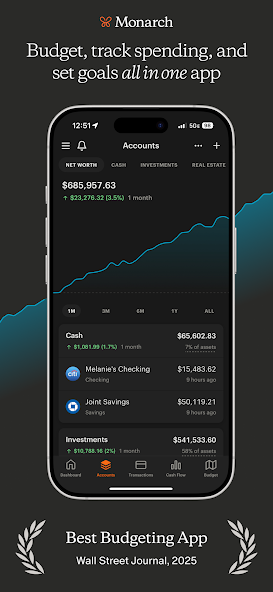
If you share finances with a partner — or want to — Monarch Money is the most capable option available on Android.
It was built by former Mint product leaders (more on that in the FAQ), and it’s earned recognition from The Wall Street Journal (“Best Budgeting App”) and Forbes (“Best Mint Replacement”). Everything comes together in one clean dashboard: checking, savings, credit cards, investments, loans, and even crypto.
What Makes It Stand Out:
- Unlimited household members at no added cost — partners, spouses, even adult kids
- Assign individual transactions to specific family members
- Privacy toggle for purchases you’d rather keep to yourself
- Automatic subscription detection
- Net worth tracking that updates in real time
- Investment portfolio monitoring
- Customizable spending reports
- Both strict category budgeting and flexible “flex” budgeting modes
Pros:
- Purpose-built for couples, with individual privacy controls that reduce financial conflict
- Clean, polished interface that works equally well on web, iOS, and Android
- No ads, ever — the subscription model means your financial data isn’t the product
- Offers a prorated refund if you cancel mid-billing cycle
Cons:
- No free tier at all — subscription required after the 7-day trial
- Bank connection reliability varies depending on your financial institution
- The 7-day trial is short for a financial app where meaningful patterns take time to emerge
Right for you if: You and a partner want a single, shared financial command center — with room for privacy where you need it.
Skip this if: You’re budgeting solo and don’t need household sharing features, or you need a free option..
3. Rocket Money — Best for Canceling Subscriptions
Price: Free basic plan | Premium: $6–$12/month (you choose) Google Play: 4.6 ★ | Method: Category-based
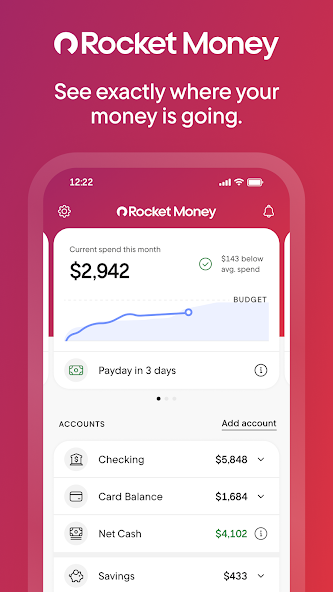
Most budgeting apps show you where your money went. Rocket Money actually stops money from leaving your account.
Its headline feature is subscription management: the app scans every linked account, surfaces recurring charges you may have completely forgotten about, and — on the premium plan — will cancel those subscriptions for you. For many Americans, this alone pays for the upgrade many times over within the first month.
What Makes It Stand Out:
- Automatic detection of every recurring charge across all linked accounts
- Subscription cancellation assistance — premium users can request Rocket Money to cancel services directly
- Bill negotiation service — Rocket Money’s team contacts providers to try to lower your bills
- Low-balance and overspending alerts
- Smart savings recommendations based on your spending history
- Net worth tracking (premium)
- Two custom budget categories on the free plan
Pros:
- Free plan includes account linking, balance monitoring, and subscription identification — genuinely useful without paying
- 7-day free trial of all premium features
- The cancellation and negotiation services create direct, immediate savings
Cons:
- Premium uses a “choose your own price” slider — some users find the flexible pricing model confusing
- Better at finding savings than building a detailed forward-looking budget
- Budgeting tools are basic compared to YNAB or Monarch Money
Right for you if: You suspect you’re quietly hemorrhaging money on forgotten streaming services, apps, and subscriptions — and you want something that fixes it automatically.
Skip this if: You want granular, zero-based budgeting. Rocket Money is a savings optimizer, not a full budget planning system.
4. PocketGuard — Best Automated Budgeting
Price: $12.99/month or $74.99/year | Free trial: 7 days Google Play: 3.6 ★ | Method: Automated zero-based
PocketGuard is for people who want to budget but don’t want to think about budgeting.
Connect your accounts and it instantly calculates how much money you have left to spend today — after bills, savings goals, and essential expenses are set aside. The “In My Pocket” number answers the one question that matters most every day: “Can I actually afford this right now?”
What Makes It Stand Out:
- “In My Pocket” — real-time disposable income calculator after all commitments
- Automatic transaction categorization that gets smarter over time
- Recurring bill tracking
- Subscription manager
- Net worth tracker
- Debt payoff planning tools
- Rollover budgets — unspent money carries forward to next month automatically
Pros:
- Fastest setup on this list — meaningful insights within minutes of connecting accounts
- Rollover budgets prevent the “use it or lose it” mentality that derails some budgeters
- Visual pie charts make spending patterns immediately clear
Cons:
- No longer offers a free tier — trial only
- Android experience lags behind iOS; the new “Pace” spending alert feature is currently iPhone-only, with Android support expected later in 2026
- Lowest Google Play rating on this list, with some user reviews citing billing complaints
Right for you if: You want budgeting insights without daily manual work. You’re fine letting the app make recommendations while you focus on your actual life.
Skip this if: You need a free app, or you want full Android feature parity with iOS users right now.
5. Goodbudget — Best Free Option (Solo Budgeters)
Price: Free | Premium: $10/month or $80/year Google Play: 3.9 ★ (20K+ reviews) | Method: Envelope budgeting
Goodbudget digitizes the classic cash-envelope system. Create envelopes for each spending category, fill them with budgeted amGoodbudget is the digital version of an old-school system: the cash envelope method. You create an envelope for each spending category, fill it with your budgeted amount for the month, and when the envelope is empty — you stop spending in that category.
It sounds old-fashioned, but the psychology behind it works. And Goodbudget has been helping Americans budget this way since 2009.
What Makes It Stand Out:
- 20 free spending envelopes — enough for most household budgets
- Two-device sync on the free plan
- Shared envelopes with a partner at no cost
- Savings goal tracking
- Debt paydown monitoring
- No bank credentials required on the free tier — maximum privacy
- Premium upgrades add unlimited envelopes, bank syncing, 5 devices, and 7 years of transaction history (free stores 1 year)
Pros:
- Most generous free plan on this entire list
- Manual entry builds genuine spending awareness — you confront every transaction, which changes behavior
- Couples can share a budget on the free plan
- No bank access required — your credentials stay with you
Cons:
- Manual data entry requires consistency — miss a few days and catching up feels overwhelming
- Interface is functional but looks dated next to Spendee or Monarch
- Free plan is capped at 1 account and 2 devices
Right for you if: You want a proven, free budgeting system and you’re willing to enter transactions yourself. The manual process is a feature, not a bug.
Skip this if: You hate manual entry, or a modern-looking interface matters to you.
6. EveryDollar — Best for Dave Ramsey Followers
Price: Free (manual) | Premium: $17.99/month or $79.99/year | Free trial: 14 days Google Play: 4.3 ★ | Method: Zero-based budgeting

EveryDollar is Dave Ramsey’s budgeting app, built by Ramsey Solutions. It relaunched in January 2026 with new features including a EveryDollar is Dave Ramsey’s budgeting app, built by his company, Ramsey Solutions. It relaunched with new features in January 2026, including a “margin finder” that identifies where you’re overspending and live group coaching sessions with real human coaches.
If you’re following Ramsey’s Baby Steps program or his debt snowball method, this app is built exactly around that framework.
What Makes It Stand Out:
- Fully customizable zero-based budget
- Savings funds with automatic monthly rollover
- Paycheck planning for irregular or biweekly income
- Margin finder — shows exactly where you have room to cut (premium)
- Daily budget lessons and coaching content
- Live group coaching with human coaches (premium)
- Bank connectivity (premium)
Pros:
- Free version is fully functional for zero-based budgeting without bank sync
- The only app on this list built around Ramsey’s specific debt and savings methodology
- Paycheck planning is especially valuable for Americans paid biweekly or with irregular income
- The 2026 relaunch added live coaching that no competitor offers at this price point
Cons:
- Premium pricing is the highest monthly cost on this list for what you get
- Free version requires 100% manual entry — no bank sync at all
- Android Google Play rating (4.3 ★) trails the iOS version (4.7 ★), with Android users reporting occasional crashes
Right for you if: You’re actively following Dave Ramsey’s financial plan and want an app that mirrors his exact Baby Steps methodology.
Skip this if: You’re not a Ramsey follower. You’ll find more flexibility — and often lower cost — with YNAB or Goodbudget.
7. Honeydue — Best Free App for Couples
Price: 100% free (no premium version) Google Play: 4.2 ★ (2.7K+ reviews) | Method: Category-based
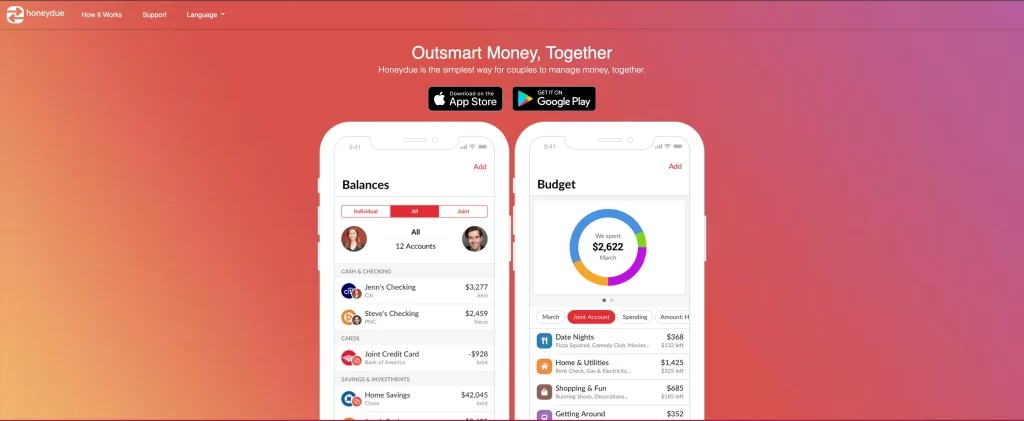
Honeydue is the only budgeting app on this list designed exclusively for couples. And unlike every other couples app, it charges nothing.
Both partners link their accounts. You set spending limits by category. You communicate about transactions through built-in chat and emoji reactions directly on purchases. You control exactly how much your partner can see — per account.
Supports over 20,000 financial institutions across the US and 4 other countries.
What Makes It Stand Out:
- Per-account privacy controls: share balances only, share balances + transactions, or hide completely
- In-app chat on specific transactions — discuss a charge directly without texting or arguing
- Bill reminders and automatic spending categorization
- Custom budget categories
- Expense splitting between partners
- Bank sync included completely free (most competitors charge for this)
Pros:
- 100% free — every feature is available with no paywall
- Privacy controls prevent the “why did you spend that?” argument before it starts
- Direct transaction-level communication reduces money stress in relationships
- Bank sync is free, which costs money on almost every competing app
Cons:
- Mobile app only — no web or desktop version
- Recent reviews mention bugs, sync delays, and slower customer support response times
- Basic compared to Monarch Money — no net worth tracking or investment monitoring
- Designed only for couples, not families or solo users
Right for you if: You and your partner want financial transparency — and to stop having money arguments — without paying for Monarch Money.
Skip this if: You budget solo, need a desktop interface, or want net worth and investment tracking built in.
8. Cashew — Best Cheap Lifetime Option
Price: Free basic | Premium: $1.49/month, $11.99/year, or $19.99 one-time lifetime Google Play: 4.8 ★ (highest on this list) | Method: Category-based tracking
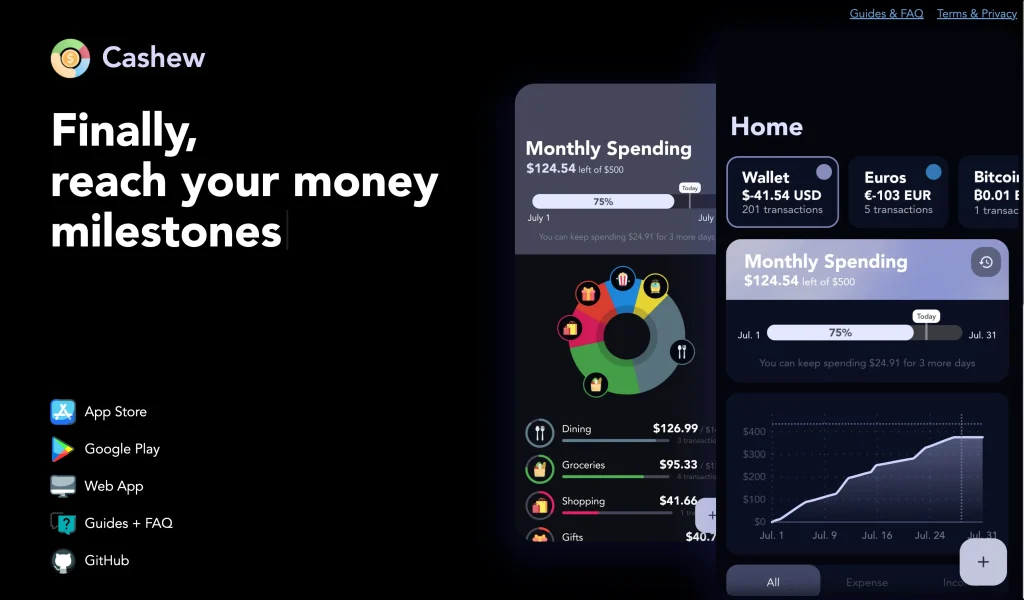
Cashew is the highest-rated budgeting app on Google Play. It’s clean. It’s fast. It stays out of your way.
The free version covers basic expense tracking. A one-time lifetime payment unlocks every premium feature permanently — no subscription, no recurring charges, ever. This is one of the best value deals in the entire personal finance app market.
What Makes It Stand Out:
- Fast, frictionless expense entry
- Category-based budgets with visual breakdowns
- Budget alerts when you’re approaching limits
- Subscription tracking
- Multi-currency support — ideal for Americans who travel or manage income in multiple currencies
- Clean, ad-free interface throughout
Pros:
- Highest Google Play rating of any budgeting app (4.8 ★)
- One-time lifetime payment eliminates subscription fatigue
- Multi-currency support is rare at this price point
- No bank credentials required — your financial data stays private
- Clean, modern interface that users actually enjoy opening
Cons:
- No bank syncing — manual entry only
- No investment tracking, debt planning, or comprehensive financial dashboard
- Lightweight by design — not a full financial management platform
Right for you if: You want a beautiful, simple expense tracker that doesn’t require your bank login and won’t keep charging you every year.
Skip this if: You need automatic transaction imports, or you want a full financial picture including investments and net worth.
9. Money Manager Expense & Budget — Best Without Bank Linking
Price: Free (15 assets) | Lifetime premium: $5.49 Google Play: 4.5 ★ (thousands of reviews) | Method: Double-entry bookkeeping
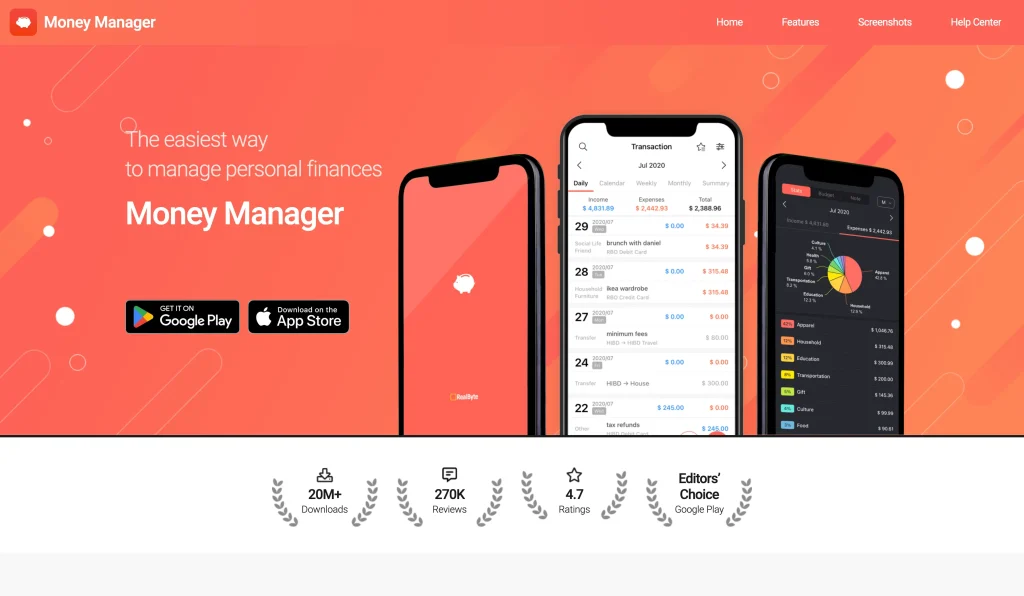
Money Manager uses a double-entry bookkeeping system — the same accounting method used by businesses for centuries. Income deposits directly to your account, expenses draw from it, and your balances are always accurate in real time. No bank credentials. No third-party data sharing. Everything stays on your device.
At its one-time lifetime price, it’s the most affordable paid option on this entire list.
What Makes It Stand Out:
- Double-entry system ensures balances are always accurate — no mysterious discrepancies
- Budget vs. actual spending graphs for instant variance analysis
- Bookmark system for recurring expenses (saves time on frequent entries)
- Subcategories for detailed tracking
- Calendar view for transaction history
- Receipt photo attachments
- Excel backup and export — your data is never locked inside the app
- PC editing over Wi-Fi sync
- Works completely offline — no internet connection needed
Pros:
- One-time lifetime price is the lowest on this list
- You own your data — Excel export means you’re never dependent on the app continuing to exist
- Double-entry accounting catches errors that single-entry apps miss
- Fully offline capable — works anywhere, including places without signal
Cons:
- 100% manual entry — no bank syncing at all
- Interface is utilitarian rather than polished
- No debt payoff planning or investment tracking
- Free version limited to 15 asset accounts
Right for you if: You refuse to hand bank credentials to any app, or you’re tracking both personal and small business expenses. Also ideal for privacy-first users.
Skip this if: You want automatic transaction imports or a visually polished, modern experience.
How to Pick the Right Budget App: 3 Questions
1. How hands-on do you want to be?
- “I want to plan every dollar” → YNAB or EveryDollar
- “I want the app to do the work” → PocketGuard or Rocket Money
- “Somewhere in the middle” → Monarch Money or Goodbudget
2. Do you share finances with anyone?
- Couples (free) → Honeydue
- Couples (full-featured) → Monarch Money
- Families up to 6 → YNAB
- Solo → Any other app on this list
3. What’s your relationship with manual entry?
“Either is fine” → PocketGuard, EveryDollar Premium, or Honeydue
“I’ll enter every transaction” → Goodbudget, Cashew, or Money Manager
“Absolutely not — bank sync only” → YNAB, Monarch Money, or Rocket Money
Tips to Actually Stick With Your Budget App
The app you choose matters less than how you use it. These habits separate people who transform their finances from people who download an app and forget about it.
Start by tracking, not budgeting. Use the app for one week without setting any budget targets. Just record what you spend and watch the patterns. Most Americans are genuinely surprised by what they find. Build your actual budget from real data, not optimistic estimates.
Turn on every alert. Enable spending alerts, bill reminders, and low-balance notifications. Apps that nudge you at the right moment keep you engaged. Apps sitting silently on your home screen get deleted.
Do a Sunday review, not a monthly one. Five minutes every Sunday catches overspending while you can still change course that week. Monthly reviews just tell you what went wrong. Weekly reviews let you fix it.
Use the free trial fully before committing. YNAB offers 34 days. EveryDollar offers 14. Monarch Money and PocketGuard offer 7. Test the features you’ll actually use — not the ones that sound impressive in the app store description.
Don’t switch apps. Pick one, give it 30 days, and let the data accumulate. The insight comes from consistent tracking over time, not from finding the perfect app.
FAQ
What is the best free budgeting app for Android in 2026?
Goodbudget is the best free budgeting app for solo users on Android. The free plan includes 20 spending envelopes, two-device sync, savings goal tracking, and debt monitoring — with no bank account access required.
For couples, Honeydue is completely free with bank syncing, shared budgets, and built-in transaction-level communication between partners.
Rocket Money also offers a genuinely useful free basic plan that identifies subscriptions and tracks spending.
Can a budget app cancel my subscriptions for me?
Rocket Money is the only major budget app that actively cancels unwanted subscriptions on your behalf. The free version identifies recurring charges. The premium plan adds a concierge team that contacts providers and cancels services directly — you don’t have to make a single phone call.
Other apps like PocketGuard and Monarch Money will surface and organize your subscriptions for you to review, but the cancellation is on you.
Do budget apps need my bank login?
No. Goodbudget, Cashew, Money Manager, and EveryDollar (free version) all work through manual entry without ever touching your bank credentials.
Apps that do link to banks use services like Plaid, which use bank-level encryption and read-only access — they can see transactions but cannot move money.
Manual-entry apps have an unexpected advantage: physically entering each purchase forces you to confront your spending in a way that automatic syncing doesn’t.
What happened to Mint? What’s the best replacement?
Mint shut down in early 2024 and directed its users to Credit Karma. Monarch Money is the most recommended Mint replacement — it was founded by former Mint product leaders and replicates the core experience with better customization, no ads, and no data selling.
YNAB, Rocket Money, and PocketGuard are all popular alternatives for former Mint users, depending on how hands-on you want to be.
Bottom Line
Here’s the honest truth: the best budgeting app is the one you’ll actually open tomorrow.
Not the one with the most features. Not the one with the best ratings. The one that fits how your brain works — whether that’s manually logging every coffee, or getting a weekly automated summary and moving on with your life.
Pick one app from this list. Track every purchase for seven days. Don’t judge the spending yet — just watch it.
Seven days of real data will show you more about your financial habits than any budget plan built from scratch. Then you can actually start fixing it.