Google just dropped a bombshell update to Google Maps. And honestly? This changes everything about how you’ll find places to go.
Your favorite navigation app isn’t just for directions anymore. It’s now powered by Gemini AI—and it can literally plan your entire night out with a simple question.
What Just Happened?
Google announced massive updates to Maps starting in November 2024. The biggest news? Gemini AI is now built right into the app.
This isn’t some tiny update. This is Google transforming Maps from a navigation tool into your personal AI assistant that actually knows your city.
Over 2 billion people use Google Maps every month. Now all of them can tap into AI that reads reviews, checks menus, and suggests places you’d actually want to visit.
The Game-Changing Feature: Just Ask Google Maps Anything
Here’s where it gets wild.
You can now type natural questions into Google Maps. Not keywords. Actual questions.
Like: “Things to do with friends at night in Boston.”
Gemini instantly gives you curated suggestions:
- Speakeasies with hidden entrances
- Live music venues with tonight’s shows
- Rooftop bars with city views
- Late-night food spots locals actually go to
Every suggestion comes with:
- AI-generated summaries of what people think
- Photos from real visitors
- Reviews about the vibe
- Whether it’s busy right now
Then you can ask follow-up questions:
“Does it have outdoor seating?”
“What’s the most popular dish?”
“Is parking easy?”
“How much does dinner cost?”
Gemini answers immediately using data from millions of reviews and photos.
Real Examples People Are Already Trying
These actually work right now:
“Dog-friendly cafes near me”
Shows cafes where dogs are welcome + photos of actual dogs at those cafes
“Budget-friendly restaurants with vegan options along my route”
Filters by price, diet, and location—all in one search
“Pizza places where a meal costs under $10”
Checks menus and reviews to find cheap pizza spots
“Coffee shops rated at least 4 stars”
Only shows highly-rated places
“Restaurants with a romantic vibe and outdoor seating”
Understands mood + specific requirements
This is basically having a local friend who knows every restaurant, bar, and cafe in the city.
Voice Commands While Driving (Hands-Free AI)
The coolest part? All of this works hands-free while you’re driving.
Starting in December 2024, Gemini integrates with Google Maps navigation.
What you can do while driving:
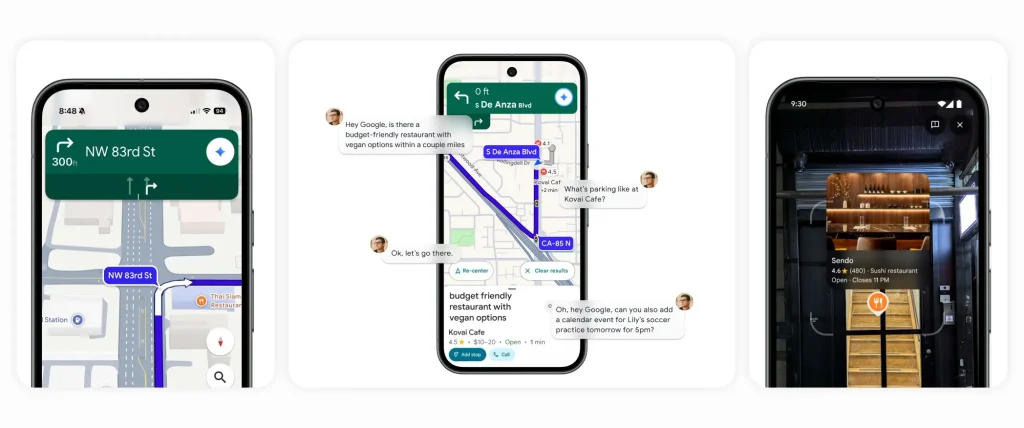
“Find a budget-friendly restaurant with vegan options along my route, something within a couple miles. What’s parking like there?”
Gemini answers everything. Then you say:
“OK, let’s go there.”
Navigation starts automatically.
You can even do random stuff:
“Add a calendar event for soccer practice tomorrow at 5 PM.”
“What happened in last night’s game?”
“Tell me the news.”
All without touching your phone. All while Maps shows you turn-by-turn directions.
Landmark Navigation: No More “Turn in 500 Feet”
Google is fixing the most annoying thing about GPS directions.
Old way:
“Turn right in 500 feet.”
You have no idea how far 500 feet is.
New way with Gemini:
“Turn right after the Thai Siam Restaurant.”
You actually see the restaurant as you drive.
Maps now highlights landmarks on your route:
- Gas stations
- McDonald’s and other chain restaurants
- Famous buildings
- Easy-to-spot stores
The landmark appears on your map highlighted in color as you approach it. You hear the direction. You see exactly where to turn.
No more missing exits because you were counting feet in your head.
Report Traffic Problems Just by Talking
This one’s genius.
Before, reporting traffic meant tapping buttons and selecting incident types while driving. Dangerous and annoying.
Now you just talk naturally:
“I see an accident”
“Looks like there’s flooding ahead”
“Watch out for that slowdown”
Gemini understands and reports it instantly to other drivers.
No menus. No buttons. Just talk.
This rolling out on Android and iOS in the next few weeks.
Camera + AI: Point Your Phone and Ask Questions
When you arrive somewhere, the fun continues.
New feature: Lens with Gemini
How it works:
- Tap the camera icon in Maps search bar
- Point your phone at restaurants, cafes, or landmarks
- Maps identifies them and drops pins on your screen
- Tap the mic and ask questions
Real questions you can ask:
“What is this place and why is it popular?”
“What’s the vibe inside?”
“What are the highly rated dishes here?”
“Does this bakery have French butter croissants?”
It’s like having Wikipedia + Yelp + TripAdvisor combined, but you just point and ask.
Available now in the U.S.
Traffic Alerts BEFORE You Even Start Driving
This might save you hours of sitting in traffic.
New: Proactive traffic alerts
Google Maps now warns you about problems even when you’re not actively navigating.
You’re at home. Maps sends a notification:
“Heavy traffic jam on your usual route to work. Leave 20 minutes early or take Highway 101 instead.”
Or:
“Road closure on Main Street. Your normal commute will take 45 minutes longer today.”
You get warnings about:
- Unexpected road closures
- Heavy traffic jams
- Accidents on your regular routes
- Construction delays
This is rolling out now on Android in the U.S.
Immersive View Expands to 150 New Cities
Immersive View is that crazy feature where AI creates a 3D model of streets, buildings, and routes.
Now available in 150 cities worldwide including:
- Brussels
- Kyoto
- Frankfurt
- Tokyo
- Barcelona
- And 145 more
What you can see:
- 3D preview of your entire route before you leave
- Weather conditions at your destination
- Traffic in 3D along your route
- Where to park (shown in 3D)
- Complex turns highlighted before you reach them
It’s like flying through your route in a video game before you actually drive it.
Better Trip Planning: Find Stops Along Your Route
Planning a road trip just got way easier.
Before: You’d have to exit navigation, search for food, memorize the place, start navigation again, add a stop manually.
Now:
- Get directions to your destination
- Tap “Add Stops”
- Maps shows top attractions, restaurants, scenic spots, gas stations along your route
- Tap to add them
- Done
All the stops are optimized so you’re not backtracking or wasting time.
Works on Android and iOS right now.
What You Need to Use These Features
Gemini in Maps (asking questions):
- Available now in the U.S.
- Android and iOS
- Just update Google Maps
- No Gemini subscription needed
Voice navigation with Gemini:
- Rolling out in December 2024
- Android and iOS first
- Android Auto coming soon
- Free for everyone
Landmark navigation:
- Coming in December 2024
- Works everywhere Google Maps works
- Automatically enabled
Traffic alerts:
- Available now on Android in U.S.
- iOS coming soon
Lens with Gemini (camera feature):
- Available now in U.S.
- Android and iOS
All features are free. No paid subscription required.
How to Try It Right Now
On your phone:
1. Update Google Maps (check App Store or Play Store)
2. Open Google Maps
3. Type a natural question in the search bar like “romantic restaurants with live music”
4. Browse AI-curated results
5. Tap on a place to read the AI summary
6. Ask follow-up questions
While driving (coming December 2024):
1. Start navigation
2. Say “Hey Google” or tap the mic
3. Ask Gemini questions about places, traffic, or anything
4. Get hands-free answers
Using the camera feature:
1. Open Google Maps
2. Tap the camera icon in search bar
3. Point at buildings/restaurants
4. Tap the mic when you see pins
5. Ask your questions
Why This Actually Matters
Google Maps was already the best navigation app. But it was basically a digital map with turn-by-turn directions.
Now it’s an AI assistant that:
- Reads reviews for you
- Understands what you’re actually looking for
- Explains why places are popular
- Helps you make decisions
- Does it all hands-free while driving
The difference:
Before: “Show me restaurants.”
Gets 50 random results. You scroll forever.
Now: “Show me romantic Italian restaurants under $50 with good wine and outdoor seating.”
Gets 5 perfect matches with AI explanations of why each one fits.
That’s the power of Gemini.
Real People Testing It
Reviewers who got early access are impressed.
CNET tested the feature and called it “surprisingly helpful.” They asked about dish recommendations at restaurants they’d never been to. Gemini gave accurate answers based on reviews and menus.
Android Authority noted the visual upgrade makes Maps feel modern and intelligent, not just functional.
People testing the voice features loved not having to stop talking to their passenger just to report traffic or find a coffee shop.
What’s Coming Next
Google’s not stopping here.
Soon:
- Similar AI features coming to Google Search
- Waze getting conversational traffic reporting
- More languages beyond English
- Expansion to more countries
Google said they’re making 100 million updates to Maps every single day using AI to analyze billions of images.
The map you see today is different from yesterday. And it’ll be different tomorrow.
The Bottom Line
Google Maps just became the smartest navigation app on the planet.
You’re not just getting directions anymore. You’re getting:
- Personalized recommendations
- Instant answers to questions
- Hands-free AI assistance while driving
- Landmark-based navigation that actually makes sense
- Traffic warnings before problems ruin your day
And it’s all free.
Update your Google Maps app today. Start asking questions. Try the camera feature. Plan your next outing with Gemini.
Your phone just became a local expert for every city in the world.
Google Maps with Gemini is rolling out now in the U.S. on Android and iOS. Voice navigation features arrive in December 2024. All features are free—no subscription required.