Gemini in Google Maps (2026): Every AI Feature Now Live in the US

As of August 2026, every headline Gemini feature in Google Maps has shipped in the US — hands-free Gemini navigation, Ask Maps, landmark directions, voice incident reporting, Lens with Gemini, and Gemini on Android Auto — and all of it is free, no Google AI Pro subscription required. What started as a "coming soon" promise in late 2024 is now the default Google Maps experience for American Android users.
In a hurry? Jump to what's live in the US right now, how to enable and use each feature, the feature availability table, Gemini on Android Auto, how to turn Gemini off, or whether any of it costs money.
What's Live in the US Right Now (August 2026)
Google Maps has quietly finished its biggest transformation in a decade. Here's the current state of play for US users:
- Hands-free Gemini in navigation — fully rolled out on Android and iOS. Gemini replaced Google Assistant inside Maps, and it now works while driving, walking, and cycling.
- Ask Maps — launched March 12, 2026 in the US and India, and expanded in English to 150+ countries in August 2026. Type or speak complex questions ("is there a public tennis court with lights I can play at tonight?") and get an answer with a custom map.
- Agentic Ask Maps actions — added August 2026, US-only for now: order food along your route (Square and Toast restaurants today, Uber Eats coming), compare and book hotels, and discover local events, all inside the chat.
- Immersive Navigation — the redesigned 3D driving view with landmarks and lane detail, live on phones since March 2026 and on Android Auto and CarPlay since July 2026.
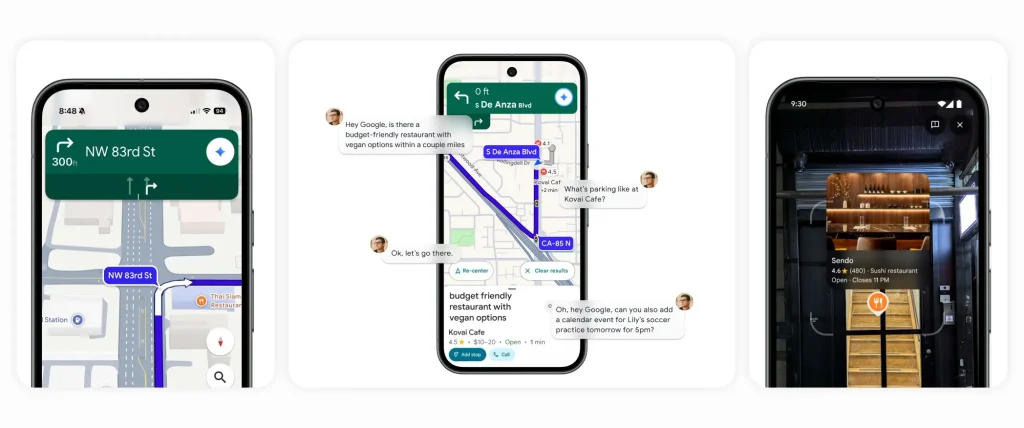
- Landmark-based directions — "turn right after the Thai Siam Restaurant" instead of "turn in 500 feet." Live in the US on Android and iOS.
- Voice incident reporting — say "I see an accident" or "looks like there's flooding ahead" and Gemini files the report. Android Auto also added a dedicated hazard button below the compass.
- Lens with Gemini — point your camera at a storefront and ask "what is this place and why is it popular?" Live in the US.
- Proactive traffic alerts — Maps warns you about closures and jams on your usual routes before you start driving. Live on Android in the US.
US availability came first for nearly all of these, and the experience is still English-first. Ask Maps went global in English in August 2026, but the agentic extras — food ordering, hotel booking, conversational edits — remain US-only for now.
Ask Maps: The Search Bar Is Now a Conversation
Ask Maps is the marquee 2026 addition. Instead of keyword searches, you ask Maps real questions and it answers with curated results, AI summaries drawn from reviews and photos, and a custom map.
Queries that work today:
- "Dog-friendly cafes with outdoor seating near me"
- "Budget restaurants with vegan options along my route"
- "A romantic Italian spot under $50 with good wine"
- "Things to do with friends at night in Boston"
You can ask follow-ups — parking, popular dishes, whether it's busy right now — and Gemini answers from Maps' review and menu data. Google says there are no ads in Ask Maps results for now, though it hasn't ruled them out. Desktop support has since arrived too: on a computer, open the Maps menu and choose Ask Maps (your browser needs WebGL enabled).
The August 2026 update pushed Ask Maps well beyond search. In the US it can now order food from restaurants along your route (Square and Toast today, Uber Eats coming soon), compare and book hotels, and surface local events — we break that down in Ask Maps food ordering and hotel booking. It also shows real-time transit departures and delays in the chat, and — if you opt in to Personal Intelligence — can pull context from Gmail, like your upcoming flight or dinner reservation, with Calendar support coming later. With Maps History on, it remembers past planning conversations, so "what did you suggest for my Seattle trip?" actually works.
Hands-Free Gemini While Driving, Walking, and Cycling
The hands-free experience that was "rolling out in the coming weeks" back in 2024–2025 is now simply how Maps works. Start navigation, say "Hey Google," and you can:
- Find stops along your route with multi-step requests ("cheap EV charging near a coffee shop on my way")
- Report traffic, crashes, and flooding by voice
- Add calendar events, check sports scores, or catch up on news mid-drive
In 2026 Google extended the same conversational Gemini experience to walking and cycling navigation — useful for asking about a place you're strolling past without stopping to type.
Gemini on Android Auto: No Longer "Coming Soon"
The biggest change since this story first broke: Android Auto support shipped. Gemini began replacing Google Assistant on Android Auto in November 2025, complete with Gemini Live for free-flowing conversation, and the rollout has since reached US drivers broadly.
On top of that, the Maps "2026 update" — Immersive Navigation with 3D buildings, landmarks, and clearer lane guidance — arrived on Android Auto with version 17.3 in July 2026, alongside CarPlay. We covered the car-screen rollout in detail in our Immersive Navigation on Android Auto piece. Incident reporting also finally landed in the car: a triangle hazard button below the compass lets you flag jams, crashes, construction, and speed traps. (If your traffic lines look glitchy on the car display, see our Android Auto traffic-lines bug fix.)
Feature Availability at a Glance (US)
| Feature | US status (Aug 2026) | Platforms | Cost |
|---|---|---|---|
| Hands-free Gemini navigation | Live (driving, walking, cycling) | Android, iOS, Android Auto | Free |
| Ask Maps | Live since March 2026; global (English) Aug 2026 | Android, iOS, desktop web | Free |
| Food ordering / hotel booking in Ask Maps | Live Aug 2026 (US only) | Android, iOS | Free (you pay for the food/room) |
| Immersive Navigation | Live (phones March 2026, cars July 2026) | Android, iOS, Android Auto, CarPlay | Free |
| Landmark-based directions | Live | Android, iOS | Free |
| Voice incident reporting | Live (+ hazard button on Android Auto) | Android, iOS, Android Auto | Free |
| Lens with Gemini | Live | Android, iOS | Free |
| Proactive traffic alerts | Live | Android (iOS pending) | Free |
Do You Need Google AI Pro? (No.)
Every Gemini feature inside Google Maps is free for US users. You do not need Google AI Pro ($19.99/month) or AI Ultra — those subscriptions gate higher limits in the standalone Gemini app, deep research, and video generation, not anything in Maps. All you need is an updated Google Maps app from the Play Store and a signed-in Google account.
The only "cost" today is data: Google isn't showing ads in Ask Maps yet, but executives have said ads aren't ruled out down the road.
How to Enable and Use Each Feature
There's no master "Gemini" switch to flip on — the features appear automatically once your app is current. Requirements: the latest Google Maps from the Play Store or App Store, a signed-in Google account, and US English as your device language for the voice features. If something's missing, update the app first — these roll out server-side, so a fresh install on an old version won't help.
Ask Maps: Tap the Ask Maps prompt under the search bar (or just type a full question into search) and ask something specific — "dog-friendly patio with good cocktails within 10 minutes." Ask follow-ups in the same thread. On desktop, open the Maps menu and click Ask Maps.
Hands-free Gemini: Start navigation, say "Hey Google," and talk naturally — "find cheap EV charging near a coffee shop on my way," "report an accident," "add pick up milk to my calendar." No setup needed; Gemini replaced Assistant inside Maps. Works while driving, walking, and cycling.
Lens with Gemini: Tap the camera icon in the search bar, hold your phone up at a storefront until pins appear, then tap the mic and ask "what is this place and why is it popular?"
Voice incident reporting: Mid-navigation, just say what you see — "looks like there's flooding ahead." No wake word gymnastics or menu required.
On Android Auto: Say "Hey Google" for Gemini, or tap the hazard triangle under the compass to report jams, crashes, construction, and speed traps.
iOS vs Android: The core features — Ask Maps, hands-free Gemini, Lens, landmark directions — are live on both. Android still gets extras first: proactive traffic alerts are Android-only so far, and Android Auto obviously has no iPhone equivalent (Gemini doesn't drive Maps through CarPlay's voice layer the same way — Siri still owns the wake word there).
How to Turn Gemini Off (or Rein It In)
Short answer: there's no single toggle that removes Gemini from Google Maps — a sore point in Google's own support forums. What you can control:
- Ignore it — classic keyword search, directions, and the old tabs all still work. Gemini only engages when you ask it something.
- Personalized Recommendations — turn this off in Maps settings and Gemini stops using your search history, saved places, reviews, and past conversations to personalize answers.
- Maps History — disable it and Ask Maps conversations aren't saved (you lose the "remember my Seattle trip" memory, which may be the point).
- Personal Intelligence — the Gmail-reading integration is opt-in. Don't enable it and Ask Maps never touches your inbox.
- "Hey Google" detection — turn off the hotword in your Google/Gemini settings if you don't want voice activation while navigating.
One privacy note worth knowing: Google's documentation says that when you tap a place and ask a question about it, Maps doesn't use or collect your location for that query — and AI answers can be wrong, so treat "is it open now" claims with the same skepticism you'd apply to any chatbot.
Bottom Line
The 2024-era caveats — "rolling out in the coming weeks," "Android Auto coming soon" — are history. As of August 2026, US Android users get the full Gemini-powered Google Maps: conversational search with Ask Maps, hands-free voice control everywhere including Android Auto, landmark directions, camera-based place questions, and proactive traffic warnings. Ask Maps can even order your dinner and book your hotel now. It's all free, it's US-and-English-first, and it makes Maps feel less like a map and more like a local who rides shotgun. Update the app and start asking it questions — and if it gets too chatty, the controls above rein it in.
Frequently Asked Questions
Is Gemini in Google Maps free, or do I need Google AI Pro?
All Gemini features in Google Maps are free in the US. Google AI Pro ($19.99/month) and AI Ultra cover the standalone Gemini app’s higher limits and tools — nothing in Maps requires a subscription.
What is Ask Maps and is it available in the US?
Ask Maps is Gemini-powered conversational search inside Google Maps. It launched in the US and India on March 12, 2026, expanded in English to 150+ countries in August 2026, and works on Android, iOS, and desktop (via the Maps menu). It answers complex questions like "find a lit tennis court open tonight" with a custom map.
Does Gemini in Google Maps work on Android Auto?
Yes. Gemini began replacing Google Assistant on Android Auto in November 2025, and the Immersive Navigation update reached Android Auto (and CarPlay) in July 2026. Android Auto also has a dedicated hazard button for incident reporting.
How do I report an accident in Google Maps with my voice?
While navigating, just say something natural like "I see an accident" or "looks like there’s flooding ahead." Gemini interprets it and reports the incident to other drivers — no menus or taps needed.
What is Lens with Gemini in Google Maps?
Tap the camera icon in the Maps search bar, point your phone at a restaurant or landmark, and ask questions like "what is this place and why is it popular?" It’s live in the US on Android and iOS.
Which languages does Gemini in Google Maps support?
The experience is English-first. Ask Maps rolled out in English to 150+ countries in August 2026, but voice navigation features and the agentic extras (food ordering, hotel booking) remain US English-focused, with more languages promised.
How do I turn off Gemini in Google Maps?
There is no single switch that removes Gemini from Maps. You can turn off Personalized Recommendations and Maps History in settings, skip the opt-in Personal Intelligence (Gmail) integration, and disable "Hey Google" hotword detection — or simply keep using classic keyword search, which still works.
Can Ask Maps really order food or book a hotel?
Yes, in the US as of August 2026. Ask Maps can find restaurants along your route and add items to a cart (Square and Toast supported, Uber Eats coming soon), compare hotel prices and availability, and surface local events — you confirm and pay yourself.