Snapchat Planets Order and Meaning Explained (2026 Guide)


The Snapchat planets order is Mercury, Venus, Earth, Mars, Jupiter, Saturn, Uranus, and Neptune — the exact order of our real Solar System. In a friend's Snapchat Solar System, you are the Sun, and Mercury is their #1 best friend while Neptune is their 8th. The closer the planet sits to the Sun, the more you and that person snap and chat. It is a Snapchat+ feature, so you need a Snapchat Plus subscription to see it.
In a hurry? Jump to: Planets in order · What each planet means · Find your position · How ranking works · Cost & free trial · Fixes · FAQ
If you have ever spotted a small red, blue, or ringed planet next to a friend's name and wondered what it meant, this guide explains the whole system: the order, the color and heart of every planet, how Snapchat decides who lands where, and how to check which planet you are in someone else's solar system. Everything below is current for 2026.
What are Snapchat Planets?
Snapchat Planets — officially called the Friend Solar System — is a Snapchat+ feature that turns your eight closest friends into planets orbiting around you. You sit in the middle as the Sun, and each of your top eight friends is represented by one planet. The nearer a planet is to the Sun, the higher that person ranks among the people you snap and chat with most.
Think of it as a playful, visual version of Snapchat's older "best friends" list. Instead of a plain ranking, your closest connections become a tiny universe, complete with planet colors, orbiting hearts, and stars that hint at how strong each friendship is inside the app.
One important detail: the Friend Solar System is private to you. Other people cannot open your profile and see your personal solar system or your full top-eight list. What you can do is check which planet you occupy in a friend's solar system — provided you are inside their top eight. We cover exactly how to do that further down.
Snapchat Planets in order
Your Snapchat Solar System has eight planets, and each one stands for one of your top eight best friends. The order follows our real Solar System exactly, counting outward from the Sun:
- Mercury – #1 best friend (closest to you)
- Venus – #2 best friend
- Earth – #3 best friend
- Mars – #4 best friend
- Jupiter – #5 best friend
- Saturn – #6 best friend
- Uranus – #7 best friend
- Neptune – #8 best friend (farthest from you)
A quick way to remember it: the four inner planets (Mercury, Venus, Earth, Mars) carry hearts and represent your tightest friendships, while the four outer planets (Jupiter, Saturn, Uranus, Neptune) have stars but no hearts, signalling more casual or fading connections.
What each Snapchat planet means
Here is what every planet looks like and the friendship rank it represents. The colors, hearts, and stars are part of the design, so you can identify a planet at a glance.
Mercury – #1 Best Friend

Mercury is your number one best friend — the person you interact with the most on Snapchat. It is shown as a red planet surrounded by red hearts. Being someone's Mercury is the strongest spot in the entire system, the equivalent of "closest friend."
Venus – #2 Best Friend

Venus represents your second-closest friend. It is a light brown (tan) planet decorated with yellow, pink, and blue hearts. It signals a very close friendship sitting just behind your number one.
Earth – #3 Best Friend

Earth is your third-closest friend. Fittingly, it is the blue-and-green planet with blue oceans, accompanied by a little moon, stars, and red heart emojis. It looks like a miniature globe and marks a genuinely meaningful connection.
Mars – #4 Best Friend

Mars is your fourth-closest friend and the last of the heart-carrying inner planets. It appears as a red planet ringed by stars and purple and blue hearts. The friendship is still strong, just a notch below the top three.
Jupiter – #5 Best Friend

Jupiter is your fifth best friend and the first of the outer planets. It is a reddish-orange planet with darker orange bands and stars floating around it — but no hearts. This is where friendships begin to read as friendly rather than ultra-close.
Saturn – #6 Best Friend

Saturn is your sixth best friend, easily recognized by its signature ring. It is an orange planet with a loop and a few stars, marking a solid but more casual bond.
Uranus – #7 Best Friend

Uranus is your seventh-closest friend. It is a green planet with no hearts around it, reflecting a more distant or occasional connection inside the app.
Neptune – #8 Best Friend

Neptune is your eighth and final best friend — the farthest planet from the Sun. It is shown as a deep blue planet with stars and no hearts, indicating the most distant relationship that still makes the top eight. After Neptune, friends no longer appear in your solar system at all.
| Planet | Friend rank | Color | Decoration |
|---|---|---|---|
| Mercury | #1 | Red | Red hearts |
| Venus | #2 | Light brown / tan | Yellow, pink & blue hearts |
| Earth | #3 | Blue-green | Moon, stars, red hearts |
| Mars | #4 | Red | Stars, purple & blue hearts |
| Jupiter | #5 | Reddish-orange | Orange bands & stars (no hearts) |
| Saturn | #6 | Orange | Ring & stars (no hearts) |
| Uranus | #7 | Green | No hearts |
| Neptune | #8 | Deep blue | Stars (no hearts) |
Also Read: All Emojis Meanings Explained: The Best Emoji Guide
How to find your position in a friend's Solar System
You cannot open your own solar system to see your top eight — Snapchat keeps that private. But you can check which planet you are in a friend's solar system, as long as you are inside their top eight. Here is how:
- Open the friend's profile: tap their Bitmoji or name to open their Friendship Profile.
- Find the badge near their name: look for a small gold-ringed badge that reads either "Best Friends" or "Friends."
- Tap the badge: a pop-up appears showing the planet you have been assigned in their solar system, along with how long you have held that spot.
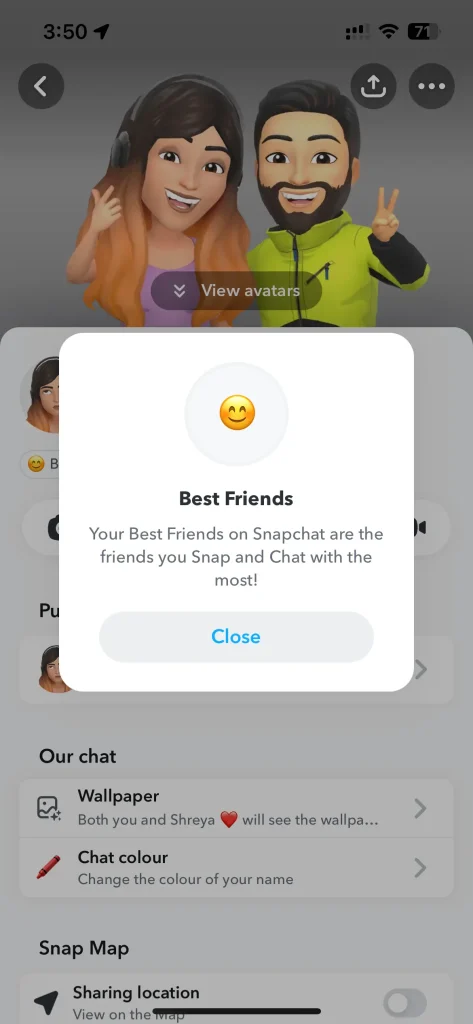
Note that you need an active Snapchat+ subscription to see the planet badge.
Best Friends vs Friends badge
The badge wording tells you whether the closeness is mutual:
- Best Friends badge: you and that person are both in each other's top eight. The friendship is mutual.
- Friends badge: they are in your top eight, but you are not in theirs (or vice versa). The connection is one-sided in terms of interaction frequency.
How Snapchat decides the planet order
Snapchat assigns planets automatically using an interaction score — you cannot manually drag a friend to a different planet. The ranking is driven mostly by how often and how recently you two engage. The main signals include:
- Snaps sent and received – the heaviest factor.
- Chats and message frequency over recent days and weeks.
- Snapstreaks – long, active streaks push someone up.
- Story views, replies, and reactions.
- Mutual engagement – two-way interaction counts more than one-sided activity.
Because the score leans on recent activity, your planets are not fixed. The system refreshes every few days, so if you start snapping someone more, they can climb toward Mercury; if you go quiet, they drift outward toward Neptune. Snapchat occasionally tweaks the visuals and Bitmoji touches inside the Friend Solar System view, but the underlying logic — eight friends, ranked by interaction — has stayed the same.
Do you need Snapchat Plus, and is there a free trial?
Yes — the Friend Solar System is a Snapchat+ exclusive. Without a subscription, the planet badges simply will not appear on profiles. Snapchat+ is a paid tier, commonly around $3.99 per month (with discounted 6-month and annual plans), though pricing varies by country and changes over time. For the exact current price in your region, check the official Snapchat+ page.
If you only want to peek at the planets, Snapchat+ typically offers a 7-day free trial. Start the trial, view your solar system, and cancel before it renews if you do not want to keep paying. There is no legitimate way to see the planets for free without a Snapchat+ subscription or trial.
How to turn the Planets feature on or off
The Friend Solar System turns on automatically once you subscribe to Snapchat+ — there is no separate switch to flip. To remove the planets, open Settings, manage your Snapchat+ membership, and cancel the subscription. When Snapchat+ ends, the planet badges disappear along with the other premium features.
Snapchat Planets not showing? Common fixes
If the planets are missing even though you expect to see them, work through these checks:
- Confirm Snapchat+ is active. The badges only appear with a live subscription or trial.
- Update the app. An outdated version of Snapchat may not render the latest solar system view.
- Make sure you're in the right top eight. You can only see your planet on a profile if you are actually inside that person's top eight friends.
- Restart the app or your device to clear a temporary glitch.
If it still won't show after all that, it may be a support issue. Our guide on how to fix Snapchat support code SS06 walks through resolving common account and app errors.
Is the Snapchat Solar System an accurate measure of friendship?
It is a fun, visual snapshot — not a verdict on real-world closeness. The solar system only measures in-app interaction: snaps, chats, streaks, and story engagement. A best friend you see every day in person but rarely snap could land far out at Neptune, while someone you barely know offline might sit at Mercury simply because you keep a daily streak going.
That gap is worth keeping in mind, because the ranking can stir up feelings it was never meant to. Discovering you are not someone's Mercury — or watching a friend slip from Earth to Saturn — can sting, and chasing a higher planet by spamming snaps misses the point. Treat the planets as a lighthearted look at your habits inside the app, not a scoreboard for your friendships.
Related reading on AndroidHire:
- How to turn on Dark Mode on Snapchat
- All Emojis Meanings Explained: The Best Emoji Guide
- How to fix Snapchat support code SS06
How we verified this guide
We built this guide by reviewing the Friend Solar System inside a Snapchat+ account and noting the color, hearts, and stars of each planet from Mercury through Neptune, then checking how the Best Friends and Friends badges reveal a planet when tapped. We cross-checked the order and ranking factors against Snapchat's own official Friend Solar Systems help article. Pricing and trial details were checked against the official Snapchat+ page and refreshed for 2026; because Snapchat+ pricing varies by region, we describe it qualitatively and point you to the source for the exact figure.
Related reading
Bottom line
The Snapchat planets order — Mercury, Venus, Earth, Mars, Jupiter, Saturn, Uranus, Neptune — ranks your eight closest Snapchat friends from #1 to #8, with the inner, heart-bearing planets marking your tightest bonds. It is a Snapchat+ feature, it updates from your recent snaps and chats, and you can check your own spot by tapping a friend's badge. Enjoy it for what it is: a playful map of your in-app habits, not a scientific reading of your real friendships.
Frequently Asked Questions
What is the order of Snapchat planets?
The Snapchat planets order is Mercury, Venus, Earth, Mars, Jupiter, Saturn, Uranus, and Neptune, matching our real Solar System. Mercury represents your #1 best friend (closest to the Sun, which is you) and Neptune represents your 8th. The closer the planet, the more you interact with that person on Snapchat.
What planet is number 1 on Snapchat?
Mercury is the number one planet on Snapchat. It is shown as a red planet with red hearts and represents your closest friend, the person you snap and chat with the most. Being someone's Mercury is the top spot in their entire Friend Solar System.
What does each Snapchat planet mean?
Each planet marks a friendship rank from #1 to #8. Mercury (red) is #1, Venus (tan) is #2, Earth (blue-green) is #3, and Mars (red) is #4 — all carry hearts. Jupiter (#5), Saturn (#6), Uranus (#7), and Neptune (#8) are the outer planets with stars but no hearts, indicating more casual connections.
Do I need Snapchat Plus to see the planets?
Yes. The Friend Solar System is a Snapchat+ exclusive feature, so the planet badges only appear if you have an active subscription. Without Snapchat+, you will not see any planets on profiles. A 7-day free trial is usually available if you just want to check them out.
How do I find out which planet I am on a friend's Snapchat?
Open the friend's profile and look for a gold-ringed badge near their name that reads Best Friends or Friends. Tap the badge and a pop-up shows which planet you are in their solar system. You can only see this if you are inside that person's top eight friends and you have Snapchat+.
How does Snapchat decide the planet order?
Snapchat assigns planets automatically based on your interaction score, which is driven mainly by snaps and chats, plus Snapstreaks, story replies, and mutual engagement. You cannot manually choose a planet. The ranking refreshes every few days based on recent activity, so friends can move closer or farther over time.
Can my friends see my Snapchat solar system?
No. Your own solar system and full top-eight list are private to you. Others cannot open your profile and see your planets. They can only learn their own planet in your system by tapping the Best Friends or Friends badge, which reveals just their position, not your whole list.
What is the difference between the Best Friends and Friends badge?
The Best Friends badge means you and that person are both in each other's top eight, so the closeness is mutual. The Friends badge means only one of you is in the other's top eight, so the interaction is one-sided. Both badges, when tapped, reveal the planet you occupy.
Does the Snapchat solar system reflect real-life friendship?
Not really. The planets only measure in-app interaction such as snaps, chats, and streaks, not real-world closeness. Someone you see daily in person could sit far out at Neptune if you rarely snap, while a daily streak partner you barely know offline could be your Mercury. Treat it as a fun feature, not a true ranking of friendships.