Best MDM Software for Android Devices in 2026 (IT Manager Picks)

The best MDM software for Android devices in 2026 is Microsoft Intune if your company already pays for Microsoft 365 Business Premium, E3, or E5. You already own it. For a cheap kiosk or POS tablet fleet, Hexnode (Pro at $2.20 per device a month, ~10% less on annual billing) or Scalefusion (from about $2) win. For locked-down hardware that only runs one app, pick Esper.
Here is the part most roundups skip. The brand name is not the hard choice. The hard choice is the Android Enterprise enrollment type. Pick Work Profile, Fully Managed, or Dedicated first. Then pick a vendor that is good at that type.
In a hurry? Jump to: quick picks · enrollment types · the 7 tools · comparison table · how to choose · 7-day trial plan · skipped on purpose · videos · FAQ
Quick picks
| You are | Pick this | Why |
|---|---|---|
| Already on Microsoft 365 | Microsoft Intune | Included in Business Premium, E3, E5. Best BYOD work profile. |
| Locking cheap tablets into one app | Hexnode | $2.20/device/mo (Pro), ~10% off annual. Strong kiosk templates. |
| Retail, logistics, field tablets | Scalefusion | From ~$2/device/mo. Easy console, good kiosk + remote view. |
| Custom Android hardware / API nerds | Esper | Built for dedicated devices, not staff phones. |
| Samsung-only fleet | Knox Manage | Chip-level Knox controls no third-party MDM can match. |
| Tiny budget, few devices | Miradore | Free for 50 devices. Premium $2.75 annual / $3.30 monthly. |
| You still use Device Administrator | Stop. Migrate now. | Intune ended DA support on GMS devices in December 2024. |
What MDM actually does on Android
MDM means Mobile Device Management. On Android it is not a spy app you sideload. It rides on Android Enterprise, Google's official work program.
A real MDM lets IT:
- Enroll a phone in minutes (QR, zero-touch, or a work account)
- Push only approved apps from Managed Google Play
- Wipe work data if the phone is lost
- Lock a tablet to one app (kiosk / dedicated mode)
- Set Wi-Fi, VPN, passcode, and USB rules from a web console
If a vendor cannot do Managed Google Play and Android Enterprise, it is not MDM. It is remote-control software wearing a costume. For staff-phone remote support, see our guide on how to remotely control an Android phone from a PC for business.
The 2026 rule: Device Administrator is dead. Microsoft ended Intune support for Android Device Administrator on GMS devices in December 2024. If your old MDM still talks about Device Admin, you are on borrowed time.
Pick the enrollment type before you pick a brand
This is the unique fork. Google documents four main setups. Mix them up and staff will revolt, or a kiosk will leak into Settings.
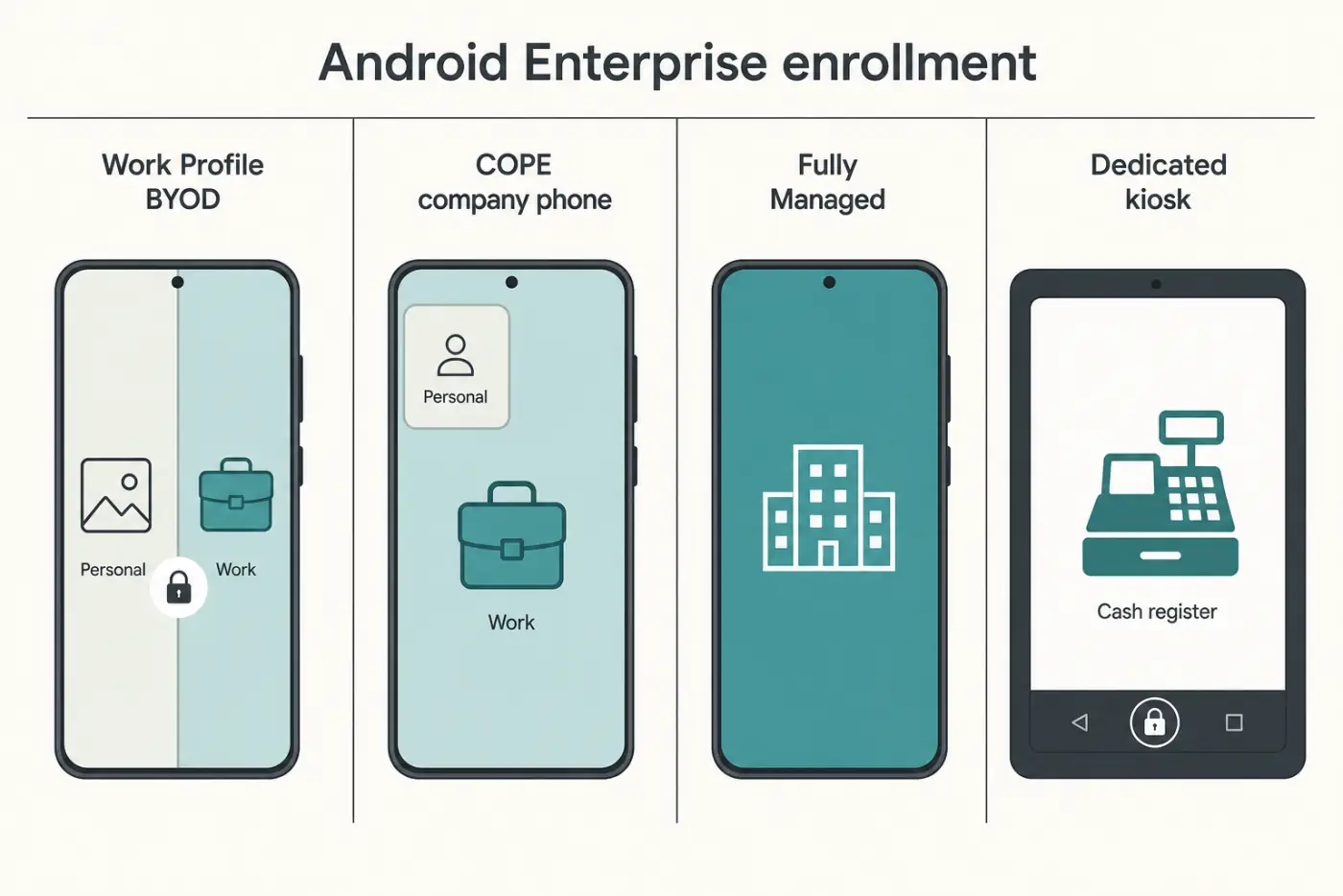
1. Work Profile (BYOD, employee-owned)
- The phone gets a work tab and a personal tab.
- IT sees work apps only. Not photos, not WhatsApp, not personal mail.
- Best for: staff who will not hand you their personal phone.
- Intune App Protection Policies can even protect Outlook without full MDM.
2. Corporate-owned work profile (COPE)
- Company owns the hardware. Staff may still have a personal side.
- IT can set device-wide rules (Wi-Fi, USB) that BYOD cannot.
- Best for: company phones that also go home.
3. Fully Managed (work-only phone)
- The whole phone is work. No personal Play Store.
- Best for: field sales, regulated jobs, high-risk data.
4. Dedicated / kiosk (one job)
- Locked to one app or a tiny set of apps.
- Buttons, status bar, and settings can be frozen.
- Best for: POS, signage, warehouse scanners, waiting-room tablets.
If you sell coffee on a tablet, you want Dedicated, not BYOD. If you give reporters phones, you want Work Profile. Same MDM brand can do both. The setup is different.
Watch: what a work profile actually is
Google's own explainer is clearer than most vendor decks. Watch this, then enroll one test phone.
The 7 best MDM tools for Android in 2026
1. Microsoft Intune — best overall if you already pay Microsoft
Price: Intune Plan 1 is $8 per user per month standalone. It is included in Microsoft 365 Business Premium, E3, and E5. Android: Work Profile, Fully Managed, Dedicated, AOSP.
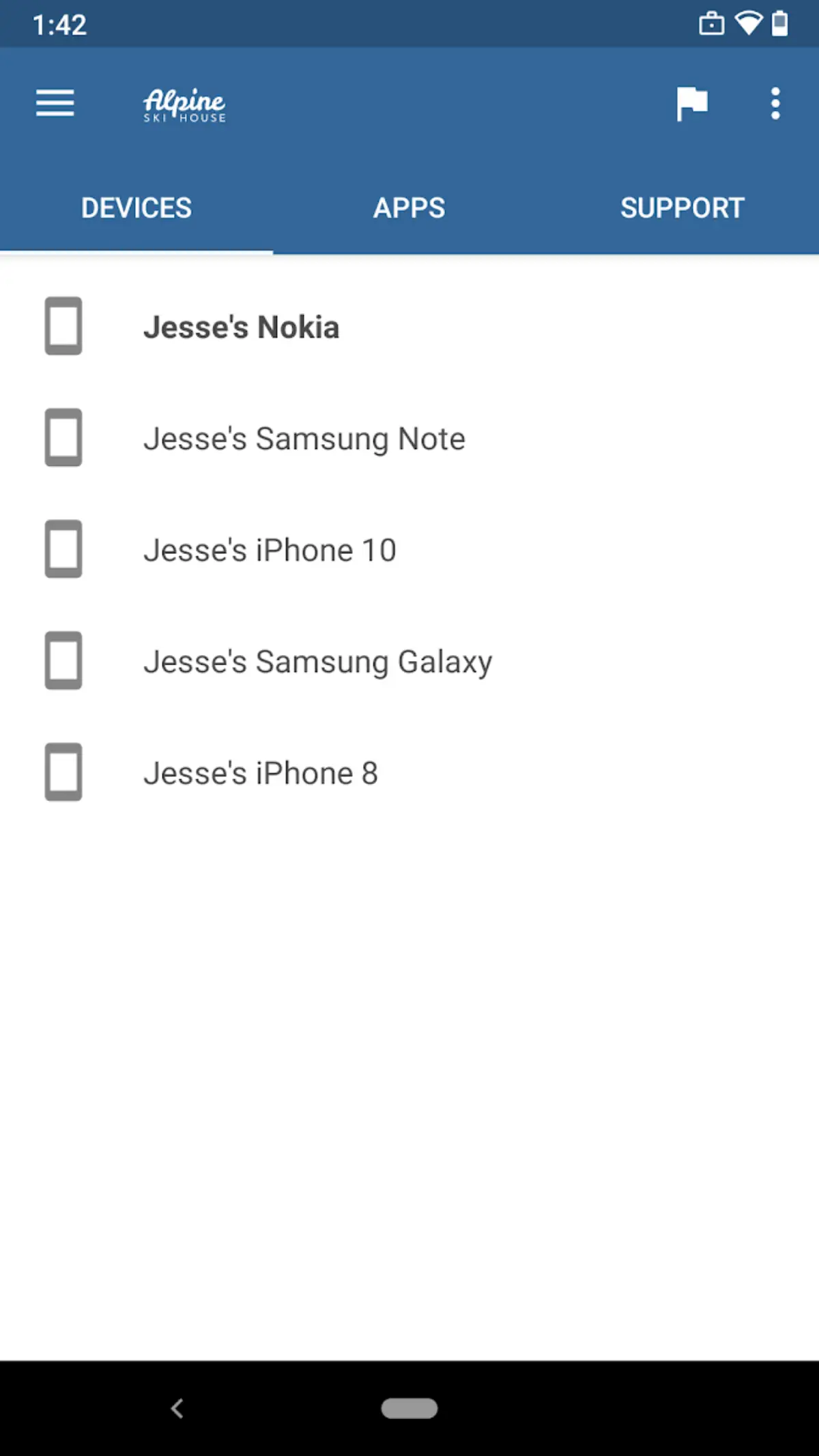
Intune is not the deepest Android kiosk tool. Hexnode and Scalefusion beat it on one-app lockdown polish. It wins for a different reason: most IT teams already have the license, and it ties Android to Entra ID Conditional Access. No compliant phone, no Outlook.
BYOD is its superpower. App Protection Policies wrap Office apps on a personal Android without taking over the whole phone. That is the option that gets the least staff pushback.
Honest limits: the console is a maze. Kiosk templates take more clicks than Hexnode. Shared / specialty devices may need Plan 2 ($4 add-on), though Microsoft started folding some of that into E3/E5 in July 2026.
Best for: any shop already on Microsoft 365. Microsoft's Intune overview.
Microsoft's own enrollment walkthrough:
2. Hexnode — best cheap kiosk and mixed-OS starter
Price: the public 2026 list is Pro $2.20 / Enterprise $3.20 / Ultimate $4.70 per device per month, with Hexnode advertising 10% off for annual billing (so Pro lands near $2 a device committed yearly). Ultra is quote-only. 14-day trial, no card. Older blogs still say “from $1.” Do not budget that. Android: Work Profile, Fully Managed, Dedicated, plus Fire OS and more.
Hexnode is the tool we hand to a 30-device shop that needs kiosk mode this week. Templates are pre-built. Pricing is per device, not per user, which is kinder when one person does not own each tablet.
Honest limits: HR and identity features are thinner than Intune. Support quality varies with plan tier.
Best for: schools, clinics, and small retail kiosks on a tight budget.
3. Scalefusion — best for field tablets and POS lockdown
Price: from about $2 per device per month (annual). 14-day trial. Android: Fully Managed and Dedicated are the sweet spot.
Scalefusion's console is the one non-specialists finish in an afternoon. Remote view, geofencing, and kiosk mode are first-class, not buried. Logistics and retail teams like it because a warehouse tablet and a manager's phone can live in the same dashboard.
Honest limits: it is not an HR system. Data residency is more US-leaning than some EU-first tools. Vendor blogs will always rank themselves #1. We keep it for the kiosk work, not the marketing.
Best for: POS, signage, and field Android. Pair it with an Android POS system if the tablet also takes payments.
4. Esper — best for dedicated Android hardware
Price: Genesis from $2 per device per month, Bridge $4, Architect $6. 25-device minimum on paid contracts, so Genesis is $50/month before add-ons. 30-day trial. No forever-free tier.
Esper is not for your CEO's personal Pixel. It is for a thousand identical kiosks, custom boards, and devices that should never see a Play Store home screen. APIs, hardware button locks, and "this device only runs our app" are the point.
Honest limits: overkill for 12 staff phones. Weak if you need iPhone parity in the same console.
Best for: product teams shipping Android as a piece of equipment.
5. Samsung Knox Manage — best if every phone is a Galaxy
Knox sits under the OS, not just on it. Firmware tamper flags, hardware-backed containers, and Knox Mobile Enrollment are Samsung-only. A third-party MDM talking to Android Enterprise APIs cannot match that depth on a Galaxy.
Honest limits: Pixel, Motorola, and Zebra fleets need something else. Mixed brands? Use Intune or Hexnode, and keep Knox as extra on the Samsungs.
Best for: regulated Samsung fleets. Read Samsung's Knox docs before you mix vendors.
6. Miradore — best free-to-start option
Price: free for up to 50 devices (no credit card). Premium is $2.75 per device per month on annual billing or $3.30 monthly. Premium+ runs about $3.95 annual / $4.75 monthly. There is a 14-day Premium trial. Hit 51 devices on the free plan and the portal can lock until you upgrade or unenroll.
Good for a pilot of 10 phones. Android Enterprise is there. Kiosk is basic. You will outgrow it when you need fancy kiosk branding or deep Windows/macOS in one pane.
Best for: proving MDM to a boss who will not sign a contract yet.
7. NinjaOne — best if your RMM already lives there
If the helpdesk already patches Windows with NinjaOne, adding Android beats standing up a second console. Work Profile, Fully Managed, and Dedicated are supported. Pricing is sales-led.
Best for: MSPs who refuse another login.
Comparison table (August 2026)
| MDM | From | BYOD work profile | Kiosk / dedicated | Best for |
|---|---|---|---|---|
| Intune | $0 if in M365 / $8 user/mo | Excellent (MAM too) | Yes, clunkier | Microsoft shops |
| Hexnode | $2.20 Pro (10% off annual) | Yes | Excellent | Cheap kiosks |
| Scalefusion | ~$2/device/mo | Yes | Excellent | Field + POS |
| Esper | $2 Genesis, 25-device min | Not the point | Best in class | Dedicated hardware |
| Knox Manage | Samsung licensing | Yes (Galaxy) | Yes + Knox | Samsung-only |
| Miradore | Free 50 devices / $2.75+ | Yes | Basic | Tiny pilots |
| NinjaOne | Quote | Yes | Yes | Existing RMM |
List prices change. Confirm on each vendor site. Per-device vs per-user math flips the bill when tablets have no named user. Hexnode Pro $2.20 (10% annual discount), Miradore Premium $2.75 annual / $3.30 monthly with a 50-device free cap, Esper Genesis $2 with a 25-device minimum, and Intune Plan 2 at $4 were all checked against the vendors' own public pages on 29 August 2026.
On page 1, skipped on purpose
Google's first page for this keyword is half vendor homepages. Naming them once is enough. Ranking them as “best” would copy a sales page.
| Name you will see | Why it is not in the top 7 |
|---|---|
| TinyMDM | Fine Android-first SMB tool. We already have Hexnode and Scalefusion in that slot. |
| Bento | Another Android kiosk lander. Same job as Hexnode. |
| JumpCloud | Shows up on most page-1 lists. It is a directory-first platform that also does MDM — buy it for identity, not for Android kiosk depth. If you are not replacing your directory, Hexnode is the cheaper answer to the same Android question. |
| SOTI MobiControl | Serious rugged / warehouse MDM. Quote-only. Overkill for a 40-phone office. |
| ManageEngine | Lives in the Zoho stack. Fine if you already pay Zoho. Not a default. |
| AirDroid Business | Remote control + kiosk. We cover it in the remote-control guide. It is not a full Android Enterprise MDM replacement for Work Profile fleets. |
| Workspace ONE / MaaS360 | Enterprise UEM. You do not buy these because a blog ranked them #8. |
| Headwind MDM | Open-source self-host. Great if you have a Linux person. Not a 7-day trial for a cafe. |
Seven ranked tools plus a skip table beats a 15-vendor dump with no enrollment types.
How to choose in 20 minutes
- Count the jobs, not the phones. Staff BYOD, company phones, and kiosks are three products. You may need two enrollment types.
- Check Microsoft first. Admin center → billing → licenses. If you see Intune or Business Premium, start there. Do not pay Hexnode and Intune for the same 50 phones.
- If the device is a cash register, ignore BYOD tools. You want Dedicated + kiosk. Hexnode, Scalefusion, or Esper.
- If staff own the phones, do not Fully Manage them. That is how you get a mutiny. Work Profile or App Protection only.
- Run a 7-day pilot on 5 real devices, including one cheap tablet and one personal BYOD volunteer.
A 7-day MDM trial that actually teaches you something
Do not demo on a flagship. Demo on the worst phone in the drawer.
- Day 1: Create the enterprise binding in Android Enterprise / Managed Google Play.
- Day 2: Enroll one Fully Managed test phone with a QR code. Push one private app.
- Day 3: Enroll one Work Profile on a personal phone. Confirm IT cannot see personal photos.
- Day 4: Lock a tablet into kiosk. Try to break out with the volume keys.
- Day 5: Remote wipe the test phone. Time how long until it is clean.
- Day 6: Lost-phone drill. Can you lock and locate within 5 minutes?
- Day 7: Export a compliance report your auditor would accept.
If a vendor fails Day 4 or Day 5, stop. Pretty dashboards do not wipe a stolen phone.
Mistakes we still see in 2026
- Buying MDM to "see everything on BYOD." Android Enterprise is built so you cannot. That is the deal.
- Skipping Managed Google Play. Sideloading APKs onto work phones is how you get malware. See our notes on Android sideloading for why IT should not copy that habit.
- One policy for phones and kiosks. A passcode on a checkout tablet will freeze the line.
- No zero-touch for 50+ devices. QR enrollment does not scale past a conference table.
- Forgetting a VPN on field phones. Pair MDM with a real tunnel. Our Android VPN picks cover the staff-phone side.
How we picked
We scored tools the way a one-person IT shop would:
- Does it speak Android Enterprise (Work Profile, Fully Managed, Dedicated), not Device Admin?
- Is pricing honest on the public page (per user vs per device)?
- Can a non-specialist lock a tablet to one app in under an hour?
- Is there a path that costs $0 because the company already bought Microsoft 365?
- Would we trust the wipe button on a lost phone?
Vendor-written "best MDM" lists always crown themselves. We used Google's Android Enterprise overview, Microsoft's current platform support page, and public list prices as of late August 2026. Always re-check quotes before you sign.
Bottom line
If Microsoft already bills you, Intune is the best MDM software for Android devices you will actually deploy. If you are locking tablets to one app, start with Hexnode or Scalefusion. If the Android device is a product, not a phone, use Esper.
Do this next: write down BYOD / company phone / kiosk counts. Open your Microsoft 365 license list. Book a 7-day trial on five ugly devices, not a slide deck.
Related reading
Frequently Asked Questions
What is the best MDM software for Android devices in 2026?
Microsoft Intune is the best overall if your company already has Microsoft 365 Business Premium, E3, or E5, because the license is included and Work Profile plus App Protection are strong. For kiosk and POS tablets, Hexnode (Pro at $2.20 per device a month, ~10% off annual) or Scalefusion (from about $2) are better. Esper wins for dedicated hardware, but paid plans have a 25-device minimum. Miradore is free for up to 50 devices.
Is Microsoft Intune free for Android?
Standalone Intune Plan 1 lists at $8 per user per month. It is included with Microsoft 365 Business Premium, E3, E5, and several EMS plans, so many firms already own it. Plan 2 is a $4 add-on, and from July 2026 Microsoft folds Plan 2 capabilities into E3 and E5. Check Admin center billing before you buy a second MDM. There is no permanent free commercial Intune plan.
What is the difference between MDM and a work profile on Android?
A work profile is an Android Enterprise container that keeps work apps separate from personal apps. MDM is the console that creates that profile, pushes apps, and sets rules. You can have a work profile without a heavy MDM UI, but in business the MDM is what enrolls the phone and wipes work data if it is lost.
Can MDM see personal photos on a BYOD Android phone?
Not if you enroll with a personally owned work profile. Google designed that mode so IT controls work apps and data only. If someone Fully Manages a personal phone, they can see far more — which is why you should never Fully Manage employee-owned devices.
Is Android Device Administrator still usable in 2026?
Treat it as dead. Microsoft ended Intune support for Device Administrator on GMS devices in December 2024. Google's path is Android Enterprise: Work Profile, Fully Managed, or Dedicated. If your vendor still sells Device Admin as the main method, plan a migration.
What MDM is best for Android kiosk or POS tablets?
Hexnode, Scalefusion, and Esper. They lock a device to one app, hide settings, and survive a reboot. Intune can do dedicated devices, but kiosk setup is slower. Esper's paid plans start at 25 devices. Pair the MDM with your POS app so a lost tablet cannot open banking or the Play Store.