Turn Off Emergency Alerts on Android: What You Can Silence

Quick answer: Open Settings, search for Wireless emergency alerts, and turn off the alert types you don't want: Extreme threats, Severe threats, AMBER alerts, Public safety messages, and any test alerts. On a Samsung Galaxy, the path is Settings > Safety and emergency > Wireless emergency alerts. In the US, you can't turn off National alerts, and Android's earthquake alerts and crisis alerts have separate switches of their own.
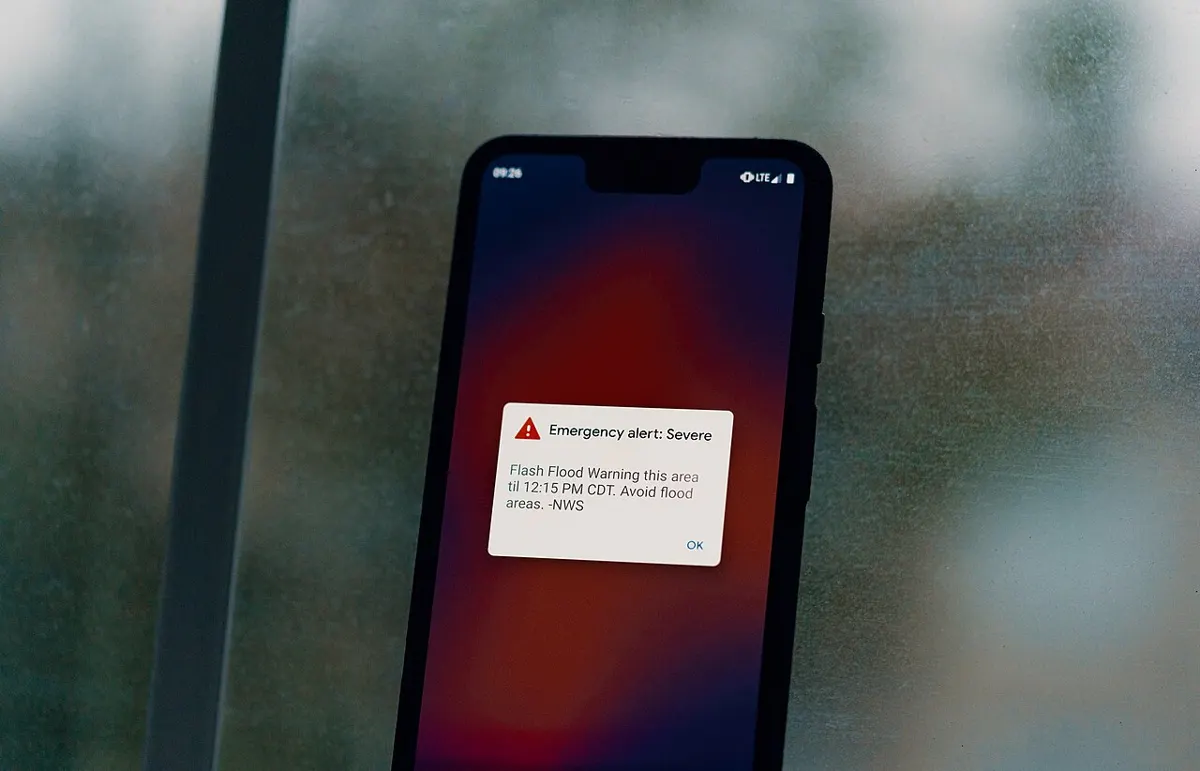
Most guides stop at "toggle off AMBER alerts," which is why so many people turn alerts off and still get woken up. An Android phone in the US can get warnings from three different systems: government Wireless Emergency Alerts sent by cell towers, Google's Android Earthquake Alerts, and Google's crisis alerts. Each one is controlled separately. This guide shows where every switch is on Pixel and Galaxy phones, which alerts federal rules keep on no matter what, and how to keep the important warnings while cutting the noise.
Jump to: what you can turn off · Pixel steps · Samsung steps · grayed-out Severe threats · earthquake and crisis alerts · make alerts less annoying · test alerts · alerts for the wrong area · troubleshooting · FAQ
Which Emergency Alerts Can You Turn Off on Android?
You can turn off every type of government alert except National alerts. Under the FCC's rule 47 CFR 10.280, carriers may let you opt out of three classes: Imminent Threat alerts, AMBER alerts, and Public Safety Messages. The FCC's consumer guide explains that Congress wrote the National alert exception into the WARN Act, so no phone setting can remove it.
Wireless Emergency Alerts (WEA) are short government warnings that participating US carriers broadcast from cell towers to every compatible phone in the affected area. They're free, you don't sign up for them, and the FCC says they aren't text messages and aren't used to track your location. Alerts start with officials such as the National Weather Service or local police and go out through FEMA's IPAWS system.
| Alert type (Android label) | What it covers | Can you turn it off? |
|---|---|---|
| National alerts (older phones: Presidential alerts) | Alerts from the President or the FEMA Administrator | No |
| Extreme threats | Imminent threats rated "Extreme," meaning an extraordinary threat to life or property | Yes |
| Severe threats | Imminent threats rated "Severe," meaning a significant threat to life or property | Yes, but only while Extreme threats is on (see below) |
| AMBER alerts | Child abduction emergencies | Yes |
| Public safety messages | Follow-up advice tied to one of the alerts above | Yes |
| State and local tests, Required monthly test | Test messages | Off unless you turn them on |
| Earthquake alerts (Google) | Magnitude 4.5+ earthquakes | Yes, separate switch |
| Crisis alerts (Google) | Natural disasters and other crises Google posts | Yes, separate switch |
Sources: FCC rules 10.400 and 10.350, the US settings in Android's open-source Cell Broadcast Receiver app, and Google's Android emergency help, checked November 4, 2026. Carriers can rename or hide some switches.
How to Turn Off Emergency Alerts on a Google Pixel
On a Pixel, the alert switches are under Settings > Notifications > Wireless Emergency Alerts, according to Google's Pixel help page. Google's android.com guide lists Settings > Safety & emergency > Wireless emergency alerts instead. If one path isn't on your phone, try the other or search Settings.
- Open Settings and tap Notifications.
- Scroll down and tap Wireless Emergency Alerts. If you can't find it, type "emergency alerts" into the search bar at the top of Settings.
- Turn off the types you don't want: Extreme threats, Severe threats, AMBER alerts, or Public safety messages.
- To turn off everything you're allowed to, turn off the Allow alerts switch at the top. National alerts still get through.
How to Turn Off Emergency Alerts on a Samsung Galaxy
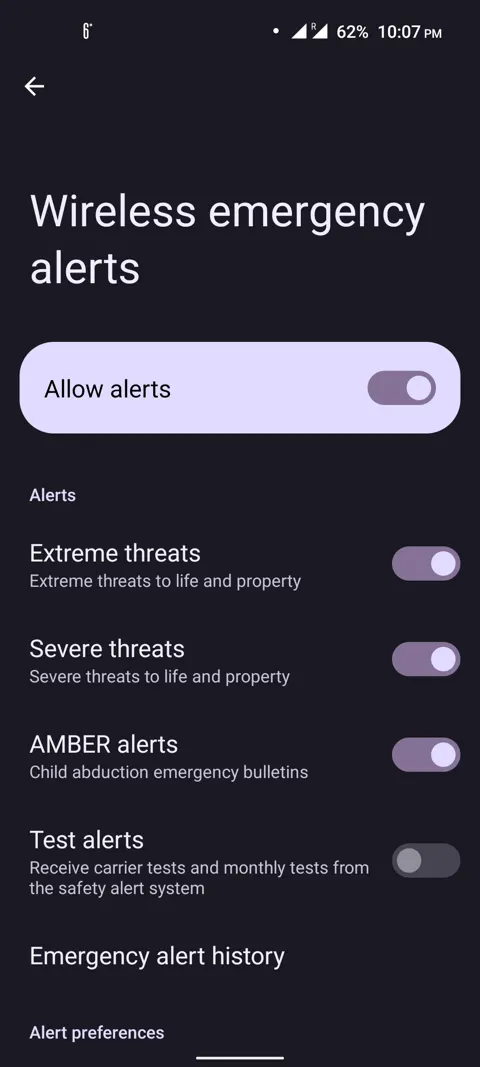
On current Galaxy phones, go to Settings > Safety and emergency > Wireless emergency alerts, as Samsung's US support page shows. The Allow alerts switch at the top controls all optional alerts at once, and the switches under Alerts control each type.
- Open Settings and tap Safety and emergency.
- Tap Wireless emergency alerts.
- Turn off Allow alerts to stop all optional alerts, or leave it on and turn off individual types.
- Swipe down to Alert preferences to change Vibration, Alert reminder, and Speak alert message.
Samsung's notifications page also lists an older route, Settings > Notifications > Advanced settings > Wireless emergency alerts, and notes that the options "may differ depending on your carrier." On Galaxy phones still running Android 10 or older, Samsung's UK support page says the settings live inside the Messages app.
Motorola, OnePlus, and other Android phones
The screen name stays the same even when the menu path doesn't. Open Settings, search for "emergency alerts" or "wireless emergency alerts," and you'll usually find the same set of switches, with names that can vary slightly by carrier.
Why Is "Severe Threats" Grayed Out?
Severe threats is grayed out because Extreme threats is off. Android's open-source alert settings code has a rule (disable_severe_when_extreme_disabled, on by default) that unchecks and locks the Severe switch whenever you turn off Extreme. Turn Extreme threats back on and the Severe switch works again.
This matters if you only want fewer weather alerts. The FCC's Imminent Threat class covers alerts rated either Extreme or Severe, and Severe is the lower of the two. To cut alerts without losing the worst ones, turn off Severe threats and leave Extreme threats on. Phone makers can change this rule, so a few models may behave differently.
How to Turn Off Earthquake Alerts and Crisis Alerts
Earthquake alerts come from Google, not from your carrier, so turning off Wireless Emergency Alerts doesn't stop them. To turn them off, go to Settings > Safety & emergency > Earthquake alerts. If your phone doesn't have Safety & emergency, Google says to look under Settings > Location > Advanced > Earthquake alerts, or just search Settings for "earthquake."
Google expanded Android Earthquake Alerts to all 50 states and 6 US territories on September 3, 2024. In California, Oregon, and Washington, the alerts use the USGS ShakeAlert seismometer network. Everywhere else, they rely on the motion sensors in Android phones. Alerts go out for magnitude 4.5 and up as a "Be Aware" notification for light shaking or a full-screen "Take Action" alert for stronger shaking. Unlike WEA, they need Wi-Fi or mobile data, so if they've stopped working, see our guide to fixing Android mobile data.
Crisis alerts are a third, separate system run through Google's Personal Safety features. They're on by default. Turn them off under Settings > Safety & emergency > Crisis alerts. Google's help page says these come from public information, official alert feeds, and Google's own sources, and that government WEA alerts always show above earthquake alerts, with regular app notifications last.
How to Keep Alerts On but Make Them Less Annoying
If the problem is a long, loud, repeating alert rather than the warning itself, change the alert preferences instead of switching alerts off. These are at the bottom of the same Wireless emergency alerts screen:
- Alert reminder: Android can replay the alert sound until you dismiss it. Android's open-source app offers Once, Every 2 minutes, Every 5 minutes, Every 15 minutes, and Never, and carriers decide which of those appear. Google's Pixel help lists Once, every 2 minutes, every 15 minutes, or not at all. Pick Once or Never to stop the repeats.
- Vibration: turn this off if the vibration is what bothers you. On phones that show Always alert at full volume, turning that on locks the vibration switch.
- Always alert at full volume: in Android's open-source code, a phone set to silent or vibrate doesn't play the alert tone unless this switch is on, though carriers can set specific alert types to override that. The switch is hidden by default in that code, so many phones don't show it.
- Speak alert message: reads the alert aloud with text-to-speech. Turn it off if you only want the tone.
- Spanish: US versions of Android's alert app include a switch to "receive emergency alerts in Spanish when possible."
The tone itself is set by law. FCC rule 10.520 requires the same pattern on every WEA phone: one 2-second tone, two 1-second tones, then the whole sequence again, using 853 Hz and 960 Hz played together. The same rule allows phones to include a way to mute it. Emergency alerts are handled by their own system app, so you change their sound on this screen, not in regular app notification settings. If ordinary app alerts are the problem, see our guide to fixing Android notifications.
To find an alert you dismissed too quickly, tap Emergency alert history on the same screen.
Why Do You Still Get Test Alerts?
Most test alerts are off by default, but two kinds can still reach you. The FCC requires carriers to make State and local tests opt-in (10.350(c)(4)), and Android's open-source app ships with that switch off. The US version also has a separate Required monthly test switch, which is off by default.
The exceptions are public awareness tests and nationwide tests. Rule 10.350(d) lets alerting authorities send up to two WEA tests per county each year that the public gets by default, as long as they announce the test beforehand and, where technically possible, say in the message that it's only a test. If a test came with the message that it was "only a test," it was most likely one of these.
Google also hides a developer-level Test alerts switch. Its help page says to tap Build number 7 times under About phone to turn on Developer options, then go back to Notifications > Wireless emergency alerts. Most people never need this, but if you turned on Developer options to fix something else, check that Test alerts is off.
Why Did You Get an Alert for a Different Area?
You get alerts for wherever your phone is, not where you live, and older phones get a wider area. Since December 2019, the FCC has required carriers to deliver alerts to the area the sender draws, with no more than a tenth of a mile of overshoot, on phones that support "enhanced geotargeting." Phones that don't support it still get alerts under the older 2017 rule, which covers the area that best approximates the emergency and can be larger than the area the sender drew.
Travel works the same way. The FCC's example is a visitor from Chicago who gets New York alerts while in New York. The phone receives whatever the local towers broadcast, which is also why WEA doesn't need to know your location.
Emergency Alerts Troubleshooting
The alert sound keeps coming back
An alert you haven't dismissed can keep replaying its sound. Open the alert and tap OK, then set Alert reminder to Once or Never. Samsung's support page says that if the same emergency alert arrives over and over, turn the phone off and back on.
I turned alerts off but still got one
Check which system sent it. A National alert or a public awareness test can't be blocked, earthquake and crisis alerts have their own switches, and weather apps send their own notifications that you control from that app's settings. Emergency alerts also aren't calls or texts, so spam call filters and message blocking won't affect them.
I'm not getting alerts at all
The FCC says a phone must be WEA-capable, switched on, not in airplane mode, and connected to a tower from a carrier that takes part in WEA. Carrier participation is voluntary, so ask your carrier if you use a smaller prepaid brand. Samsung adds that some phones won't show an alert during a phone call and that poor reception can cause misses. Also check that Allow alerts is still on.
What's Changing With Emergency Alerts
Two FCC changes are on the way. The Federal Register lists the FCC's 2023 order as effective December 15, 2026. That order requires participating carriers to support maps in alerts that show your location relative to the danger zone. A separate rule effective June 12, 2028 adds pre-written alert templates for 18 emergency types in English, the 13 next most commonly spoken US languages, and American Sign Language. Neither change affects which alerts you can turn off.
Bottom Line
To turn off emergency alerts on Android, open Wireless emergency alerts from Settings (Notifications on a Pixel, Safety and emergency on a Galaxy) and switch off the types you don't want, then turn off Earthquake alerts and Crisis alerts separately if you want those gone too. If you only want fewer alerts, turn off Severe threats and keep Extreme threats on, and set Alert reminder to Once. National alerts stay on no matter what, by federal law.
How we put this together: Aditya Singh checked each step against Google's Pixel and Android help pages, Samsung's US support pages, the FCC's WEA rules (47 CFR Part 10) and consumer guide, and the US settings files in Android's open-source Cell Broadcast Receiver code on November 4, 2026. We didn't test devices for this guide, and carriers can rename or hide some of these switches.
Frequently Asked Questions
Can you turn off National or Presidential alerts on Android?
No. FCC rules let you opt out of Extreme, Severe, AMBER, and public safety alerts, but not National alerts sent by the President or the FEMA Administrator. That's why the National alerts switch on Android stays on and can't be changed.
Why can't I turn off Severe threat alerts?
On many phones the Severe switch is grayed out because Extreme threats is off. Android's alert app turns off and locks Severe alerts whenever Extreme alerts are disabled. Turn Extreme back on and the Severe switch works again.
Does turning off Wireless Emergency Alerts stop earthquake alerts?
No. Android Earthquake Alerts are a separate Google system with their own switch under Settings > Safety & emergency > Earthquake alerts, or Settings > Location > Advanced > Earthquake alerts. Crisis alerts also have their own switch.
Do emergency alerts work without mobile data?
Wireless Emergency Alerts are broadcast from cell towers. The FCC says the phone has to be WEA-capable, switched on, not in airplane mode, and connected to a tower from a carrier that takes part in WEA. Android Earthquake Alerts are different and need a Wi-Fi or mobile data connection.
Do emergency alerts cost money or track my location?
No. Wireless Emergency Alerts are free and you don't sign up for them. The FCC says they aren't text messages and aren't used to track your location.