11 Best Reading Apps in 2026: Free eBook & Audiobook Apps Worth Downloading
The best reading apps in 2026 are Libby (completely free with a library card), Amazon Kindle (the biggest eBook store), Google Play Books (the best built-in option for Android), and Audible (the deepest audiobook catalog). If you only download one, make it Libby for free books or Kindle if you want to buy and own them.
Below we break down 11 reading apps we actually tested, what each one is best for, real 2026 pricing, and how to choose the right app for the way you read, whether that's eBooks, audiobooks, manga, or tracking your reading habit.
In a hurry? Jump to: Quick picks · Types of apps · The best apps tested · How we picked · Comparison table · Bottom line
Best reading apps in 2026 at a glance
- Best free reading app overall: Libby (free with a library card)
- Best eBook app for buying books: Amazon Kindle
- Best book reading app for Android: Google Play Books
- Best audiobook app: Audible
- Best audiobooks with your music: Spotify (15 hours/month on Premium)
- Best free audiobook app for classics: LibriVox
- Best for advanced customization & text-to-speech: Moon+ Reader
- Best reading tracker & community: The StoryGraph and Goodreads
- Best reading habit tracker: Bookly
Why reading apps are worth it in 2026
Print books keep getting more expensive, and a single hardcover can now cost more than a month of unlimited reading on most apps. A good reading app puts thousands of titles in your pocket, syncs your place across your phone, tablet and laptop, and lets you switch between reading and listening without losing your spot.
Modern apps also adjust to how you read. You get adjustable fonts, dark mode, a built-in dictionary, offline downloads, and text-to-speech that turns any eBook into an audiobook. The lines are blurring too: in 2026 Spotify bundles audiobooks with its music plans, Kindle and Audible sync seamlessly with Whispersync, and Libby pushes library books straight to your Kindle. Whether you're a casual reader, a student, or someone trying to build a daily reading habit, there's an app built for it, and most of the best ones are free.
The 3 types of reading apps (and which one you need)
1. eBook readers
These are the most common reading apps, built for people who like to read text on a screen. They let you buy or borrow books, adjust font size and brightness, bookmark pages, highlight, and look up words instantly. The best eBook reading apps for Android are Google Play Books, Kindle, Moon+ Reader, and Kobo. On iPhone, Apple Books and Kindle lead the pack.
Pros
- Carry thousands of books on one device and start reading anywhere.
- Adjust font size, color, and brightness to suit your eyes.
- Built-in dictionary lets you tap any word for a definition.
- Highlight, take notes, and sync them across devices.
Cons
- No physical feel of holding a book or turning pages.
- Long sessions on an LCD phone screen can cause eye strain (a dedicated e-reader helps).
- You depend on battery life and a charged device.
2. Audiobook apps
Audiobook apps let you listen instead of read, which is perfect for commuting, exercising, cooking, or resting your eyes. They offer professionally narrated libraries and, increasingly in 2026, realistic AI narration for books that were never recorded. The top audiobook apps are Audible, Spotify, Libby, and LibriVox for free classics.
Pros
- Hands-free reading while you drive, walk, or work out.
- Skilled narrators bring stories to life.
- A genuine help for visually impaired and struggling readers.
- Adjustable playback speed and sleep timers.
Cons
- No visuals, which matters for illustrated or technical books.
- Some people retain less from listening than from reading.
- Premium narration libraries usually require a subscription.
3. Literacy & educational apps
These apps are built for learning to read and reading to learn, which makes them ideal for kids, students, and self-improvement readers. They mix books with games, quizzes, and progress tracking. Popular picks include Epic!, Starfall, and Headsprout. For more, see our guide to the best educational apps for kids and productivity apps for students.
Pros
- Games and quizzes make reading fun for young readers.
- Personalized reading levels and recommendations.
- Huge libraries of educational material in one place.
Cons
- Can reduce time spent with physical school books.
- Phone notifications create distractions.
- The best features often sit behind a subscription.
The best reading apps in 2026, tested
Before you download anything, ask yourself: do you want to buy and own books, borrow them free, mostly listen, or track what you read? Your answer points straight to the right app. Here are our top picks for 2026.
1. Amazon Kindle - the best eBook app overall
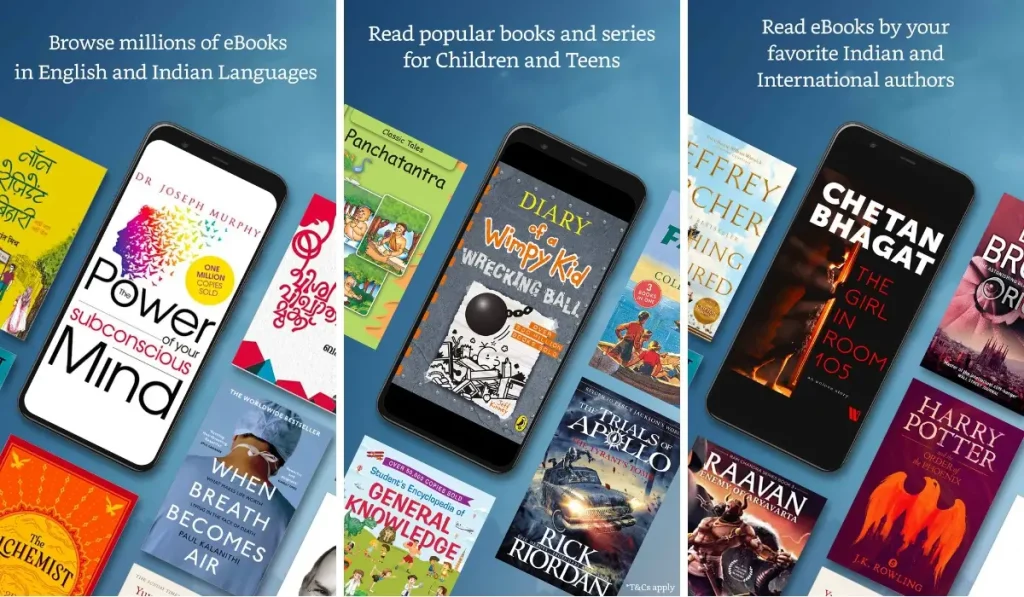
Kindle is the most popular and best-stocked eBook app, with millions of titles, top sellers, and indie books you can buy and keep forever. The free app works on Android, iPhone, Mac, PC, and Kindle e-readers, so you don't need to own a Kindle device to use it.
Kindle includes a built-in dictionary and Wikipedia lookup, customizable fonts and dark mode, and Whispersync, which lets you switch between reading an eBook and listening to its Audible audiobook without losing your place.
What it is: Amazon's flagship eBook app and store, free on every platform.
Key features
- Millions of eBooks plus Kindle Unlimited for all-you-can-read access.
- Customizable fonts, size, background color, dark mode, and brightness.
- Works on Android, iOS, Mac, PC, and Kindle devices with one login.
- Syncs your last page, bookmarks, and notes across every device.
- Built-in dictionary and instant Wikipedia lookups.
Best for: Anyone who wants to buy and own books from the largest catalog on the web.
Pros
- The largest eBook store anywhere, including bestsellers and classics.
- Deeply customizable reading display.
- Seamless sync between phone, tablet, and e-reader.
- Switch from reading to listening with Whispersync.
- Kindle Unlimited gives flat-fee access to a huge catalog.
Cons
- Locked into Amazon's format, so books don't transfer to other apps.
- Many bestsellers aren't included in Kindle Unlimited.
- Buying books individually adds up fast.
Pricing (2026)
The Kindle app is free. Kindle Unlimited costs $11.99/month for unlimited access to a rotating catalog of over a million titles. The entry-level Kindle e-reader is $109.99 and the Kindle Paperwhite lists at $159.99, though both drop during Amazon sales. You can also just buy individual eBooks with no subscription at all.
2. Libby - the best free reading app
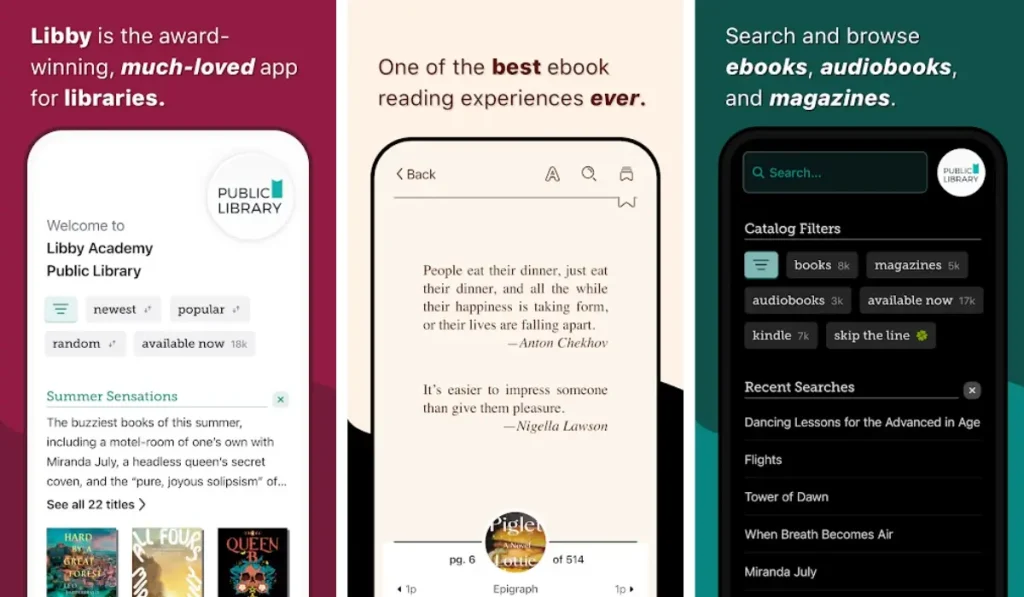
Libby is hands-down the best free reading app in 2026. With a free library card, it gives you instant access to your local library's full digital collection: eBooks, audiobooks, and magazines, all at no cost. Built by OverDrive, it works on Android, iOS, and the web, and is used by more than 90% of public libraries in North America, in 78 countries worldwide.
You borrow titles just like at a physical library, download them for offline reading, and place holds on popular books to get notified when they're available. It supports Android Auto and Apple CarPlay for audiobooks in the car, and can even send your library eBooks to your Kindle. Everything syncs automatically across your devices.
What it is: A free app that unlocks your public library's entire digital catalog.
Key features
- Free eBooks, audiobooks, and magazines with a library card.
- Clean, beginner-friendly interface with customizable fonts and dark mode.
- Offline downloads so you can read or listen without data.
- Place holds and get notified when a title frees up.
- Send borrowed eBooks to your Kindle, and listen in the car via CarPlay/Android Auto.
Best for: Readers who want bestsellers and audiobooks for free and already have (or can get) a library card.
Pros
- Completely free, with no ads, no in-app purchases, and no late fees.
- Bestsellers, classics, and audiobooks all in one app.
- Simple enough for first-time digital readers.
- Offline access for travel.
Cons
- Popular titles can have long waitlists.
- You need a valid library card.
- Catalogs vary by library and region.
Pricing (2026)
Libby is 100% free. The only requirement is a library card, which most public libraries issue at no cost (some let you sign up right inside the app using your phone number).
Also Read: The Best Android Apps in 2026
3. Audible - the best audiobook app

Audible has the deepest catalog of professionally narrated audiobooks, making it the top choice for anyone who'd rather listen. It's ideal for commuters, gym-goers, and readers with visual impairments or reading difficulties. You get speed control, sleep timers, offline downloads, and Whispersync with Kindle so you can switch between reading and listening on the fly.
What it is: Amazon's premium audiobook service with the biggest commercial narration catalog.
Key features
- Massive library of audiobooks with high-quality, often celebrity, narration.
- Adjustable playback speed and sleep timer.
- Offline downloads for listening anywhere.
- Whispersync to move between Kindle eBooks and Audible audiobooks.
Best for: Heavy listeners who want the widest selection and best narration quality.
Pros
- The biggest commercial audiobook catalog.
- Professional, often celebrity, narrators.
- Excellent for accessibility and hands-free reading.
- Fine-grained speed control.
Cons
- The Premium Plus plan gives only one credit per month.
- Beyond your credits, extra audiobooks cost more.
- The best value requires a subscription.
Pricing (2026)
| Plan | Audible Standard | Premium Plus |
|---|---|---|
| Price (monthly) | $8.99 | $14.95 |
| Credits / month | 1 (Standard catalog) | 1 (any title) |
| Free trial | 30 days | 30 days |
| Offline listening | Yes | Yes |
In 2026 Audible replaced its old plans with Standard ($8.99/month), which gives one monthly title from a curated catalog, and Premium Plus ($14.95/month), which adds one credit a month for any title including new releases plus the all-you-can-listen Plus Catalog. A Premium Plus 2-credit plan ($22.95/month) and an annual option ($149.50/year for 12 credits) are also available, and any audiobook you buy with a credit is yours to keep.
4. Google Play Books - the best book reading app for Android
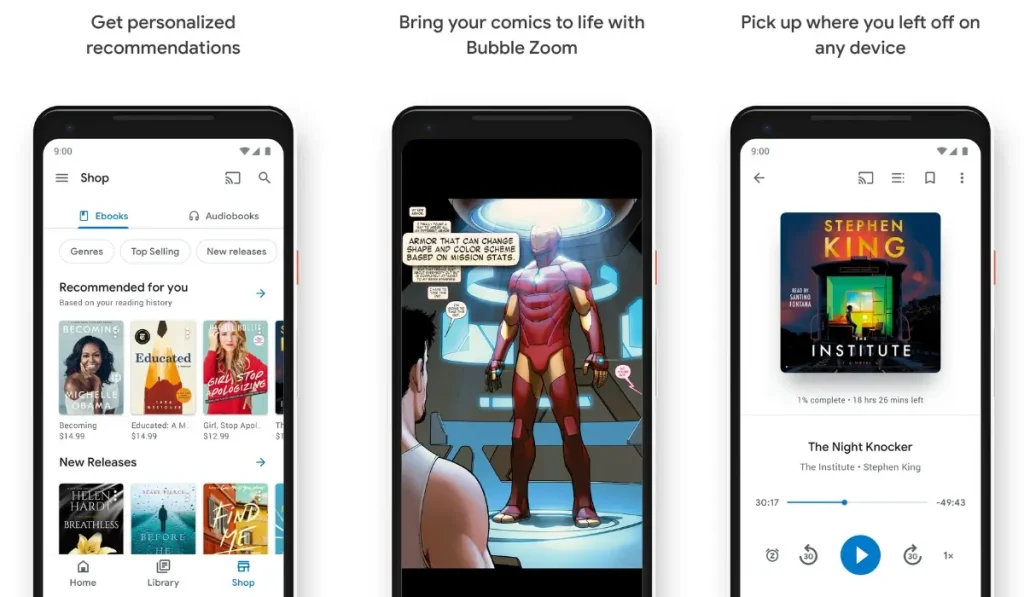
Google Play Books is the best book reading app for Android because it comes built in and asks for no subscription. You buy eBooks and audiobooks à la carte, upload your own PDFs and EPUBs, and use the Read Aloud feature to have any book read to you. It's a great fit for anyone already living in the Google ecosystem, and it works on iPhone too.
What it is: Android's default reader and store with strong support for your own files.
Key features
- Buy eBooks and audiobooks with no subscription required.
- Upload your own PDF and EPUB files to read in the app.
- Read Aloud turns any eBook into a hands-free listen.
- Syncs reading position, bookmarks, and notes across devices.
- Auto-adjusts brightness and color at night to reduce eye strain.
Best for: Android users and students who want to read their own PDFs and EPUBs without paying a subscription.
Pros
- No subscription, pay only for what you buy.
- Best support for your own PDF and EPUB files.
- Tight integration with your Google account.
- Read Aloud built in for free.
Cons
- Smaller audiobook catalog than Audible.
- Buying frequently gets pricey.
- Fewer exclusive titles than Amazon.
Pricing (2026)
The app is free with no subscription. You only pay for books you buy, and prices are set by the publisher. This makes it one of the best free reading apps for students who want to load their own course PDFs.
5. Spotify - the best way to get audiobooks with your music
Spotify is the surprise audiobook story of 2026. If you already pay for Spotify Premium, you get 15 hours of audiobook listening every month at no extra cost from a catalog of more than 700,000 titles, alongside your music and podcasts in one app. For most casual readers that's roughly one to two books a month for free with a subscription you already have.
Spotify has been expanding fast: there's a standalone Audiobooks Access plan for non-Premium users, an Audiobooks+ add-on that doubles your hours, and a new Page Match feature that uses your phone camera to find your place in the audiobook from a photo of the physical page.
What it is: A music and podcast app that now bundles a generous monthly audiobook allowance.
Key features
- 15 hours of audiobook listening per month included with Spotify Premium.
- Music, podcasts, and audiobooks in a single app.
- Audiobooks+ add-on for an extra 15 hours; family and duo members can add hours too.
- Page Match jumps to your spot from a photo of a printed page.
Best for: Existing Spotify Premium subscribers who want audiobooks without paying for a second service.
Pricing (2026)
The 15 monthly hours come free with any Spotify Premium plan. A standalone Audiobooks Access subscription runs $9.99/month for 15 hours from the same catalog of 700,000+ titles, and the Audiobooks+ add-on tops up your hours. Unused hours don't roll over to the next month.
6. The StoryGraph & Goodreads - the best reading trackers
If you want to track what you read, find your next book, and connect with other readers, The StoryGraph and Goodreads are the two apps to know in 2026. Goodreads (owned by Amazon) has the largest community and the most reviews. The StoryGraph is the fast-growing independent alternative with better stats, mood-based recommendations, and a cleaner, ad-free interface.
Neither app is an eBook reader, they're companions to whatever app you read in. Use them to set a yearly reading goal, log finished books, and get smart recommendations.
Best for: Readers who want to set goals, log books, and discover their next read.
Key features
- Set and track annual reading goals.
- Detailed reading stats by mood, pace, genre, and page count (StoryGraph).
- Massive review database and friend activity (Goodreads).
- Personalized recommendations for your next read.
Pricing (2026)
Goodreads is free. The StoryGraph has a generous free tier plus an optional Plus subscription for advanced stats. Either works alongside Kindle, Libby, or Google Play Books.
7. Moon+ Reader & LibriVox - the best free Android extras
Two more apps every Android reader should know. Moon+ Reader is the most customizable eBook reader on Android, supporting EPUB, PDF, MOBI, and more, with built-in text-to-speech that turns your eBooks into audiobooks. The free version is ad-supported; Pro is a one-time purchase around $4.99.
LibriVox is a free goldmine of human-narrated public-domain classics, with tens of thousands of titles recorded by volunteers. If you love Jane Austen, Sherlock Holmes, or other out-of-copyright books, it's completely free with no catch. For AI-narrated reading of any text, apps like Speechify and ElevenReader are the standout 2026 newcomers.
Best for: Power users who want total control over formatting and text-to-speech (Moon+ Reader), and classics lovers who want free human narration (LibriVox).
8. Bookly - the best reading habit tracker
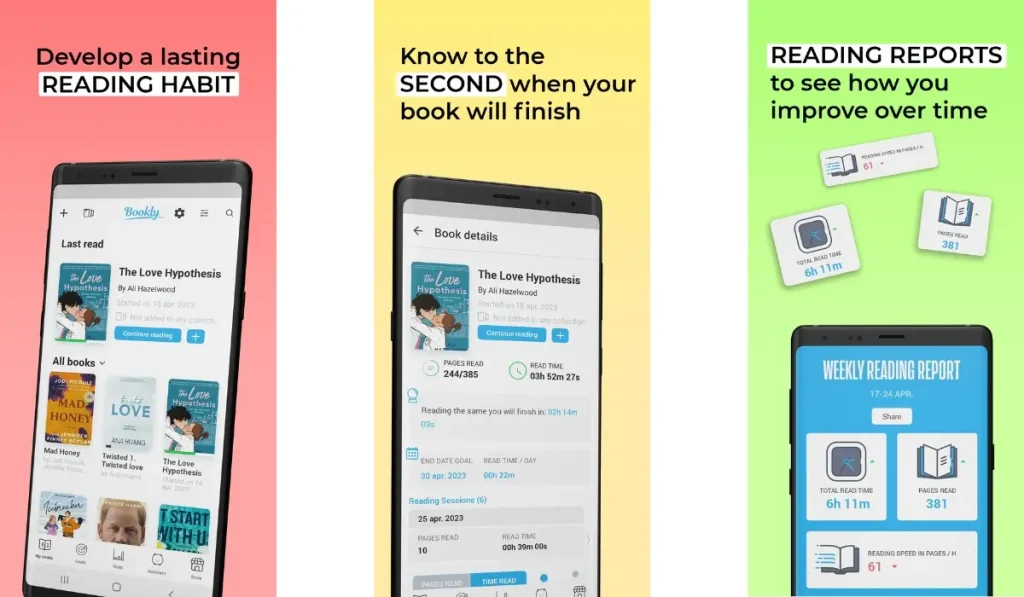
Bookly isn't an eBook reader, it's a habit tracker that helps you read more. It times your reading sessions, tracks pages and speed, sets daily and monthly goals, and gamifies the whole experience with stats and achievements. It's perfect for goal-oriented readers and students who want to stay consistent.
What it is: A reading habit and session tracker, not a book source.
Key features
- Track reading time, pages, and speed per session.
- Set daily and monthly reading goals.
- Reminders to keep you consistent.
- Detailed stats, quotes, and achievements.
Best for: Readers who want to build a daily habit and measure their progress.
Pros
- Builds a consistent reading habit.
- Clear statistics on your progress.
- Motivating goals and streaks.
Cons
- No books, it's a tracker only.
- Full features need a subscription.
- The timer can feel like pressure for some readers.
Pricing (2026)
Bookly has a free version. Premium runs roughly $19.99 every six months to unlock unlimited tracking and all stats.
How we picked and tested these reading apps
We approached this guide the way a real reader shops for an app, not the way a press release describes one. We installed each app on Android phones and tablets and used them for everyday reading and listening rather than a quick demo. Here is what we weighed:
- Catalog and value: We compared library size, what's free versus paid, and how far each subscription actually stretches.
- Reading experience: We tested font and theme controls, dark mode, dictionary lookups, and how comfortable long sessions felt.
- Sync and offline: We checked that our place, highlights, and downloads carried across phone, tablet, and the web.
- Audiobook quality: For listening apps we compared narration, speed controls, sleep timers, and Android Auto / CarPlay support.
- Current 2026 pricing: We verified every price against the official store or service page as of June 2026, including Audible's new Standard plan and Spotify's audiobook hours.
We re-check these picks whenever pricing or plans change, which is why Audible's revamped tiers and Spotify's growing audiobook offering both made this edition. Looking for more great apps to round out your phone? See our picks for the best Android apps in 2026 and the best AI apps for iPhone. To keep your library safe, it's also worth setting up one of the best cloud storage and backup apps.
How to choose the right reading app for you
With thousands of apps available, picking one comes down to a few simple questions. Work through these and you'll land on the right app fast:
- Buy or borrow? Want to own books? Use Kindle or Google Play Books. Want them free? Use Libby with a library card.
- Read or listen? Prefer listening? Audible (paid) or Spotify, LibriVox, and Libby (free or bundled) are your apps.
- Already pay for Spotify? Use the 15 free monthly audiobook hours before paying for another service.
- Which device? Pick an app that syncs across your phone, tablet, and computer, all the apps above do.
- Free or subscription? Libby, LibriVox, and Google Play Books cost nothing to start.
- Just want to read more? Pair any reading app with a tracker like Bookly or The StoryGraph.
Best reading apps in 2026 compared
| App | Best for | eBooks | Audiobooks | Price (2026) | Platforms |
|---|---|---|---|---|---|
| Amazon Kindle | Buying eBooks | Yes | Via Audible | Free app; Unlimited $11.99/mo | Android, iOS, PC, Mac |
| Libby | Free library books | Yes | Yes | Free (library card) | Android, iOS, Web |
| Audible | Audiobooks | No | Yes | $8.99–$14.95/mo | Android, iOS |
| Google Play Books | Android readers | Yes | Yes | Free (buy per book) | Android, iOS, Web |
| Spotify | Audiobooks with music | No | Yes | Free 15 hrs w/ Premium; Access $9.99/mo | Android, iOS, Web |
| The StoryGraph | Tracking & recs | No | No | Free + Plus | Android, iOS, Web |
| Moon+ Reader | Customization & TTS | Yes | TTS | Free / $4.99 Pro | Android |
| LibriVox | Free classics | No | Yes | Free | Android, iOS |
| Bookly | Reading habit | No | No | Free / $19.99 per 6 mo | Android, iOS |
The bottom line
For 2026, the smartest setup for most readers is Libby for free borrowing, plus Kindle or Google Play Books for books you want to own. If you listen a lot, get Audible for the deepest catalog, or lean on Spotify's 15 free monthly hours if you already subscribe. Add The StoryGraph or Bookly to track your progress, and you've got a complete reading toolkit, most of it free. Start with one app that matches how you read, and build from there.
Frequently Asked Questions
What is the best free reading app in 2026?
Libby is the best free reading app in 2026. With a free library card, it gives you unlimited access to your local library's eBooks, audiobooks, and magazines at no cost and with no ads, late fees, or in-app purchases. For free classics, LibriVox (audiobooks) and Google Play Books (which lets you upload your own files) are also excellent.
What is the best reading app for Android?
Google Play Books is the best book reading app for Android because it's built in, needs no subscription, supports your own PDFs and EPUBs, and includes a free Read Aloud feature. Moon+ Reader is the best choice if you want deep customization and built-in text-to-speech, and Kindle is best if you want the largest eBook store.
What is the best app for audiobooks in 2026?
Audible has the largest catalog of professionally narrated audiobooks, with plans from $8.99 to $14.95 per month. If you already pay for Spotify Premium, you get 15 hours of audiobook listening free every month, which is great for casual listeners. For free audiobooks, use Libby (with a library card) for bestsellers or LibriVox for thousands of public-domain classics.
How much does Audible cost in 2026?
In 2026 Audible offers a Standard plan at $8.99 per month (one title a month from a curated catalog) and Premium Plus at $14.95 per month, which adds one credit a month for any title plus the all-you-can-listen Plus Catalog. A 2-credit Premium Plus plan is $22.95 per month, and an annual Premium Plus plan runs $149.50 per year for 12 credits.
Does Spotify include audiobooks?
Yes. Spotify Premium plans include 15 hours of audiobook listening every month at no extra cost, from a catalog of hundreds of thousands of titles. You can add more hours with the Audiobooks+ add-on, or subscribe to the standalone Audiobooks Access plan for $9.99 per month if you don't want full Premium. Unused hours do not roll over to the next month.
How much does Kindle Unlimited cost in 2026?
Kindle Unlimited costs $11.99 per month and gives you unlimited access to a rotating catalog of over a million eBooks and selected audiobooks. The Kindle app itself is free, and you can also buy individual eBooks without any subscription. Note that Kindle Unlimited is not included with Amazon Prime.
What is the best app to track my reading?
The StoryGraph and Goodreads are the best apps for tracking books, setting reading goals, and getting recommendations. The StoryGraph has the best stats and a clean, ad-free interface, while Goodreads has the largest community and review database. Bookly is best if you specifically want to track reading time and build a daily habit.
Are reading apps better than physical books?
It depends on how you read. Reading apps are cheaper, portable, syncable across devices, and offer adjustable fonts, dark mode, and text-to-speech. Physical books have no screen strain and a tactile feel many readers prefer. Many people use both: apps for travel and convenience, print for deep reading.