Best Android Emulator for Gaming on PC in 2026: Pick by Game

Our default pick for most people is BlueStacks 5. Pick LDPlayer 9 for a weak PC, MuMuPlayer for Android 15, and GameLoop for PUBG Mobile. But check first: Genshin Impact, Clash Royale and Wuthering Waves already run on Windows, so they need no emulator. This pick comes from published specs and publisher rules, not from our own benchmarks.
Spec-based comparison. We did not install or benchmark the software. Every figure comes from a source linked in this guide, read on November 18, 2026. We plan to recheck it by December 16, 2026.
Quick picks
| If you want | Pick | Why |
|---|---|---|
| The safest route | The game’s official PC version, or Google Play Games on PC | Made or approved by the publisher or Google. |
| One emulator for most games | BlueStacks 5 | 4GB RAM minimum on its product page. Free with ads. |
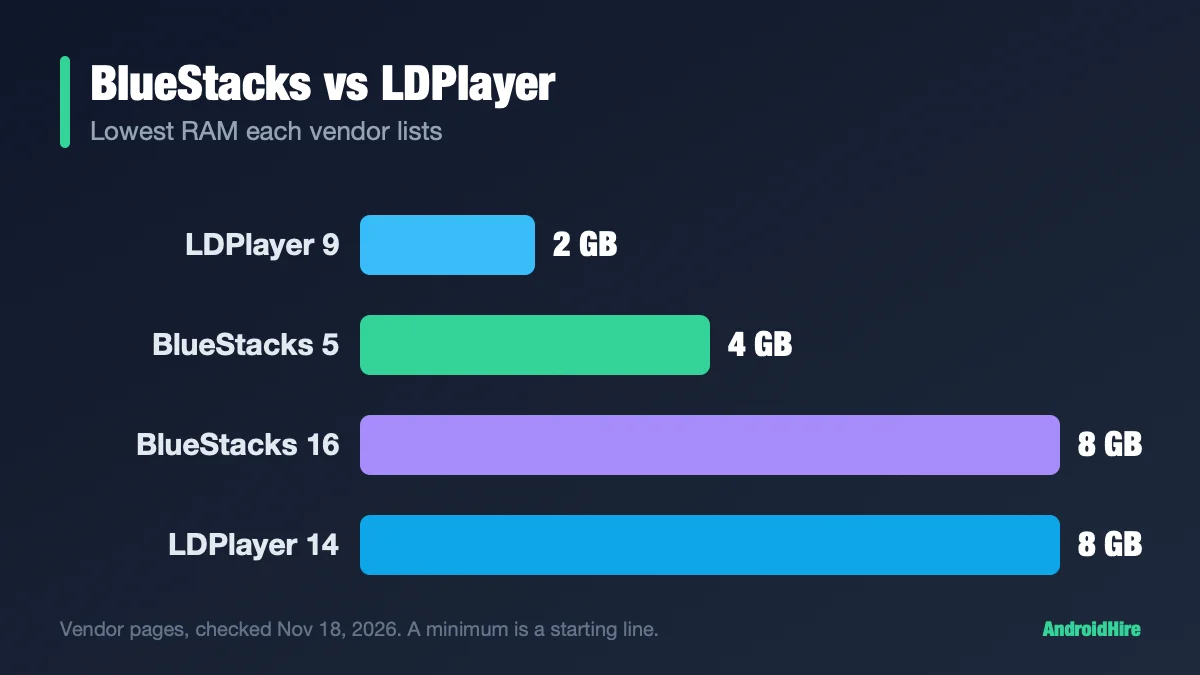
| A weak PC | LDPlayer 9 | 2GB minimum on LDPlayer’s page (dated 2020). |
| The newest Android | MuMuPlayer (Android 15) | Since June 18, 2026. BlueStacks 16 (Beta) has Android 16 but needs 8GB. |
| PUBG Mobile | GameLoop | Calls itself the official PUBG MOBILE emulator. PUBG pages we read name none. |
| Call of Duty: Mobile | No safe pick | Activision says the game does not officially support emulators. |
Key facts, checked November 18, 2026
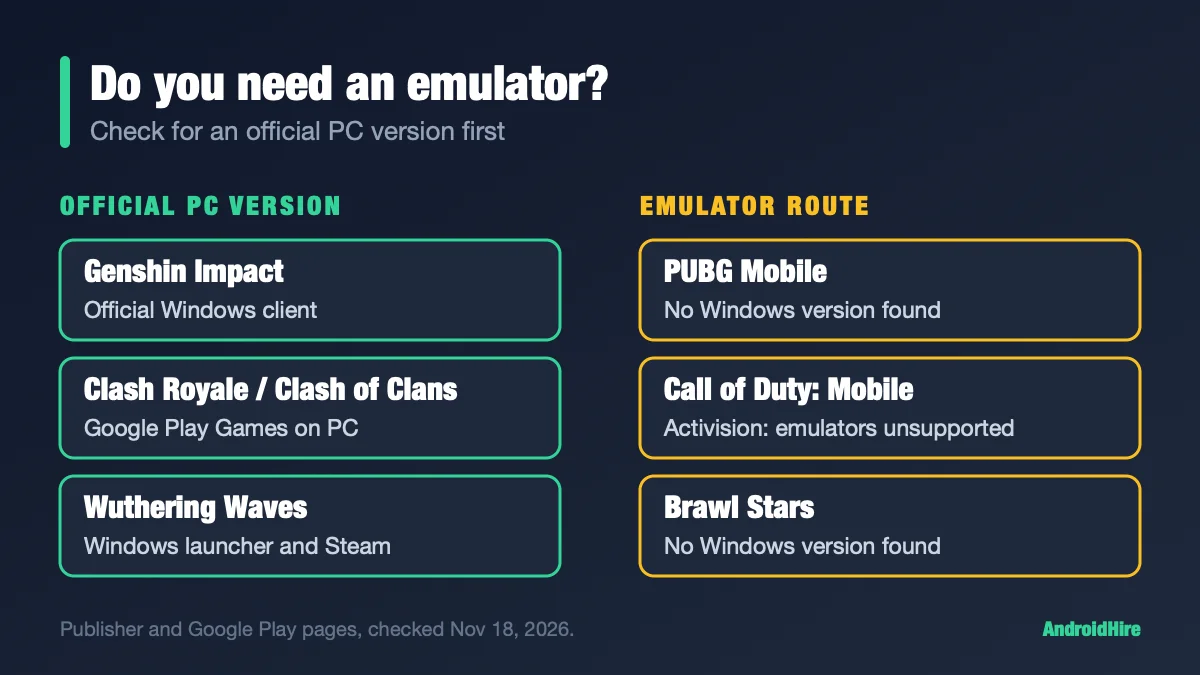
- Many popular games need no emulator. Google Play shows a Windows tag for Genshin Impact, Wuthering Waves, Clash of Clans, Clash Royale, Free Fire MAX and the US version of Mobile Legends (example).
- Call of Duty: Mobile: Activision says it “does not officially support the use of emulators” (Activision).
- Roblox: said on August 7, 2025 it is restricting emulator access (Roblox).
- Frame rates: BlueStacks 16’s page advertises up to 240 FPS. MuMu says 240 in its FAQ and 480 on its homepage. The game sets the real cap.
- Android 15: MuMuPlayer has it. BlueStacks 16 (Beta) is Android 16.
Jump to: do you need an emulator · official CoD emulator? · low-end PC · comparison table · the picks · frame rates · bans and macros · why use one · safety · outdated claims · FAQ
Do you need an emulator at all?
An official PC version is safer than any emulator, because the publisher built and supports it. Here is what we found on Google Play and the publishers’ own pages.
| Game | Official Windows route | Emulator needed? |
|---|---|---|
| Genshin Impact | HoYoverse’s Windows client (requirements). Also on Google Play Games on PC. | No |
| Honkai: Star Rail | HoYoverse PC launcher | No |
| Wuthering Waves | Official Windows launcher. Windows-tagged on Google Play. | No |
| Clash of Clans, Clash Royale | Google Play Games on PC. Supercell promotes it (Supercell). | No |
| Free Fire MAX | Windows-tagged on Google Play (Google Play Games on PC) | Maybe not |
| Mobile Legends: Bang Bang (US) | Windows-tagged on Google Play. In the US it is a separate app, “Mobile Legends: Bang Bang.US.” | Maybe not |
| Roblox, Minecraft, Among Us | Official Windows client (Roblox), Java and Bedrock for PC (Minecraft), Steam (Among Us) | No |
| PUBG Mobile, Call of Duty: Mobile, Brawl Stars | No Windows version found | Yes, if you want to play on PC |
How to check a game yourself: open its Google Play page on a PC. If you see an “Install on Windows” button, it runs through Google Play Games on PC.
Is there an official emulator for Call of Duty: Mobile?
Short answer: no. Activision does not name one. Its help page says the game “does not officially support the use of emulators.” The same page says emulator players “will only be matched with other players using emulators.” GameLoop calls itself the official emulator for the game, but that claim is on GameLoop’s own page (Activision help page).
Best Android emulator for gaming on a low-end PC
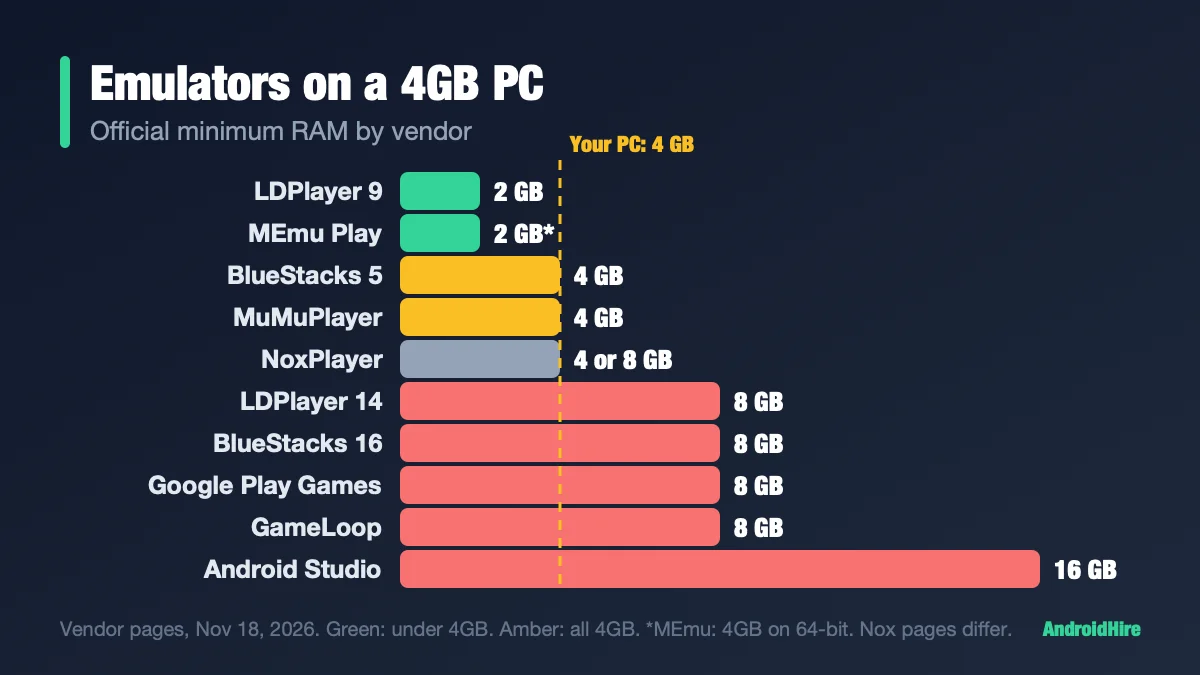
For a weak PC, start with LDPlayer 9. LDPlayer’s page lists a 2GB minimum (LDPlayer). BlueStacks 5 lists 4GB (BlueStacks). Google Play Games on PC, LDPlayer 14 and BlueStacks 16 (Beta) list 8GB, so skip them on a small PC. Turn on virtualization in the BIOS first. For exactly 4GB, read our 4GB RAM guide.
Comparison table: the numbers vendors publish
| Emulator | Android | Official minimum RAM | Price and ads |
|---|---|---|---|
| Google Play Games on PC | Set by Google | 8GB, SSD, 4 physical cores | Free |
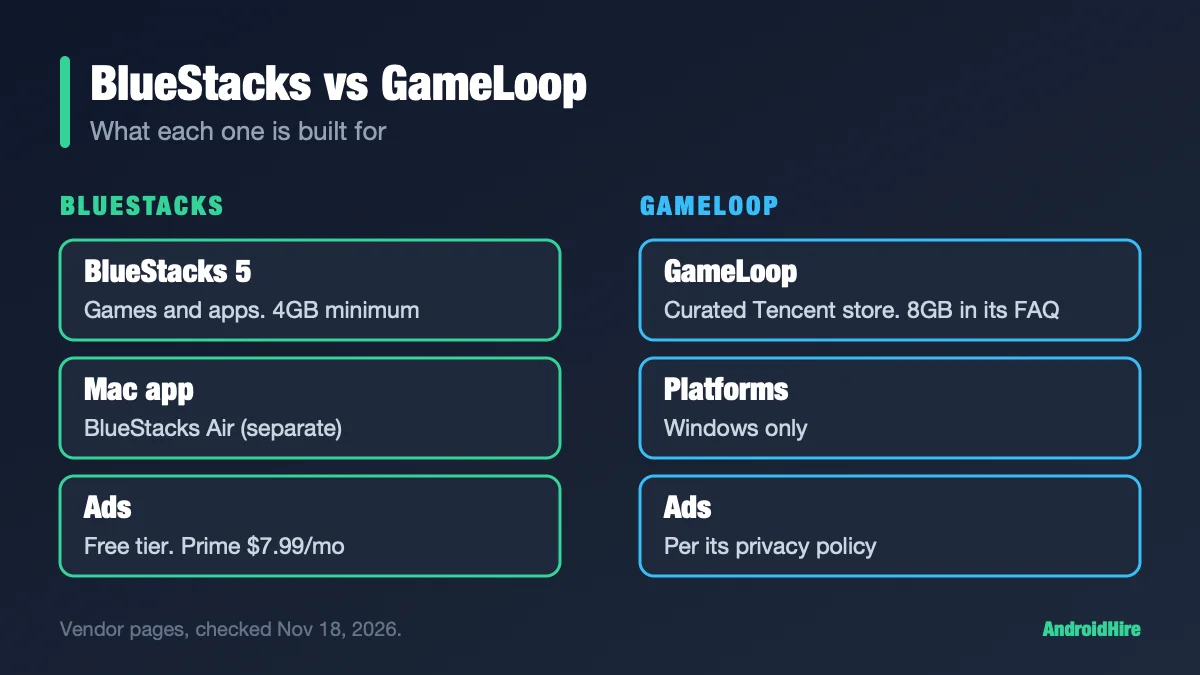
| BlueStacks 5 | Nougat, Pie, 13 (Beta) | 4GB | Free with ads. Prime $7.99 a month. |
| BlueStacks 16 (Beta) | 16 | 8GB | Free (Beta) |
| LDPlayer 9 / 14 | 9 / 14 (Beta) | 2GB / 8GB | Free with ads. LD Premium. |
| MuMuPlayer | 12 and 15 | 4GB, i5-7500-class CPU | Free with ads. Ad-free paid. |
| GameLoop | Not published | 8GB on its game pages | Ads per its privacy policy |
| MEmu Play | 5.1, 7.1, 9, 12 | 2GB (4GB on 64-bit) | Free with ads |
| NoxPlayer | 9, 12 (Beta) | 4GB to 8GB (its pages differ) | Free with ads. Premium $3.69 a month. |
Android Studio’s emulator and Genymotion are developer tools, not built for gaming. Android 11 is gone for new BlueStacks 5 instances in recent builds, so check which Android versions your build offers.
The picks, with the facts
Google Play Games on PC: the official option
Google’s app left beta on September 23, 2025 (Google). It plays games from its catalog, and Google labels each one Optimized, Playable, Untested, Unsupported or Not available (badges).
It added key remapping in January 2025, a per-game refresh-rate setting, and an “Aim and shoot” control for shooters in January 2026 (release notes). It needs 8GB of RAM and may ask you to turn on Windows Hypervisor Platform, which can stop other emulators from running (requirements).
BlueStacks 5: the general-purpose pick
BlueStacks 5 lists 4GB of RAM, 5GB of disk and Windows 7 or newer on its product page (BlueStacks). It is free with ads; Prime removes in-session ads for $7.99 a month after a $3.99 first month (BlueStacks blog).
Its PUBG Mobile and Free Fire guides are written by BlueStacks, not by the publishers. For a feature comparison, see BlueStacks vs LDPlayer.
LDPlayer: low minimum and a newer Android
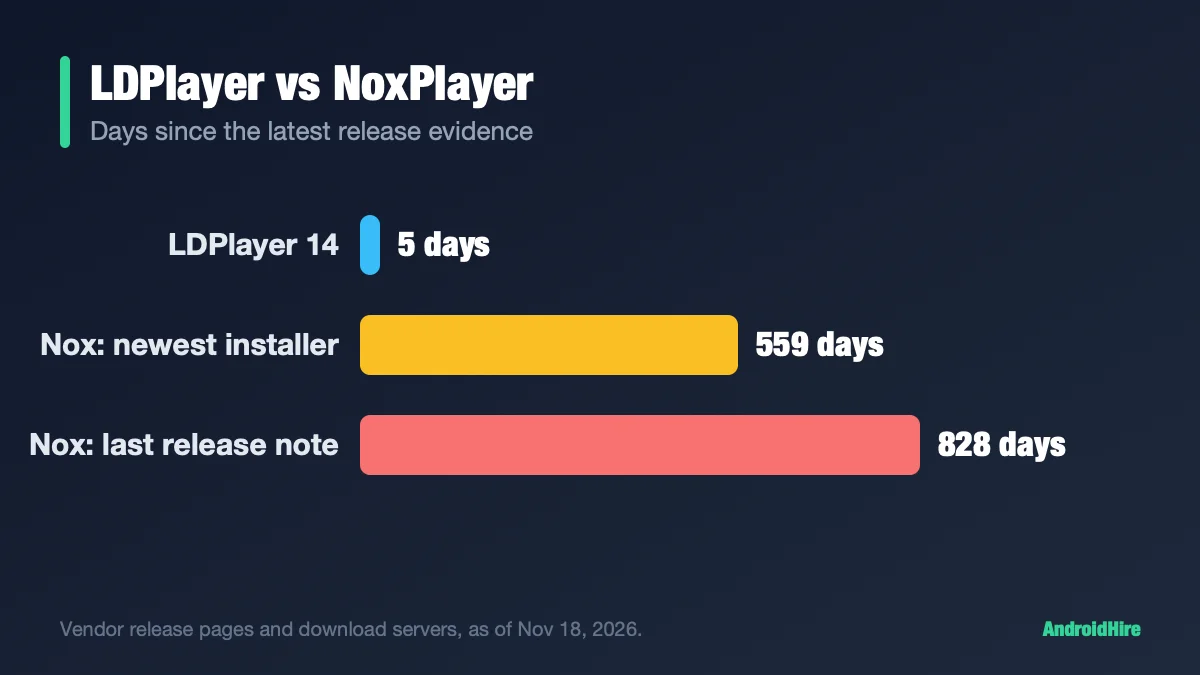
LDPlayer 9 (Android 9) lists a 2GB minimum on a page dated 2020. LDPlayer 14 runs Android 14, is still labelled Beta and wants 8GB, per LDPlayer’s Vietnam spec page (page). See LDPlayer vs NoxPlayer for its update history.
MuMuPlayer: Android 15
MuMuPlayer V6.8.0 came out September 23, 2026 (release notes). Android 15 instances arrived in V6.1.3, next to Android 12. On Android 15, MuMu says 32-bit ARM apps and Magisk are not supported.
The free version has ads. Ad-free is a membership at $10 per 30 days on promotion ($12 standard) (MuMu).
GameLoop: for Tencent shooters
GameLoop’s game pages say it is developed by Tencent. Its privacy policy says it was developed by Hong Kong Gathering Media Limited, and its license is an agreement with Tencent (privacy policy, license). It focuses on PUBG Mobile, Call of Duty: Mobile and Free Fire. Its store is curated and shows ads. We covered it in BlueStacks vs GameLoop.
MEmu Play and NoxPlayer
MEmu is actively updated (9.5.9 on November 18, 2026, MEmu) and tops out at Android 12. NoxPlayer’s last documented release was August 2024. For a Nox decision, read LDPlayer vs NoxPlayer.
What frame rate will you really get?
No emulator’s FPS number is a promise. The game sets the cap. Here is what each vendor publishes:
| Emulator | What it says | Note |
|---|---|---|
| BlueStacks 16 (Beta) | Up to 240 FPS | Its footnote calls the figure an illustration, not a measurement |
| BlueStacks 5 | No maximum on its product page | It says to run games at the FPS you want |
| MuMuPlayer | Up to 240 FPS in its FAQ; up to 480 on its homepage | Its own pages disagree |
| LDPlayer 9 | 120 FPS, and 240 for NIKKE | A 2022 support page |
| GameLoop | No number | It says FPS follows the game |
| Google Play Games on PC | A per-game refresh-rate setting | No cap in the release notes |
Publishers rarely state a PC-side cap for their mobile games. So treat “240 FPS” as a setting you can pick, not as what you will see. Sources: BlueStacks 16, MuMu FAQ, LDPlayer.
The only fair check is your own game on your own PC. Our side-by-side test steps show how to run one.
Bans, macros and anti-cheat: what game makers say
The emulator’s brand is rarely the reason for a ban. The rules about emulators and automation are. None of the publisher pages we read (Activision, Supercell, HoYoverse, Garena, Roblox, PUBG esports) recommends BlueStacks, LDPlayer or MuMuPlayer. We did not check business partnerships. Here is what we could read:
| Game | What the publisher says | Source |
|---|---|---|
| Call of Duty: Mobile | Does not officially support emulators. Emulator players are matched only with each other. Its enforcement policy (dated 2019) does not mention emulators or macros. | Activision help, policy |
| PUBG Mobile | A 2018 PCGamesN report said emulator users are matched with other emulator users. The 2026 tournament rulebook says players may not use an emulator to play on a PC. That rule is for tournaments. | PCGamesN, rulebook v1.7.0 |
| Free Fire | Garena Pakistan set up an emulator matchmaking pool for ranked modes in 2022. Two outlets reported a July 2026 Garena notice: from August 1, emulator accounts are not eligible for the Ranked and Weapon leaderboards. We could not read Garena’s own notice or a US page. | Garena, report 1, report 2 |
| Roblox | On August 7, 2025 it said it is restricting emulator access. On October 27, 2026 it said creators can block devices that fail hardware attestation, and that people on Android emulators “will become unable to play.” The check starts on Android. | Aug 2025, Oct 2026 |
| Clash and Brawl games | Supercell’s terms list “emulators” next to bots and hacks, in a clause that ends “designed to modify or interfere.” It also ships Clash on PC. | Supercell terms |
| Genshin Impact | Its terms of service (updated May 20, 2026) do not use the word “emulator.” A November 7, 2025 notice names mouse macros and automation scripts. | terms, notice |
Macros are the bigger risk. Supercell says bots and automation scripts “will result in a permanent ban” (Safe & Fair Play). Garena Pakistan’s anti-hack FAQ calls cheating “a zero-tolerance policy,” defined as using unauthorized third-party programs (FAQ).
No publisher we read names multi-instance sync, and no vendor says it is ban-safe. Do not use macros or scripts in online matches. We could not read the current PUBG Mobile terms or Garena’s US pages, so check your game’s own support site before ranked play.
Why use an emulator for Android gaming?
- A bigger screen.
- A keyboard, mouse or gamepad instead of touch.
- Several accounts or games at once, with multi-instance tools.
The trade-offs: ads in free tiers, setup work, and a publisher that may not allow emulators in online play.
Is an Android emulator safe?
The software is widely used, but pick your download source with care. Use only the vendor’s own site, and skip “download portal” mirrors. Free tiers show ads. For history on two brands, see the safety section in LDPlayer vs NoxPlayer.
On a Mac or Linux PC?
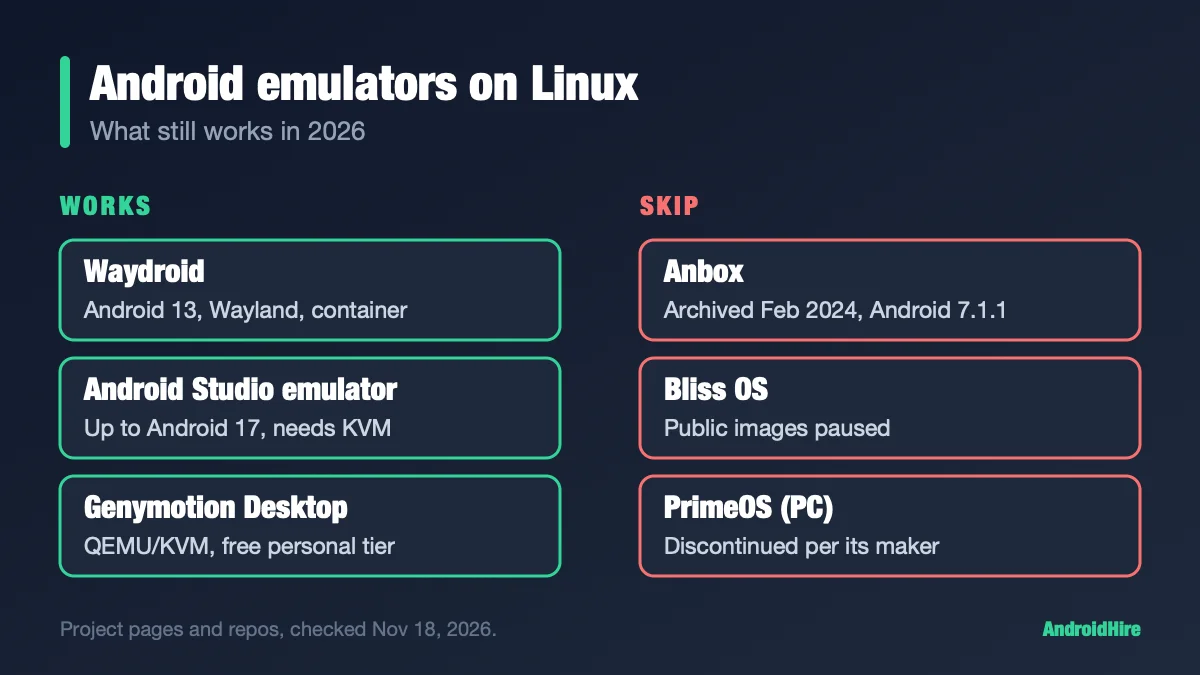
Most gaming emulators here are Windows-first. For Mac, see our Mac emulator guide. For Linux, see our Linux guide.
Claims you will read elsewhere that are out of date
| You may read | What the official pages say |
|---|---|
| “GameLoop is the only sanctioned emulator for PUBG Mobile and Call of Duty: Mobile.” | Activision says Call of Duty: Mobile does not officially support emulators. GameLoop’s “official” label is its own. |
| “MuMu is the only emulator with Android 15.” | That is MuMu’s claim. Genymotion’s free personal edition lists Android up to 15 (Genymotion). |
| “MuMu is Android 12 and MEmu is Android 9.” | MuMu has had Android 15 since June 18, 2026. MEmu has an Android 12 instance. |
| “Genshin’s terms ban emulators.” | Its terms (updated May 20, 2026) do not use the word. |
| “Use Windows Subsystem for Android.” | Microsoft ended it on March 5, 2025 (Microsoft). |
How we checked this guide
This is an editorial guide, not a lab test. We read Google Play Help and Play listings, each emulator vendor’s pages and release notes, and the publishers’ support and rules pages for the games above.
- Not tested: frame rates, battery use, and game compatibility on any emulator.
- Could not read: Garena’s own July 2026 notice, current PUBG Mobile terms, Garena’s US support pages, and Roblox’s help-center anti-cheat page.
- Windows tags come from each game’s own listing on the US Play store. They are not the full catalog.
- Vendor claims such as MuMu’s “first” or “480 FPS” are labelled as claims.
Sources we read (November 18, 2026)
- Activision: can I use an emulator for CoD Mobile
- Activision: CoD Mobile enforcement policy
- Roblox DevForum: third-party emulators (Aug 2025)
- Roblox DevForum: Device Trust API (Oct 2026)
- Supercell terms of service
- Supercell Safe & Fair Play
- Supercell: Clash Royale on PC
- Genshin Impact terms of service
- HoYoLAB notice, Nov 7, 2025
- HoYoverse: Genshin PC requirements
- Garena Free Fire Pakistan: emulator pool
- Garena Free Fire Pakistan: anti-hack FAQ
- Free Fire leaderboard report (Brazil)
- Free Fire leaderboard report (India)
- PUBG Mobile competition rulebook v1.7.0
- PCGamesN on PUBG Mobile emulator matchmaking (2018)
- Google Play Games on PC requirements
- Google Play Games release notes
- Google Play Games badges
- Google: Play Games out of beta
- Google Play: Genshin Impact listing
- BlueStacks 5 product page
- BlueStacks 16 product page
- BlueStacks Prime blog
- LDPlayer 9 requirements
- LDPlayer 14 spec page (Vietnam)
- LDPlayer FPS page
- MuMuPlayer release notes
- MuMuPlayer high-FPS FAQ
- MuMuPlayer membership
- GameLoop PUBG Mobile page
- GameLoop privacy policy
- GameLoop license
- MEmu 9.5.9 release
- Genymotion Desktop
- Microsoft: WSA (archived)
Our recommendation, from the specs
Check for an official PC version first. If there is none, use BlueStacks 5 as the default, LDPlayer 9 for a weak PC, MuMuPlayer for Android 15, and GameLoop for PUBG Mobile. Whichever you pick, leave macros alone, and read your game’s emulator rules before ranked play.
Do this next: look up your main game in the first table. If it has an official PC version, use that. If not, install one emulator and play five minutes before you add a second.
More emulator guides
Frequently Asked Questions
Which Android emulator should I use for my game?
For most people, BlueStacks 5. For a weak PC, LDPlayer 9. For Android 15, MuMuPlayer. For PUBG Mobile, GameLoop. First check whether your game has an official PC version: Genshin Impact, Wuthering Waves, Clash of Clans, Clash Royale and Roblox do, and they need no emulator.
Which Android emulator has the highest FPS?
We found no independent test. BlueStacks 16's page advertises up to 240 FPS and calls the figure an illustration, MuMuPlayer says 240 in its FAQ and 480 on its homepage, and LDPlayer's 2022 page says 120, with 240 for NIKKE. These are settings, not guarantees, because the game sets the real cap.
Can you get banned for using an Android emulator?
Rules vary by game. Activision says Call of Duty: Mobile does not officially support emulators and keeps emulator players in their own matches. Roblox is restricting emulators. Supercell's terms list emulators next to bots and hacks. Macros and automation are a bigger ban risk across publishers. Read your game's support page before ranked play.
Which Android emulator supports Android 15?
MuMuPlayer has had Android 15 instances since V6.1.3 on June 18, 2026, with no 32-bit ARM apps and no Magisk. Genymotion Desktop's free personal edition also lists Android up to 15, and Android Studio's emulator offers newer images, but both are developer tools. BlueStacks 16 (Beta) runs Android 16 and needs 8GB of RAM. LDPlayer 14 (Beta) runs Android 14.
Is Google Play Games on PC better than an emulator?
It is the official option and free, but it plays only catalog games and needs 8GB of RAM, an SSD, four physical cores and virtualization on. An emulator can run games outside that catalog and offers key mapping and multi-instance, but it shows ads and may be unsupported by the game's publisher.
What is the best emulator for PUBG Mobile?
GameLoop calls itself the official PUBG MOBILE emulator, and its game pages say Tencent develops it. The PUBG pages we could read name no emulator, and the 2026 tournament rulebook says players may not use an emulator to play on a PC. We found no independent frame-rate test comparing GameLoop with BlueStacks.
What is the best emulator for Free Fire?
GameLoop and BlueStacks 5 both list Free Fire, and Free Fire MAX is Windows-tagged on Google Play. Garena Pakistan set up an emulator matchmaking pool in 2022. Two outlets reported that from August 1, 2026 emulator accounts are not eligible for the Ranked and Weapon leaderboards. Check your region's rules.
Do I need a graphics card for an Android emulator?
Vendors name cards such as the GTX 660 or GTX 1050 for GameLoop, and Google's minimum is an Intel UHD 630. LDPlayer warns that onboard graphics can cause black screens on LDPlayer 14. For weak PCs, LDPlayer 9 has the lowest official RAM minimum.