BlueStacks vs LDPlayer in 2026: Which Is Better for Gaming?

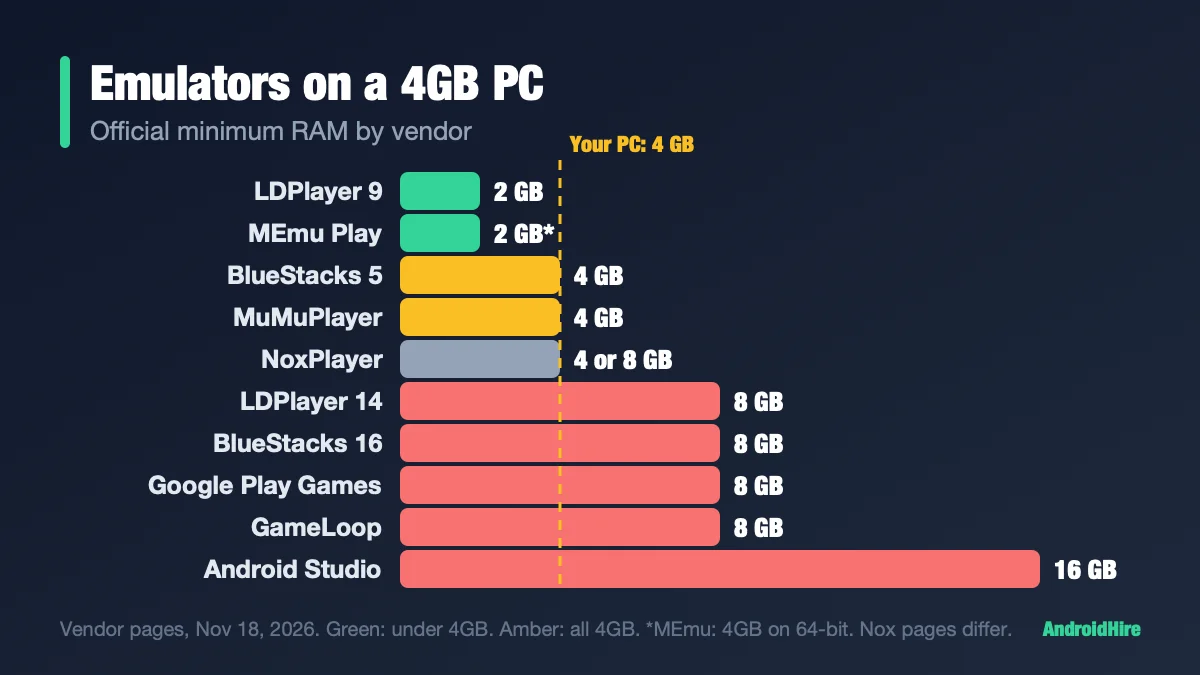
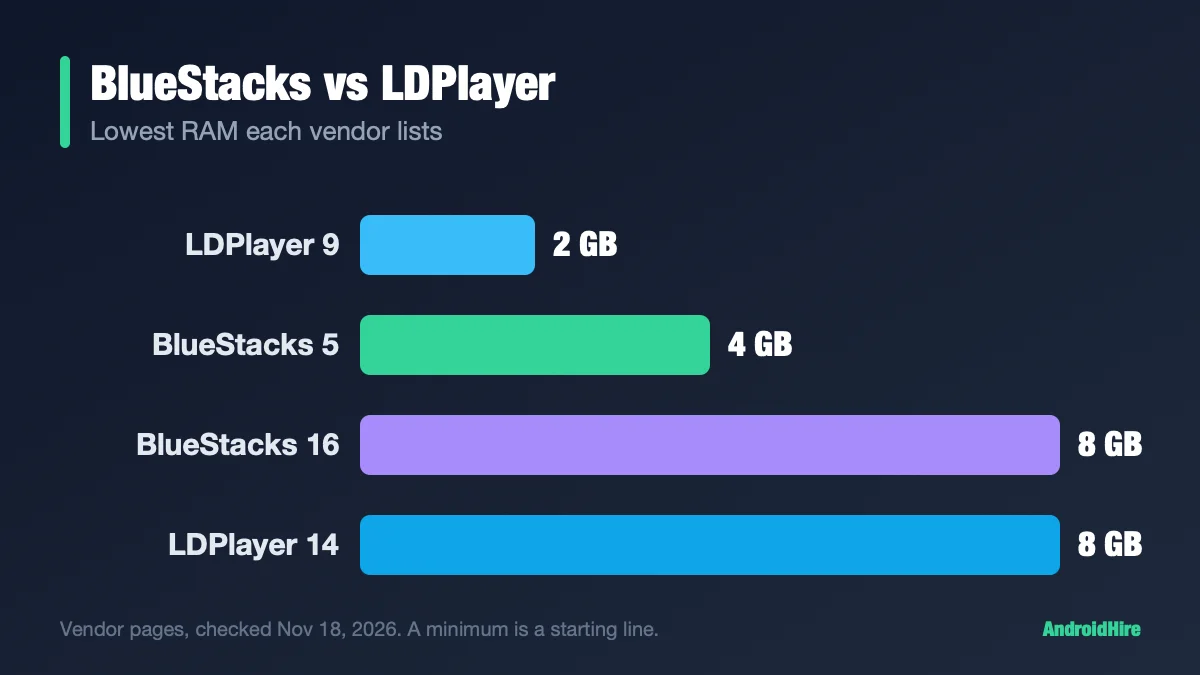
On a 4GB PC, try LDPlayer 9 first. On an 8GB PC, either one works, so test both. On a Mac, use BlueStacks. LDPlayer 9 lists a 2GB minimum and BlueStacks 5 lists 4GB. No fair outside test exists: BlueStacks and LDPlayer each ran their own tests, and each one wins its own. Both are free with ads. Each now has a newer line, BlueStacks 16 and LDPlayer 14, that many guides skip.
Spec-based comparison. We did not install or benchmark the software. Every figure comes from a source linked in this guide, read on November 18, 2026. We plan to recheck it by December 16, 2026.
Which one should you pick?
| Your situation | Start with | Why |
|---|---|---|
| PC with 4GB of RAM or less | LDPlayer 9 | It lists a 2GB minimum. BlueStacks 5 lists 4GB. See our 4GB RAM guide. |
| 8GB PC, one game at a time | Either one | Both list this as workable. No outside test picks a winner, so use the 15-minute test. |
| Many windows or accounts | Test both | LDPlayer says Hyper-V off works best for this. BlueStacks has Eco Mode and Multi-Instance tools. Their own claims point in different directions. |
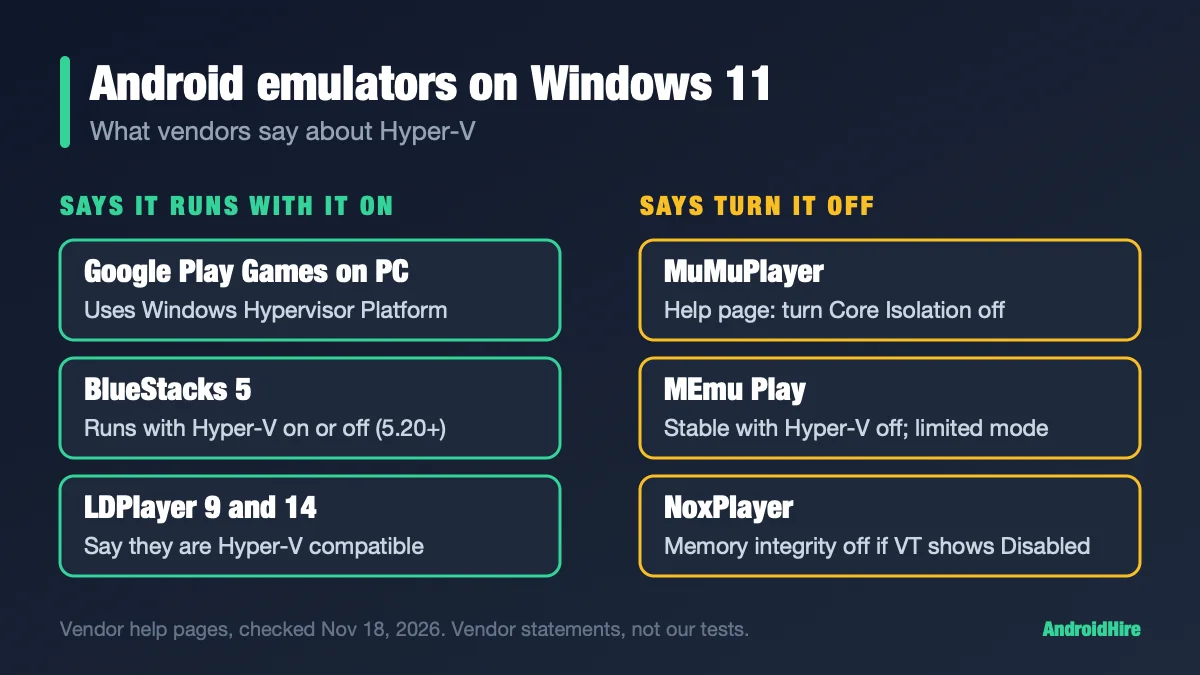
| Hyper-V must stay on (WSL2, Docker) | Either one | Both vendors say they work with Hyper-V on. We found no fair test of speed. See Hyper-V. |
| A game that needs a newer Android | LDPlayer 14 or BlueStacks 5 (Android 13) | Both are labelled Beta. Check the game’s “Requires Android” line first. See Android 16. |
| You hate ads | Either paid plan | BlueStacks Prime is $7.99 a month after $3.99 the first month. LDPlayer’s plan has no listed price. |
| A Mac | BlueStacks | BlueStacks offers a separate, free Mac app (BlueStacks Air). See our Mac emulator guide. |
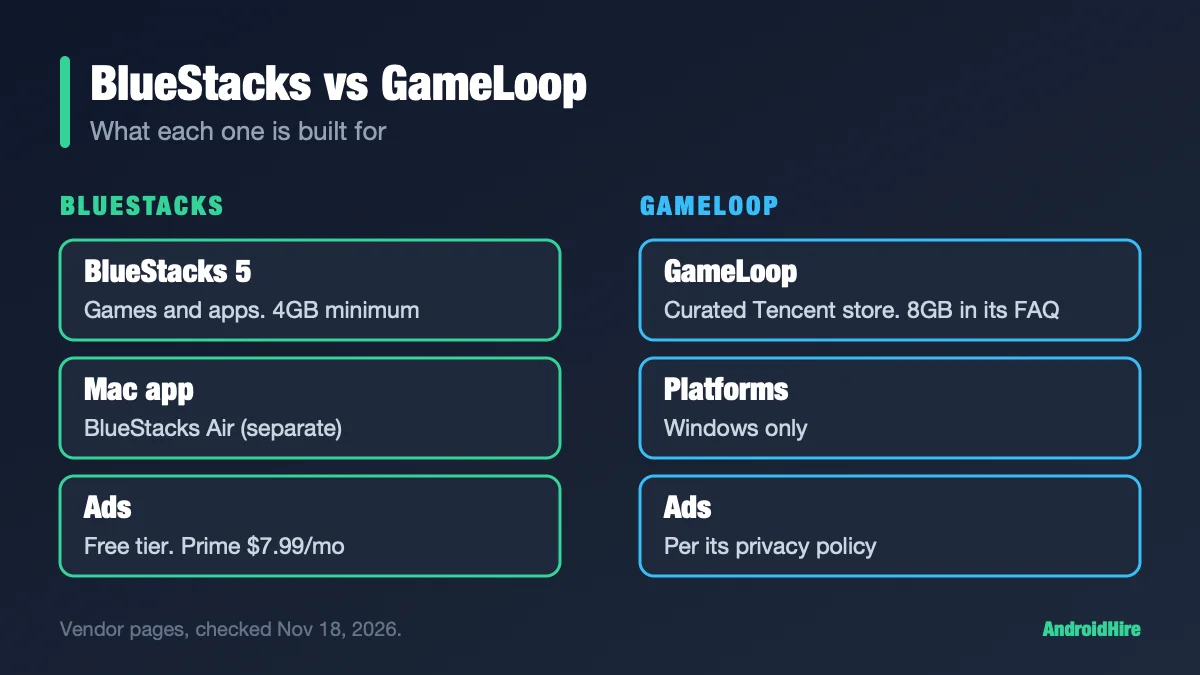
| PUBG Mobile or Call of Duty: Mobile | Read the GameLoop guide | Tencent-linked GameLoop is a third option. See BlueStacks vs GameLoop. |
| MuMuPlayer or NoxPlayer too | See our other guides | LDPlayer vs NoxPlayer and best emulator for gaming. |
Key facts, checked November 18, 2026
- BlueStacks 5 lists 4GB of RAM and 5GB of disk on its product page (BlueStacks).
- LDPlayer 9 runs Android 9 and lists a 2GB RAM minimum, with virtualization on in the BIOS (LDPlayer).
- LDPlayer 14 runs Android 14, is still labelled Beta, and lists 8GB on its Vietnam support page (page).
- BlueStacks 16 (BlueStacks Desktop) runs Android 16, is Beta, and asks for 8GB or more (BlueStacks).
- Both are free with ads. BlueStacks Prime removes ads for $3.99 the first month, then $7.99 a month (BlueStacks). LDPlayer’s ad-free plan has no price on its own page.
- Every speed test we found was run by BlueStacks or LDPlayer.
Jump to: the four versions · specs · speed tests · how many windows · Hyper-V · Android versions · ads and price · safety · outdated claims · test them yourself · FAQ
What are you really comparing? Four versions
This is why most guides are out of date. Each brand now sells two lines.
| Version | Android | Status (Nov 18, 2026) | Minimum RAM |
|---|---|---|---|
| BlueStacks 5 | Nougat 32-bit, Pie 64-bit (Android 9), Android 13 (Beta) | Current. Built for games. | 4GB |
| BlueStacks 16 (BlueStacks Desktop) | Android 16 | Product page says Beta | 8GB or more |
| LDPlayer 9 | Android 9 | Stable | 2GB |
| LDPlayer 14 | Android 14 | Homepage still says Beta | 8GB (Vietnam support page) |
For games, most people want BlueStacks 5 or LDPlayer 9. The rest of this guide compares those two first, then notes where 16 and 14 change the answer. Our BlueStacks details come from bluestacks.com pages only. BlueStacks’ support site blocks automated readers.
Official specs, side by side
These numbers come from each vendor’s own pages. They show where each company says “it starts to work.” They do not show how it feels.
| BlueStacks 5 | LDPlayer 9 | |
|---|---|---|
| Minimum RAM | 4GB | 2GB |
| Free disk (minimum) | 5GB | 36GB |
| Windows | Windows 7 or above on its product page. The BlueStacks 16 page calls Windows 10 recommended. “Optimized for Windows 11.” | Page lists XP, 7, 8, 8.1, 10 and 11. The page is dated 2020. |
| Virtualization (VT-x / AMD-V) | BlueStacks says to turn it on | Must be on in the BIOS |
| Recommended | Not listed on its product page | Core i5-10500 or better, 16GB of RAM, GTX 1660 Ti or better, 100GB of disk |
| Android | Nougat 32, Pie 64, Android 13 (Beta) | Android 9, runs 64-bit and 32-bit apps |
| Price | Free with ads | Free with ads |
Notice the disk row. LDPlayer 9’s English page asks for 36GB of free space, far more than BlueStacks’ 5GB. Plan your drive before you install.
LDPlayer 14 needs more than LDPlayer 9. LDPlayer’s Vietnamese support page (July 23, 2026) lists 8GB of RAM as the minimum, a video card with more than 2GB of memory, an SSD and 64-bit Windows 10. It says one window uses about 2GB at the minimum setup, and 4 to 6GB at the recommended 16GB setup. LDPlayer calls these its own test results. We read the page in Vietnamese, so have a Vietnamese reader confirm before you rely on it.
Which one is faster? What the tests really say
Every test we found was run by BlueStacks or LDPlayer, and each one wins its own. Some AI summaries call LDPlayer’s test independent. It is not. LDPlayer ran and published it.
| Test | Who ran it | Hardware and builds named? | Compared |
|---|---|---|---|
| BlueStacks report (April 2026, updated July 14) | BlueStacks | No hardware, no builds | BlueStacks 5 vs LDPlayer 9 |
| Tech How article (September 2026) | BlueStacks paid for it, per the article | No | Same data |
| LDPlayer test (July 2026) | LDPlayer | Hardware yes (i5-13400, RTX 3050, 31.7GB). Builds no. | LDPlayer 14 vs BlueStacks on its Android 13 Beta |
| BlueStacks 4-way page (2021, updated 2026) | BlueStacks | No | Older builds |
| Test | What it found |
|---|---|
| BlueStacks report | BlueStacks ahead on AnTuTu by about 23% on Intel, 6.6% on AMD and 4.1% on Nvidia setups. Boot time about 6 to 13 seconds vs about 41 to 51 for LDPlayer. |
| LDPlayer test | Cookie Run: Kingdom averaged 124.38 FPS vs 102.69. Arknights averaged 203.72 vs 157.05, with a low-end average of 87.76 vs 36.14. |
| LDPlayer ten-window test | Ten Clash of Clans windows. Process CPU use 42.39% vs 61.08%. Physical memory 22,717MB vs 26,492MB. BlueStacks used less dedicated memory (2,915MB vs 3,233MB). |
Sources: BlueStacks report, LDPlayer test.
Here is why you should treat these with care:
- The BlueStacks report names no hardware or builds. The results sit in images.
- LDPlayer’s test pits its Android 14 Beta against BlueStacks on Android 13 Beta. That is not the default BlueStacks setup, and it is not LDPlayer 9.
- Boot times disagree. BlueStacks’ older page implies about 20 seconds for LDPlayer, and its 2026 report says about 41 to 51.
- Small blogs disagree with each other. One says LDPlayer idles near 1.2GB and BlueStacks near 1.8GB. Another says the reverse. None show raw data, so we do not print their figures.
Numbers also swing for reasons that have nothing to do with the brand: the Android version, whether Hyper-V is on, the graphics mode, how much RAM and how many cores each window gets, and the game. That is why we built the test below. If you want a faster answer, YouTube has benchmark videos for this pair. We have not checked them.
How many windows can you run?
LDPlayer says one LDPlayer 14 window uses about 2GB at its minimum setup and 4 to 6GB at its recommended setup. That is LDPlayer’s own figure for its own build. We found no matching figure for BlueStacks on a page we could read. Start with one window and add more one at a time, watching Memory in Task Manager.
Hyper-V and Windows 11: the real trade-off
Hyper-V is a Windows feature that runs virtual machines. WSL2 and Docker turn it on. Some Windows security settings do too. Emulators need virtualization as well, so the two can clash.
Both vendors now say their emulator works with Hyper-V on.
- LDPlayer shipped a version on March 5, 2026 that runs normally with Hyper-V enabled (LDPlayer). It says light play is fine with it on. For many windows or heavy games, it says that disabling Hyper-V can yield better performance. Recent LDPlayer 14 notes list Hyper-V smoothness fixes (builds 14.0.27.1 and 14.0.30.0).
- BlueStacks said in June 2023 that it runs with Hyper-V on when you use a Pie 64-bit instance (BlueStacks blog). Its help center covers newer builds, so read it for your version. Its download page says its Windows build is “Optimized for Windows 11” (BlueStacks).
We found no fair test of speed with Hyper-V on. Run the 15-minute test twice: once with Hyper-V on and once off. Our virtualization section shows how to check what your PC is running, and our Windows 11 table covers more emulators.
Android versions: when it matters
A game says “Requires Android 9” (or 10, or 12) on its Google Play page. If the emulator’s Android is older than that, the game will not install. A newer Android does not give you more frames per second on its own.
- Most popular games still run on Android 9. That covers LDPlayer 9 and BlueStacks 5’s Pie 64-bit.
- Need newer? Use LDPlayer 14 (Android 14, Beta) or BlueStacks 5’s Android 13 (Beta). BlueStacks 16 goes to Android 16, but needs 8GB of RAM and is still labelled Beta.
- Old advice is wrong. You will read “both run Android 7.1.2.” BlueStacks 5 still offers a Nougat build, but LDPlayer 9 is Android 9 and LDPlayer 14 is Android 14.
Do you need Android 16 to play new games?
Not by default. BlueStacks promotes Android 16 (BlueStacks blog). Google’s rule from August 31, 2026 is that new apps and updates must target Android 16. Google says an app that targets a recent version “can still run on older Android versions” (Google). What matters is the game’s “Requires Android” line on Google Play.
Ads and price: what each paid plan does
BlueStacks. The free version shows ads. BlueStacks Prime is the paid option at $7.99 a month, with $3.99 for the first month. BlueStacks says it removes in-session ads and adds monthly store credits (BlueStacks blog, June 23, 2026).
LDPlayer. The free version shows ads on the emulator desktop and pop-ups from sponsored apps. LD Premium removes them (LDPlayer). LDPlayer’s own page gives no price. One third-party listing says $2.99 a month, which we could not confirm, so check the LD Store before you buy.
Is either one safe?
Both are widely used. The safest habit is the same for each: download only from the vendor’s own site, and skip “download portal” mirrors. On LDPlayer’s site, check which button you click. When we looked, the top Download button gave LDPlayer 14 (Beta). Choose LDPlayer 9 for the steadier version. That may differ by region.
- BlueStacks: we found no credible 2026 security report. The free version shows ads. BlueStacks’ trademark notice names now.gg, inc.
- LDPlayer fixes: build 14.0.27.1 (September 14, 2026) lists a security-vulnerability fix (LDPlayer notes). Update to the latest build.
- Installer tip: Android Headlines reports that LDPlayer’s online installer offers optional ad-tech add-ons you can decline, and the offline installer leaves them out. We could not confirm the steps on an official page.
LDPlayer, May 2026. An anonymous account on X said LDPlayer, LDCloud and LDShop recorded gameplay, including when players typed their logins. It named about 190,000 to 200,000 accounts. We found no proof posted.
LDPlayer replied that an unauthorized person got into a non-production storage bucket on May 13, 2026. It tied the bucket to an old version of LDCloud, its cloud phone service. It said some non-public material was leaked, and it called the other claims false and misleading (Android Guias, mobi.gg, which recommends BlueStacks). We found no report showing the Windows emulator recorded anything. If you used LDCloud or LDShop, change your passwords and turn on two-step sign-in.
Use a Google account you do not use for banking or work. Read our note on emulator bans before you sign in to an account you cannot lose.
Claims you will read elsewhere that are out of date
| You may read | What the vendor pages say |
|---|---|
| “Both run Android 7.1.2.” | BlueStacks 5 offers Nougat, Pie and a Beta Android 13. LDPlayer 9 is Android 9. LDPlayer 14 is Android 14. |
| “BlueStacks needs 2GB of RAM.” | BlueStacks 5’s own product page says at least 4GB. The 2GB figure belongs to an older version. |
| “LDPlayer 14 has no published spec.” | LDPlayer’s Vietnam support page lists 8GB of RAM as the minimum. |
| “LDPlayer has no ads.” | LDPlayer’s own LD Premium page says the plan removes emulator-desktop ads and sponsored pop-ups. |
| “LDPlayer 14 is out of beta.” | LDPlayer’s homepage still labels it Beta, despite a June 25 launch announcement. |
| “LDPlayer’s test is independent.” | LDPlayer ran and published it. |
How to test both on your PC in 15 minutes
This is the fair test no one has published. We have not run it. Do it once and you will know more than any benchmark chart tells you. Install one emulator at a time and close it before you open the other.
- Reboot first. A fresh start gives you a clean baseline.
- Write down your PC. Open Task Manager (Ctrl+Shift+Esc), go to Performance, and note your RAM and whether Virtualization says Enabled.
- Give both the same settings. Use the same RAM, the same number of CPU cores and the same resolution. A 720p window is a fair start on a weak PC.
- Time the first boot. Use your phone’s stopwatch from the click to the Android home screen.
- Note memory at idle. With the emulator on its home screen, look at the Memory total in Task Manager.
- Play the same five minutes. Use the game you really care about. Write down stutters, heat and fan noise.
- Repeat with the other emulator, and keep the one that felt smoother. If you use Hyper-V, repeat once with it on and once off.
How we checked this guide
This is an editorial comparison, not a lab test. On November 18, 2026 we read the vendors’ download pages, product pages, blog posts, release notes and support pages in a normal web browser. We did not install either emulator and we ran no tests. Every BlueStacks fact here comes from bluestacks.com pages. We say who ran every test.
- Not checked: frame rates, battery use, game compatibility, install size, and whether BlueStacks’ “turn off ads” setting still works.
- Not confirmed: the newest LDPlayer 9 build number, and BlueStacks 5 details that appear only on its support site.
- LDPlayer pages were read through a summarizing tool, so its wording is paraphrased unless in quotation marks that we checked.
- Absence, not denial: we saw no Linux version for either one.
Sources we read (November 18, 2026)
- BlueStacks 5 product page
- BlueStacks 16 product page
- BlueStacks download page
- BlueStacks vs LDPlayer performance report
- BlueStacks Hyper-V blog (June 2023)
- BlueStacks Prime blog
- BlueStacks 16 blog
- LDPlayer 9 requirements
- LDPlayer 14 spec page (Vietnam)
- LDPlayer 14 vs BlueStacks test
- LDPlayer Hyper-V release
- LDPlayer version history
- LD Premium page
- LDPlayer: is LDPlayer safe
- Android Guias on the May 2026 allegation
- mobi.gg on the May 2026 allegation
- Google: target API level requirement
Our recommendation, from the specs
On a 4GB PC, try LDPlayer 9 first. On a normal 8GB PC, try both. On a Mac, use BlueStacks. Choose LDPlayer 14 or BlueStacks 5’s Android 13 only if a game needs a newer Android, and expect Beta behavior. Skip BlueStacks 16 unless you have 8GB or more and want desktop-style multitasking.
Do this next: run the 15-minute test with the one game you care about. It takes less time than reading another comparison, and it is the only result that fits your PC.
More emulator guides
Frequently Asked Questions
Is LDPlayer better than BlueStacks?
It depends on your PC. LDPlayer 9 lists the lower RAM minimum (2GB against 4GB). BlueStacks has a free Mac app. No fair outside test picks a winner: each company's own test says it wins.
Which uses less RAM, BlueStacks or LDPlayer?
By official minimum, LDPlayer 9 asks for less: 2GB against 4GB for BlueStacks 5. LDPlayer 14 and BlueStacks 16 both list 8GB. We found no credible independent measurement of real use, and small blogs disagree with each other.
Which boots faster?
BlueStacks says it starts in about 6 to 13 seconds and LDPlayer in about 41 to 51. That is BlueStacks' own test with no hardware named. An older BlueStacks page implied about 20 seconds for LDPlayer, so treat the numbers with care.
Is LDPlayer better than BlueStacks for a low-end PC?
LDPlayer 9 lists the lower minimum: 2GB of RAM, against 4GB for BlueStacks 5. On a 4GB PC, LDPlayer 9 is the safer first try. LDPlayer 14 lists 8GB. No outside test compares them on weak hardware, so run our 15-minute test.
Is LDPlayer safe to use in 2026?
LDPlayer is widely used. In May 2026 an anonymous account claimed its cloud services recorded logins. LDPlayer said an unauthorized person reached a non-production storage bucket on May 13 and called the rest misleading. We found no report showing the Windows emulator recorded anything. Download only from ldplayer.net and decline optional add-ons.
Is BlueStacks safe?
We found no credible 2026 security report about BlueStacks. The free version shows ads. Download it only from bluestacks.com.
What is the difference between LDPlayer 9 and LDPlayer 14?
LDPlayer 9 runs Android 9, lists a 2GB RAM minimum and has no Beta label. LDPlayer 14 runs Android 14, is still labelled Beta, and lists 8GB of RAM on its Vietnam support page.
Do BlueStacks and LDPlayer work with Hyper-V on?
Both vendors say yes, with conditions. LDPlayer released a Hyper-V-compatible version on March 5, 2026, but says turning Hyper-V off can be faster for many windows or heavy games. BlueStacks said in 2023 that it runs with Hyper-V on with a Pie 64-bit instance. We found no fair speed test.
Does BlueStacks or LDPlayer work on Windows 11, a Mac or Linux?
BlueStacks' download page says its Windows build is optimized for Windows 11, and LDPlayer 9's requirements page lists Windows 11. BlueStacks offers a separate, free Mac app. We saw no official Linux version for either one.
Do I need Android 16 to play new games?
Not by default. Google requires new apps and updates to target Android 16 from August 31, 2026, but an app targeting a recent version can still run on older Android versions. Check the game's Requires Android line on Google Play.