BlueStacks vs GameLoop in 2026: Which Emulator Is Better?

Use BlueStacks if you play many games. Use GameLoop if you mostly play PUBG Mobile or Call of Duty: Mobile. GameLoop is Tencent-linked, and its store is small. BlueStacks runs far more apps. Neither one is proven faster, and neither is ban-proof: no game maker says either is safe for ranked play.
Spec-based comparison. We did not install or benchmark the software. Every figure comes from a source linked in this guide, read on November 18, 2026. We plan to recheck it by December 16, 2026.
Is GameLoop better than BlueStacks? Pick by situation
| You want to… | Start with | Why |
|---|---|---|
| Play many different games and apps | BlueStacks | GameLoop’s store is curated. Its FAQ says Clash of Clans, Clash Royale and Boom Beach were removed. |
| Play only PUBG Mobile | GameLoop | It calls itself the official PUBG MOBILE emulator. Read the ban section first. |
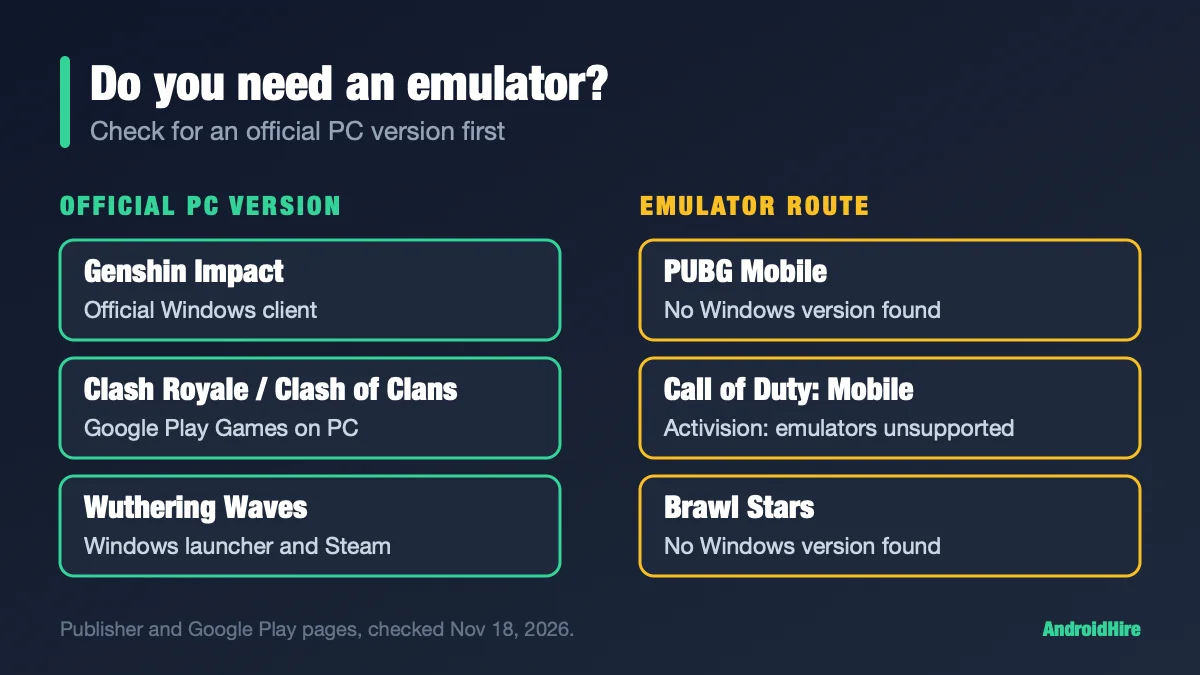
| Play Call of Duty: Mobile | Either, with care | Activision says the game does not support emulators. GameLoop says “Don’t worry about getting banned.” See below. |
| Play Free Fire | Either, or Google Play Games on PC | GameLoop lists Free Fire. Free Fire MAX is Windows-tagged on Google Play (Google Play Games on PC needs 8GB). |
| Use Windows 11 | BlueStacks | BlueStacks’ page says “Optimized for Windows 11.” GameLoop lists no Windows 11 support. |
| Use a Mac | BlueStacks | BlueStacks offers a separate, free Mac app for Apple Silicon (BlueStacks Air). GameLoop lists Windows only. See our Mac guide. |
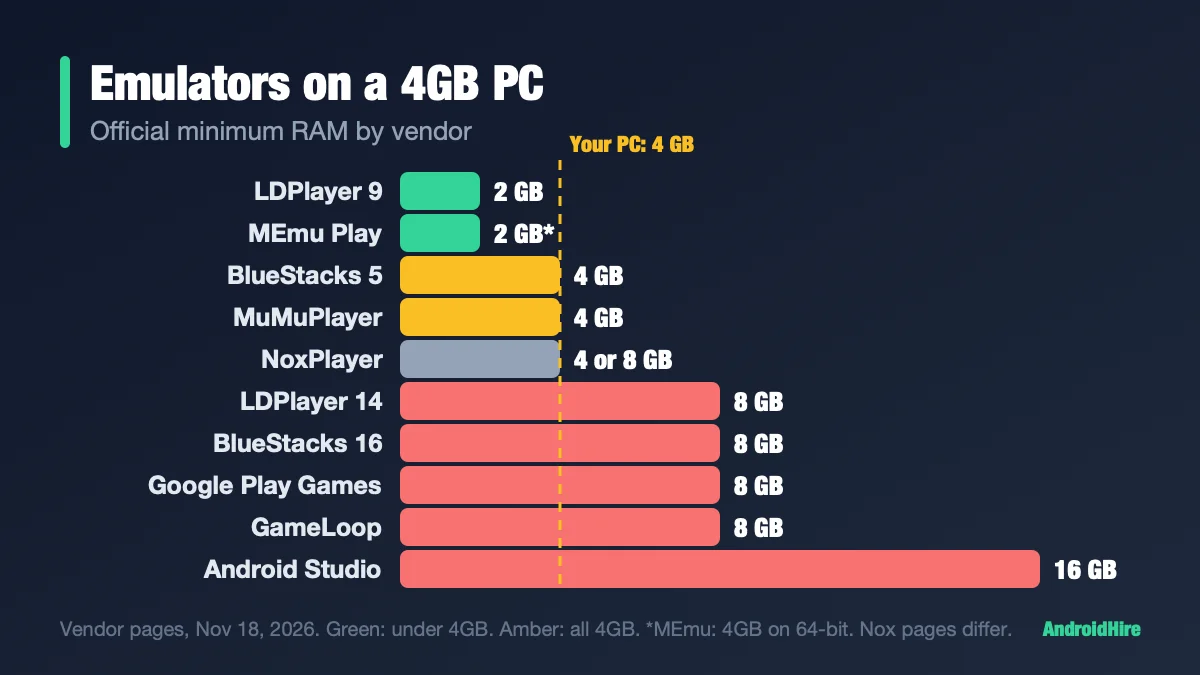
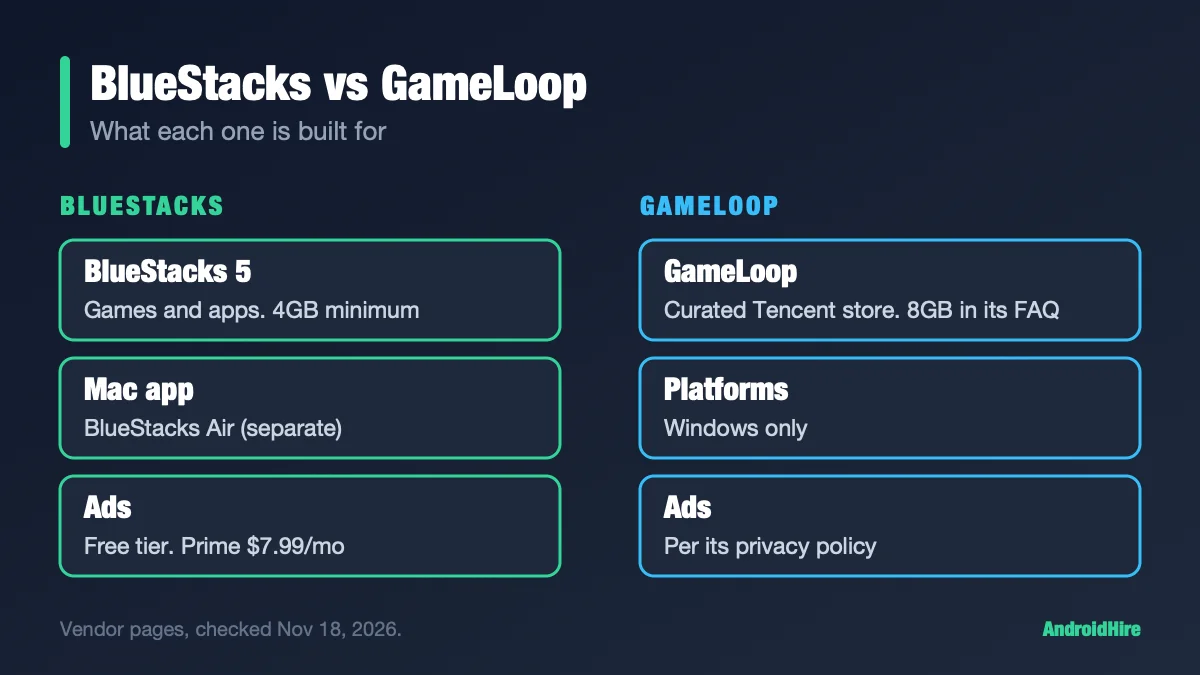
| Use a PC with 4GB of RAM | Neither is ideal | BlueStacks lists 4GB. GameLoop asks for 8GB. See our 4GB RAM guide. |
| Skip ads | BlueStacks Prime | $3.99 the first month, then $7.99 a month. We found no ad-free GameLoop plan. |
Key facts, checked November 18, 2026
- GameLoop shows no version number on its site. Its Facebook page announced builds 4.1.143.90 (32-bit) and 5.1.153.90 (64-bit) in late May 2026 (post). November posts name no client build.
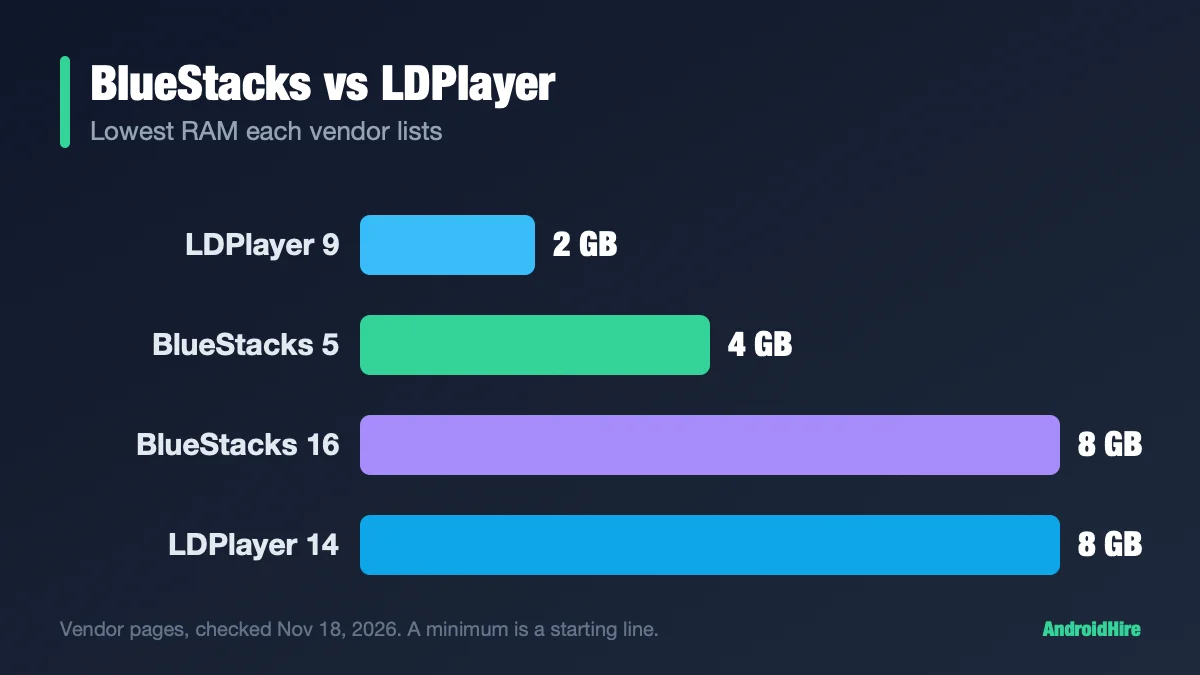
- BlueStacks 5 is BlueStacks’ main version, with a 4GB RAM minimum. BlueStacks 16 runs Android 16, is in beta and needs 8GB (BlueStacks).
- GameLoop’s FAQ asks for an i5-6400, 8GB of RAM and a GTX 660 (FAQ). No GameLoop page we read lists Windows 11.
- Both show ads. GameLoop’s privacy policy says it uses your location to deliver ads. BlueStacks’ free tier is ad-supported.
- Windows only for GameLoop. BlueStacks has a separate, free Mac app.
Jump to: specs · what you can install · bans · official for CoD? · is it safe · low-end PC · speed · Windows 11 · numbers elsewhere · FAQ
Official specs, side by side
These come from each vendor’s own pages. Where a page does not say, we write “not published.”
| BlueStacks 5 | GameLoop | |
|---|---|---|
| Who makes it | BlueStacks | Its game pages and license say Tencent. Its privacy policy names Hong Kong Gathering Media Limited. |
| Minimum RAM | 4GB | 8GB in its 2021 FAQ and on its game pages |
| Windows | Windows 7 or above on its pages; Windows 10 recommended. “Optimized for Windows 11.” | FAQ: Windows 7 and up. Game pages: 64-bit Windows 8.1 or 10. Windows 11 not listed. |
| Graphics | Up-to-date graphics drivers | FAQ: GTX 660. PUBG Mobile page: GTX 1050. |
| Android inside | Nougat 32-bit, Pie 64-bit, Android 13 (Beta) | Not published |
| Mac | Yes: a separate, free app for Apple Silicon (BlueStacks Air) | None listed |
| Ads | Yes on the free tier. Prime removes them. | Yes, per its privacy policy |
GameLoop installs through a small web stub of a few megabytes, so the version only shows after you install it. Download portals print many different version numbers. Do not trust them. Get it from gameloop.com.
What can you actually install?
GameLoop is a curated game store. Its FAQ says you can use it to play “any Android game or apps.” Other FAQ pages say otherwise:
- Clash of Clans, Clash Royale and Boom Beach “have been removed from GameLoop” because of the game’s request (FAQ).
- “The current Google service is not stable on the simulator” (FAQ).
- We found no official page that documents installing your own APK files.
The homepage features PUBG Mobile, Call of Duty: Mobile and Free Fire, and lists PUBG Mobile Flash first. The PC needs for Flash match PUBG Mobile’s: 8GB of RAM and a GTX 1050.
BlueStacks is the broader tool. It has Multi-Instance, Macros, Eco Mode and game controls. For two accounts or many apps, it is the safer pick. For a longer feature list, see our BlueStacks vs LDPlayer guide.
Can you get banned for using GameLoop or BlueStacks?
Nobody who makes the games says either one is safe for ranked play. GameLoop says it is. Here are the three voices:
What GameLoop says. Its product page says its anti-cheat tool, Tencent Protect, is “an anti-cheat component targeting Android emulator scene.” It adds: “Don’t worry about getting banned when playing on PC” (GameLoop). That is GameLoop’s promise. It is not a rule from Activision, Krafton or Garena.
What BlueStacks says. Its PUBG Mobile and Call of Duty: Mobile pages say nothing about bans or matchmaking. They say BlueStacks “does not carry any malware, spyware, or any sort of additional software that could harm your PC” (BlueStacks).
What the game makers say.
| Game | What the publisher says | Source |
|---|---|---|
| Call of Duty: Mobile | Does not officially support emulators. Emulator players are matched only with each other. Its enforcement policy (dated 2019) does not mention emulators or macros. | Activision help, policy |
| PUBG Mobile | A 2018 PCGamesN report said emulator users are matched with other emulator users. The 2026 tournament rulebook says players may not use an emulator to play on a PC. That rule is for tournaments. | PCGamesN, rulebook v1.7.0 |
| Free Fire | Garena Pakistan set up an emulator matchmaking pool for ranked modes in 2022 and said it encourages mobile devices. We found no mention on its US pages. | Garena |
Some guides say Activision allows GameLoop. We found no such sentence on Activision’s help pages. The PUBG 2018 report is old, and we could not read a current PUBG page that repeats it.
Macros are a separate risk. HoYoverse and Supercell name macros or automation scripts in their rules. Activision and Garena ban “unauthorized third-party” software, but the pages we read do not name macros (Garena FAQ). BlueStacks’ own macro page says macros are enabled only for games whose developers support them. Do not use macros in online matches. GameLoop also does not recommend any VPN, because it may lead to an in-game ban (FAQ).
Bottom line on bans: treat “you will not be banned” as a promise from GameLoop, not from the game.
Is GameLoop the official emulator for Call of Duty: Mobile?
No game maker calls GameLoop official for Call of Duty: Mobile. Only GameLoop does. GameLoop’s page says it is the “official emulator” for the game (GameLoop). Activision’s FAQ says the game “does not support the use of emulators” (Activision).
GameLoop’s Facebook page also admitted a Call of Duty: Mobile crash on its 64-bit engine on December 19, 2025, and advised switching to the 32-bit engine (post). On November 14, 2026 it advertised “120 FPS Support” for the game. It showed no PC, settings or test.
Is GameLoop safe? Is BlueStacks?
GameLoop. We found no named, dated malware report for GameLoop. We also did not scan its installer. Its privacy policy (December 22, 2023) discloses a lot (policy):
- It uses your IP address and location to deliver ads in GameLoop.
- It collects file, process, module and memory information tied to the game, and game screenshots, to detect cheating.
- Its servers are in Germany, the USA, India, Singapore and Thailand, and staff can see data “from the People’s Republic of China.”
- Hong Kong Gathering Media Limited is named as the data controller.
BlueStacks. BlueStacks says on its game pages that it does not carry malware or spyware. That is BlueStacks’ own claim. The free version shows ads, and Prime removes them (BlueStacks blog). Download either one only from its own site.
Which is better for a low-end PC?
Neither one is proven faster on a weak PC. BlueStacks lists 4GB of RAM. GameLoop’s pages list 8GB. GameLoop’s own FAQ says its 32-bit build is for “older or less powerful devices” (FAQ), so start there if you try it on a weak PC. GameLoop’s product page says “Better performance on all PC models, especially low-end machines.” That is a claim, not a test.
On virtualization, GameLoop’s page says “No VT needed.” Its own VT guide says turning VT on can raise performance “more than 10 times” (guide). Google Play Games on PC asks you to turn it on. Check it in Task Manager under Performance, then CPU.
Which one is faster?
GameLoop’s Facebook page says Call of Duty: Mobile has “120 FPS Support.” BlueStacks says its High FPS setting goes up to 240 FPS, and that the result depends on your PC (BlueStacks). Neither number is a test.
We found no written test that names the PC, the builds and the method. YouTube has tests, which we have not checked. For your own answer, install one emulator at a time, give both the same RAM, cores and resolution, and play the same five minutes. The side-by-side steps in our BlueStacks vs LDPlayer guide work for this pair too.
Does GameLoop work on Windows 11?
- BlueStacks: its download page says its Windows build is “Optimized for Windows 11” (BlueStacks).
- GameLoop: its pages do not list Windows 11. Third-party sites say it runs there. Some how-to posts blame startup errors on virtualization being off, Hyper-V or Memory Integrity. GameLoop has not confirmed those fixes.
Our Windows 11 readiness check shows how to look.
Does GameLoop work on Mac?
We found no Mac version. Every official GameLoop page we read lists Windows only. BlueStacks offers a separate, free Mac app for Apple Silicon, called BlueStacks Air (BlueStacks).
Numbers and claims you will read elsewhere
| You may read | What we found |
|---|---|
| “GameLoop is free with no ads.” | Its privacy policy says ads are delivered in GameLoop. |
| “GameLoop is exempt by design, so there is no ban risk.” | Activision says the game does not support emulators. GameLoop’s ban-safety line is its own. |
| “Activision allows GameLoop.” | We found no such sentence on Activision’s help pages. |
| “30 to 40 FPS vs 20 to 30 FPS” or “1.5 to 2.5GB vs 2.5 to 4GB of RAM.” | Comparison pages print these with no PC, build or method, so we do not repeat them. |
| “GameLoop runs on Mac.” | Every official page we read lists Windows only. |
| “GameLoop runs Android 7.1.2.” | GameLoop does not publish an Android version. |
| “GameLoop has no multi-instance.” | Its PUBG Mobile page lists multi-instance as a feature. |
How we checked this guide
This is an editorial comparison, not a lab test. We read GameLoop’s site, FAQ, privacy policy, license and Facebook posts, BlueStacks’ own pages and blog, Activision’s help pages, the PUBG Mobile esports rulebook and Garena’s support pages.
- Not checked: frame rates, battery use, game compatibility, and the contents of either installer.
- Not confirmed: GameLoop’s Android version, whether you can install any APK, and whether a client build newer than late May 2026 exists.
- Old source: the PUBG Mobile matchmaking report is from 2018.
- BlueStacks’ support site blocks automated readers, so we did not use it. Every BlueStacks fact here comes from bluestacks.com or its blog.
Sources we read (November 18, 2026)
- GameLoop product page
- GameLoop FAQ: FPS too low
- GameLoop FAQ: enable VT
- GameLoop FAQ: 64-bit vs 32-bit
- GameLoop FAQ: removed games
- GameLoop FAQ: Google services
- GameLoop FAQ: VPNs
- GameLoop: PUBG Mobile page
- GameLoop: Call of Duty: Mobile page
- GameLoop privacy policy
- GameLoop license agreement
- GameLoop Facebook: build post (May 2026)
- GameLoop Facebook: CoD crash post (Dec 2025)
- BlueStacks download page
- BlueStacks 16 product page
- BlueStacks High FPS page
- BlueStacks Mac page
- BlueStacks: PUBG Mobile page
- BlueStacks: Call of Duty: Mobile page
- BlueStacks Prime blog
- Activision: emulator FAQ (help center)
- Activision: emulator FAQ (support site)
- Activision: enforcement policy
- PUBG Mobile competition rulebook v1.7.0
- PCGamesN: PUBG Mobile emulator matchmaking (2018)
- Garena Free Fire Pakistan: emulator pool
- Garena Free Fire Pakistan: anti-hack FAQ
- Google Play Games on PC requirements
Our recommendation, from the specs
Use BlueStacks if you play more than one game or want apps too. Use GameLoop if you play PUBG Mobile, and accept its curated store and ads. No game maker says either is safe for ranked play, and Activision does not support emulators in Call of Duty: Mobile.
Do this next: read the support page of your main game about emulators. Then install one emulator, run a five-minute match, and only add the second one if the first felt wrong.
More emulator guides
Frequently Asked Questions
Is GameLoop better than BlueStacks for PUBG Mobile?
GameLoop focuses on PUBG Mobile and calls itself the official PUBG MOBILE emulator. PUBG's own pages that we could read name no emulator, and its 2026 tournament rules bar emulators on PC. We found no written test of the two that names the PC, builds and method. For casual play, pick the one that feels smoother on your PC.
Is GameLoop the official emulator for Call of Duty: Mobile?
Only GameLoop says so. Its own page calls it the official emulator for the game. Activision's FAQ says Call of Duty: Mobile does not support the use of emulators, and we found no Activision sentence that allows GameLoop.
Is GameLoop safe to use?
We found no named, dated malware report for GameLoop, and we did not scan its installer. Its privacy policy discloses ads, broad anti-cheat data collection including game screenshots, servers in several countries and staff access from China. Download it only from gameloop.com.
Is BlueStacks safe?
BlueStacks says on its game pages that it does not carry malware or spyware. That is its own claim. The free version shows ads, and Prime removes them for $3.99 the first month, then $7.99 a month. Download it only from bluestacks.com.
Can you get banned for using GameLoop or BlueStacks?
GameLoop's page says not to worry about bans on PC, but that is GameLoop's promise, not the game maker's. Activision says Call of Duty: Mobile does not support emulators and keeps emulator players in their own matches. Macros and automation are a bigger ban risk. Check your game's support page before ranked play.
Does GameLoop have ads?
Yes. GameLoop's privacy policy says it uses your IP address and location to deliver advertisements in GameLoop. We found no ad-free plan. BlueStacks' free tier also has ads, and BlueStacks Prime removes them.
Does GameLoop work on Windows 11 or Mac?
GameLoop's official pages do not list Windows 11, though third-party sites say it runs there. We found no Mac version. BlueStacks' download page says its Windows build is optimized for Windows 11, and BlueStacks offers a separate, free Mac app for Apple Silicon.
Which is better for a low-end PC?
Neither is proven better. BlueStacks lists 4GB of RAM. GameLoop's pages list 8GB, and its FAQ says the 32-bit build is for older or less powerful devices. See our 4GB RAM emulator guide for options.