How to Fix an Android Phone Not Charging (2026)

If your Android phone is not charging, swap the cable and wall brick first. Then look in the USB-C port with a flashlight. Lint is more common than a dead battery. Asurion’s repair techs say worn cables and dirty ports beat failed batteries most days.
Match the symptom before you buy a new phone. Charges only at one angle? That is lint or a worn port. Wireless works, cable does not? The port is the problem. Stops at 80%? That can be Battery Protection, not a fault.
In a hurry? Jump to: symptom table · cable and brick · clean the port · 0% will not turn on · software · when to stop
What “not charging” actually looks like
These are different bugs. They need different fixes.
| What you see | Start here |
|---|---|
| No icon, no heat, nothing | Cable, brick, wall outlet |
| Charges only if you hold the plug | Lint in the port, or a loose port |
| Slow charge all night | Weak brick, laptop USB, or a cheap cable |
| Stops around 80% or 85% | Battery Protection / charge limit |
| Moisture or liquid warning | Unplug. Air-dry. No rice, no heat gun |
| Wireless works, cable does not | Port, not the battery |
| Cable works, wireless does not | Case, pad, or coil alignment |
| Gets very hot, then stops | Heat limit. See our overheating guide |
| Back is swollen | Stop. Do not charge. Get it to a shop |
Fix 1: Prove the charger is not the problem
USB-C cables fail inside the jacket. The plug still looks new.
- Borrow a cable and brick that already charge another phone.
- Plug into a wall outlet. Skip the laptop USB port. Many USB-A ports only push about 5W. That can look like “not charging” on a phone that is on.
- Skip the car USB jack until the wall test works.
- Look for a bent plug, a loose strain relief, or burn marks. Toss that cable.
Fast charging is a wattage match. A 5W cube will fill a 25W or 45W phone slowly. That is not a broken battery. Use a USB-PD brick your brand lists as supported. Samsung, Pixel, and OnePlus each have their own fast-charge rules. A random “65W” brick from a market stall can handshake badly and trickle, or not start at all.
If you see Check charging accessory, Google says the cable or brick is damaged or not supported. Swap both. Try a different wall outlet. A power bank or a laptop USB port can look like “not charging” because they push too little power.
Fix 2: Clean the USB-C port (no metal)
Pocket lint packs into the port every time you plug in. The plug then sits short of the pins. Charging becomes flaky or stops.
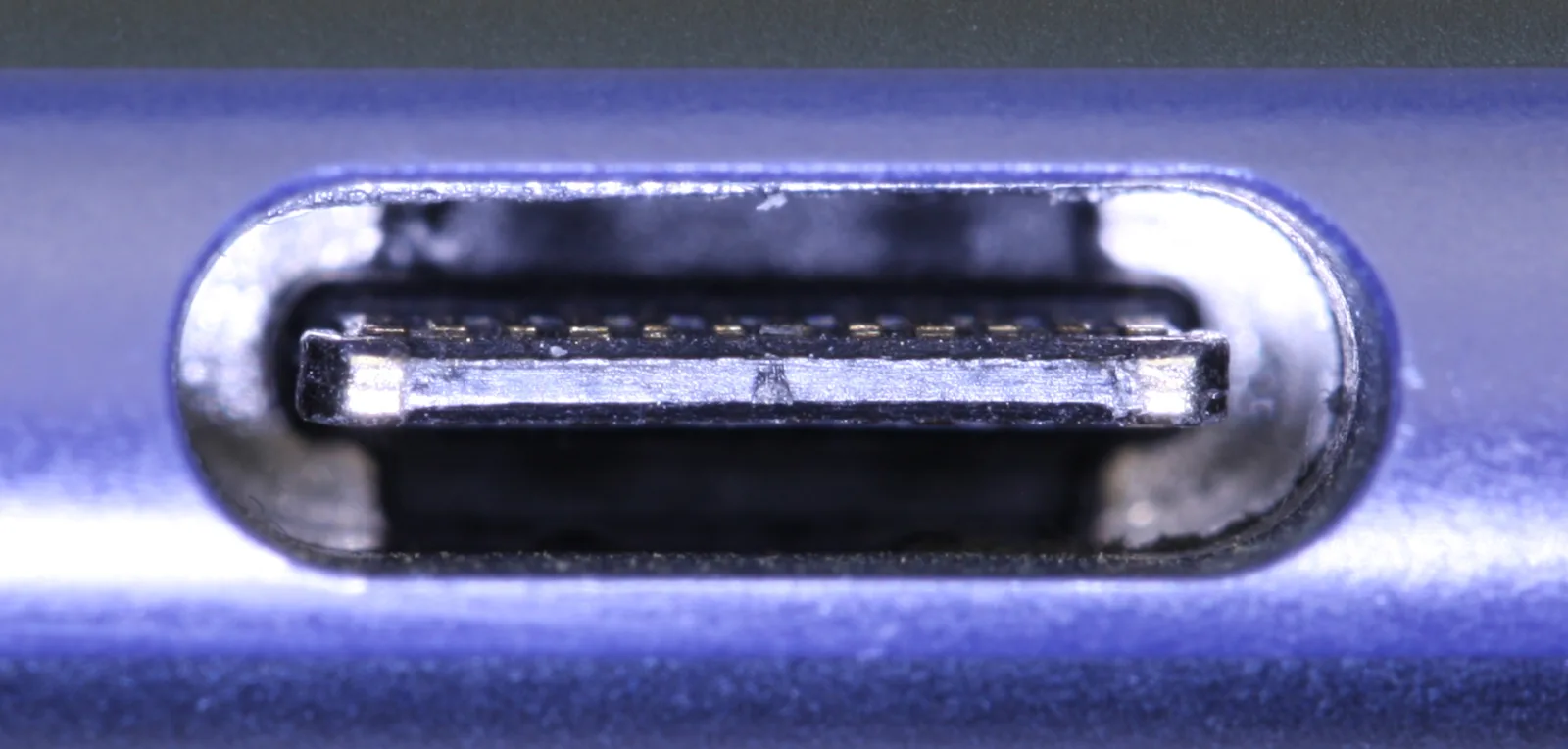
iFixit and iFixit’s port-cleaning guide are the method we follow:
- Power the phone off.
- Shine a light into the port. You often see a gray felt of lint.
- Use a wooden or plastic toothpick, a soft anti-static brush, or short bursts of canned air. No metal pins. No sewing needles. Bridging pins can kill the port.
- The plug should sit flush with the bottom edge. If you still see metal of the connector, clean again.
- If you see green crust or burn marks, stop. That is corrosion or a short. That is a shop job.
Pull the case off while you test. Thick cases stop some plugs from seating.
Fix 2b: Phone at 0% will not turn on
Google’s Android Help treats a fully dead phone as a wait, not a new battery on day one.
- Use a known-good wall charger. Leave it plugged in for at least 30 minutes with the screen off.
- A red light often means the cell is too empty to boot. Keep charging. A battery icon means it is charging while off. You can restart.
- If the screen stays black, call the phone from another line or use Find My Device. If it rings, the phone is on and the screen is the fault, not the charger.
- Hold Power + Volume Down for 20 seconds if it is frozen.
- Still nothing after an hour on a wall brick? That is hardware. Stop overnight experiments on a swollen pack.
Fix 3: Restart, then check charge limits
A stuck charging process looks like a dead port. Restart first. If the phone is frozen, hold Power + Volume Down for 10 to 20 seconds.
Then look for a charge cap. iFixit notes this clearly: the phone sees a charger but will not pass a set percent. That is often a hold-charge or Battery Protection setting, not a failed cell.
- Samsung: Settings > Battery > Charging settings. Turn off Protect battery if you need a full 100% today.
- Pixel: Settings > Battery > Charging optimization. Adaptive charging can wait until morning. That looks like “stuck at 80%” overnight.
- OnePlus / Oppo: look for Optimized charging or a similar 80% limit.
Update Android next: Settings > System > System update (Samsung: Software update). Then update apps in Play Store. A bad battery app or a “fast charge booster” can sit on the charge path. Boot into Safe Mode if charging started failing the day you installed one of those.
Safe Mode: hold Power, then press and hold Power off until you see Reboot to safe mode. Plug in there. If it charges in Safe Mode, uninstall the new apps after a normal reboot.
Fix 4: Moisture warnings
Unplug at once. Leave the phone in moving air for several hours. Screen down on a dry cloth helps the port drain. Do not use rice. Do not use a hair dryer. Heat drives water deeper. Plug in only after the warning is gone.
Fix 5: Use wireless charging as a test
If the phone supports Qi and a pad charges it, the battery and charge chip are likely fine. The USB-C port is the weak link. If wireless also fails, you are looking at software, a charge-limit setting, or the battery itself.
Apps do not fix a dirty port. AccuBattery and Ampere only show whether current is flowing. If they read near 0 mA on a wall charger after a clean port, the hardware is not taking power. If they show a normal charge rate, the phone is charging and the screen or a charge-cap setting is fooling you. Skip random “fast charge booster” APKs.
If the phone is on and still crawls, power it off and leave it on the wall charger for an hour. Background apps can eat the same watts the brick puts in, so it looks stuck.
Fix 6: Case, heat, and the outlet
- Remove the case. Thick cases stop the plug seating fully. If it charges naked, the case is the problem.
- Let it cool. Android throttles or pauses charging above about 40 °C. A phone left in a hot car or under a pillow shows the bolt icon but gains nothing until it cools.
- Test the outlet. Plug a lamp or another device into the same socket. Smart plugs, power strips with dead switches, and loose wall sockets get blamed on the phone constantly.
Fix 7: Safe mode and software
- Hold the power button, then long-press Power off until Reboot to safe mode appears.
- Plug in. If it charges normally in safe mode, a third-party app (battery managers, aggressive cleaners, old charging-animation apps) is blocking it. Uninstall recent apps one at a time.
- Check Settings > System > Software update. Charging regressions on Pixel and Samsung have been fixed by monthly patches more than once.
- Last resort before a repair shop: back up, then Settings > System > Reset options > Erase all data. If a fresh phone still will not charge, it is the port or battery.
When it is hardware
Stop home fixes if you see any of these:
- The back is lifting or the screen is separating. That is a swollen pack. It is a fire risk.
- The port wiggles. The cable only works at one angle after a real cleaning.
- The phone dies at 30–40%, or the percent jumps around, even on a known-good charger.
- It stays dangerously hot at idle. Power off. Do not charge on a bed.
iFixit treats a battery under about 80% health as a replacement candidate. Pixel, Samsung, and many 2026 Androids show Battery health or Battery information in Settings. A shop quote for a battery is often $50 to $100 in the US. A new port is more if it is soldered to the board.
A phone that also reboots on charge may be heat or a dirty port. Walk through Android phone keeps restarting after the cable test. Pixel owners who drain fast should read our Pixel 10 Pro battery notes.
Bottom line
Prove the cable. Clean the port without metal. Restart. Turn off the 80% charge cap if you need a full tank. Use wireless charging as a fork: it tells you port vs battery. Swelling means you stop and go to a shop.
Next step: plug a known-good wall charger in right now. If the icon appears, the phone was never the problem. If it does not, clean the port, then decide if you need a battery or a port, not a new phone.
Frequently Asked Questions
Why is my Android phone not charging when plugged in?
The usual causes are a worn USB-C cable, a weak wall brick, lint in the port, or a software glitch. Asurion notes those external problems beat a failed battery most of the time. Swap to a known-good charger, then inspect the port with a light before you assume the phone is dead.
How do I clean an Android charging port safely?
Power the phone off. Use a wooden toothpick, a soft brush, or short bursts of canned air. Do not use metal pins. Metal can bridge the USB-C pins and kill the port. The plug should sit flush with the bottom of the phone when the port is clear.
Why does my Android phone stop charging at 80%?
Many phones have Battery Protection, Optimized charging, or Adaptive charging that holds around 80% to slow battery wear. Turn that setting off in Battery settings if you need 100% today. iFixit flags this hold-charge behavior as a common false alarm.
Can dust stop a phone from charging?
Yes. Pocket lint packs into USB-C and keeps the plug from reaching the pins. The phone may show nothing, charge only at an angle, or charge slowly. Cleaning the port fixes this more often than replacing the port.
How do I know if the charging port is damaged?
After a real cleaning, the cable still feels loose, only works at one angle, or wireless charging works while the cable never does. Burn marks or green crust mean stop and use a shop. A wobbly port is hardware, not a settings problem.
What should I do if I see a moisture detected warning?
Unplug immediately. Let the phone air-dry for several hours. Do not use rice or a hair dryer. Plug in only after the warning clears. Charging into a wet port can corrode the pins.
When should I replace the battery instead of troubleshooting?
When the back is swollen, the phone dies at 30 to 40%, health reads under about 80%, or it stays hot at idle on a known-good charger. A swollen pack is a fire risk. Power off and do not charge it.
My Android phone is at 0% and will not turn on. What should I do?
Plug a known-good wall charger in and wait at least 30 minutes. Google says a red light means the battery is too empty to boot. If the screen stays black, call the phone. A ring means it is on and the display is the problem. Do not assume a new battery until that wait is done.
Should I use AccuBattery or Ampere to fix charging?
They measure charge current. They do not clean a port or replace a cable. Use them only after a known-good charger and a lint-free port. Near 0 mA means power is not entering. A normal mA reading means the phone is charging and you should look at Battery Protection or the screen instead.
Why does my Android stop charging when it gets hot?
Android pauses or slows charging above roughly 40 °C to protect the battery. Take off the case, move it out of sunlight, and stop gaming while plugged in. Charging resumes once it cools.
Can an app stop my Android phone from charging?
Yes. Boot into safe mode and plug in. If it charges normally there, a third-party battery manager or cleaner app is the cause. Remove recently installed apps one at a time.