Carrier Unlock Your Android Phone: Verizon, AT&T, T-Mobile

To carrier unlock an Android phone, pay it off, meet your carrier's waiting period, and then ask the carrier that sold it: Verizon now unlocks a postpaid phone automatically once it's paid in full, AT&T needs 60 days and a request at att.com/deviceunlock, and T-Mobile unlocks after 40 days of service. Prepaid brands are much stricter in 2026, with Cricket, Metro, Boost and Verizon Prepaid all at about a year.
Also in this topic: Android Guides hub.
Jump to: check if it's unlocked · 2026 rules by carrier · request an unlock · Verizon · AT&T · T-Mobile · Cricket, Metro, Boost · still says SIM not supported · FAQ
Quick answer: A carrier lock is software that stops a phone sold by one carrier from working with another carrier's SIM or eSIM. The carrier that sold the phone is the only one that can remove it, and it does so free once you qualify. In the US that usually means the phone is paid off, isn't reported lost or stolen, and has been active for the carrier's minimum time. Several of those minimums changed in 2026, so older guides are often wrong.
How to Check If Your Android Phone Is Unlocked
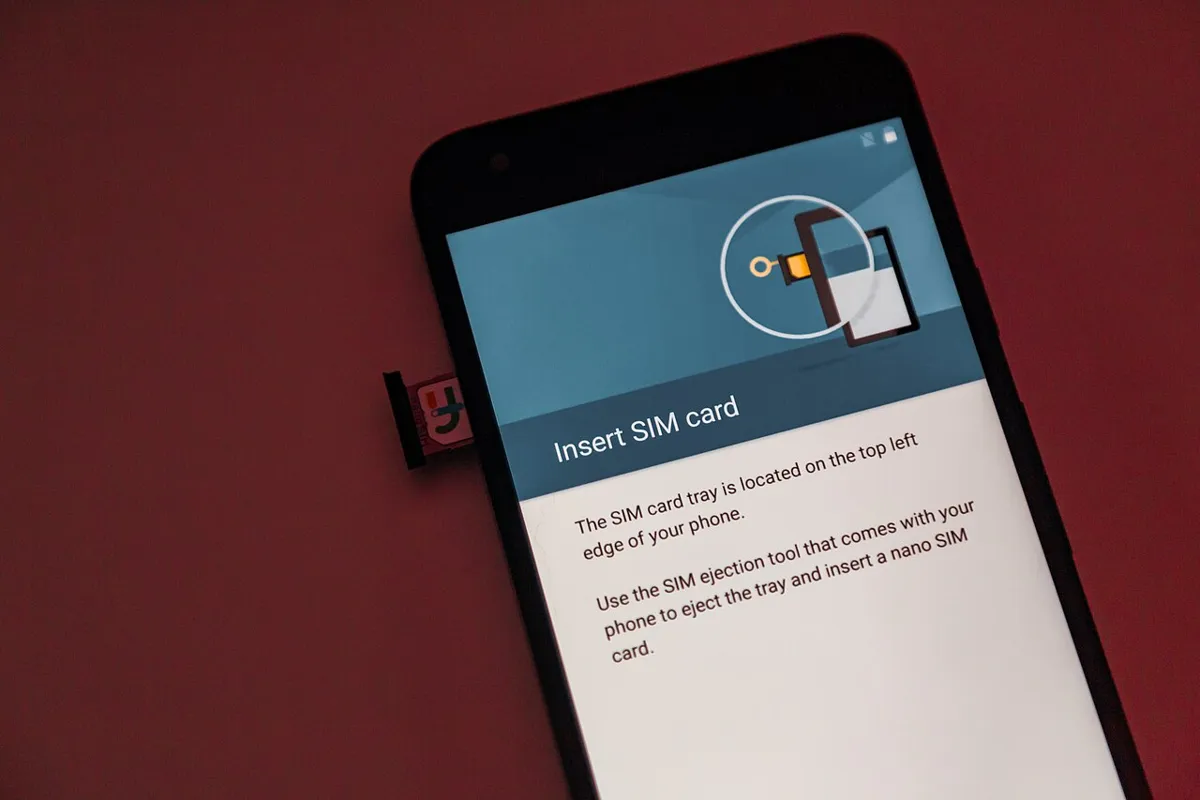
The quickest check is in Settings on a Samsung Galaxy, and the surest check on any phone is a SIM from a different carrier. If the other carrier's SIM works for a call and a text, the phone is unlocked. If you see "SIM not supported" or a request for a network unlock PIN, it's still locked. Verizon's unlocking FAQ names "SIM Not Supported" as the sign of a locked Verizon phone, and notes that the wording varies by manufacturer.
Samsung Galaxy
On newer Galaxy phones, go to Settings > Connections > More connection settings and look for Network lock status (on T-Mobile phones the menu is called Network Unlock). AT&T's unlock article gives that path for Samsung models released after September 1, 2025.
For older AT&T Galaxy phones, AT&T says to open Settings > About phone > Software information and read the Service provider software version:
- Ends in ATT/ATT: the phone came from AT&T and can be unlocked through AT&T.
- Contains ATT but ends in something else: it was unlocked before it came to AT&T.
- No ATT at all: AT&T can't unlock it; ask the carrier that originally sold it.
Google Pixel
Every Pixel sold by the Google Store is unlocked, according to Google's Pixel carrier help page, and an unlocked Google Store Pixel shows "Fi" until you set it up with a carrier. A Pixel bought from a carrier can be locked. Google's help pages don't describe a lock-status screen for Pixel, so AT&T's Pixel 10 Pro tutorial uses the network list instead: Settings > Network & internet > SIMs, pick the SIM, and turn off Automatically select network. Networks from only one carrier suggest a lock, but see the caveats below.
Any Android phone
- Ask the carrier. Your online account or carrier app shows it. AT&T's account page says "Device unlocked" in Device info, and T-Mobile's T-Life app has a "Device lock status" field.
- Try another carrier's SIM. A friend's SIM or a free trial SIM works. With eSIM-only phones, AT&T says to request an unlock rather than test, because there's no card to swap.
- Find your IMEI with *#06# in the Phone app or under Settings > About phone. Unlock requests and new-carrier compatibility checks often ask for it.
Checks that don't prove anything
Three popular tips give false answers often enough that you shouldn't rely on them:
- The available-networks list. Verizon says a locked phone can still roam onto another carrier's network, so seeing other carriers listed doesn't prove the phone is unlocked. Seeing only one can simply mean weak coverage.
- The "OEM unlocking" switch in Developer options. That setting controls whether the bootloader can be unlocked for flashing software, according to the Android Open Source Project. It isn't a carrier-lock indicator, even though some AI answers present it as one.
- Third-party IMEI checker sites. They read databases, not your carrier's records, so treat them as a hint. Your carrier's own answer is the one that counts.
Carrier Unlock Rules in 2026, by Carrier
Postpaid phones now unlock when they're paid off (plus 40 or 60 days on AT&T and T-Mobile), while most prepaid phones stay locked for a year. This table summarizes each carrier's published policy as of October 29, 2026. All of them also require that the phone isn't reported lost, stolen or tied to fraud.
| Carrier | When the phone can be unlocked | How it's unlocked | Policy changed |
|---|---|---|---|
| Verizon (postpaid) | When it's paid in full; 35-day hold if you paid with a Verizon Gift Card | Automatic | Jan 27, 2026 (was 60 days) |
| Verizon Prepaid | After 365 days of paid, active service | On request | Jan 27, 2026 (was 60 days) |
| AT&T (postpaid) | Bought 60+ days ago, paid in full, bill not past due | Automatic for eligible Apple, Samsung and Google phones; otherwise request online | — |
| AT&T Prepaid | 12 months of paid service | Request | — |
| T-Mobile (postpaid) | 40 days active on the line, paid in full | Automatic within 2 business days if the phone supports remote unlock | — |
| T-Mobile Prepaid | 365 days since activation, or more than $100 in refills and 14+ days since purchase | Automatic within 2 business days if the phone supports remote unlock | — |
| Cricket | 365 days of paid service (six months if bought before July 1, 2026) | myCricket app, Cricket Device Unlock app, or online | Jul 1, 2026 |
| Metro by T-Mobile | 365 days from activation | Automatic within 2 business days | — |
| Boost Mobile | Postpaid: when paid off. Prepaid: 1 year after activation | Automatic within 2 business days | — |
Sources: Verizon, Verizon Prepaid, AT&T, T-Mobile, Cricket, Metro and Boost Mobile unlock policy pages. Carriers can change these without notice, so check the linked page before you switch.
Why the change? Verizon used to be the only national carrier the FCC required to unlock phones after 60 days. On January 12, 2026, the FCC waived that rule, citing phone theft and trafficking, and Verizon now follows the same voluntary CTIA Consumer Code as other carriers. That code, described on the FCC's cell phone unlocking guide, commits carriers to unlock prepaid phones no later than one year after activation and to answer an unlock request within two business days. It's an industry pledge, not an FCC rule, which is worth knowing because some carrier blogs still describe the one-year prepaid limit as an FCC requirement.
How to Request a Carrier Unlock, Step by Step
The request takes a few minutes once the phone qualifies. The basic steps are the same for every carrier:
- Pay off the phone. Clear any device installment balance and any past-due bill. On Verizon, pay with a debit or credit card, because a Verizon Gift Card adds a 35-day hold.
- Wait out the minimum period. Use the table above. Prepaid lines usually need a full year of paid service, and suspended days may not count.
- Check the status in your carrier account or app. Many phones unlock on their own once they qualify, so you may already be done.
- Request the unlock if it hasn't happened. Use the carrier's unlock page or app (links in each section below) and have the IMEI ready (dial *#06#).
- Restart the phone. Most carrier unlock apps ask for a restart to finish. Then insert the new carrier's SIM or set up its eSIM.
Unlocking a qualifying phone is free. Under the CTIA code, participating carriers don't charge current or former customers to unlock an eligible device, though they may charge people who were never customers a reasonable fee.
How to Unlock a Verizon Android Phone
A Verizon postpaid phone bought on or after January 27, 2026 unlocks by itself once the full device price is paid, so there's usually nothing to request. Verizon's unlocking policy also says that once a phone is unlocked, Verizon will never re-lock it. Some AI search answers say every Verizon phone sold since that date needs 365 days; that's only the prepaid rule.
- Paying off early: Verizon's FAQ says to pay off the device agreement with a debit or credit card in a store, online, in the app, or through Customer Service, and the phone unlocks shortly after.
- Inside the first 30 days: the only way to trigger the automatic unlock is to pay off the phone in cash at a corporate Verizon store, which Verizon ties to its 30-day return window.
- Gift cards: paying with a Verizon Gift Card delays the unlock by 35 days. Verizon's business unlock page applies the same 35-day delay to full-price purchases paid by paper check, bill credit, or a card that's swiped or typed in instead of using the chip or tap to pay.
- Replacement phones: a phone bought as a replacement, rather than for a new line or upgrade, doesn't unlock automatically.
- Bought before January 27, 2026: those phones unlocked automatically 60 days after purchase.
If a paid-off Verizon phone still won't take another SIM, Verizon's FAQ says to do a factory data reset and contact Verizon if it's still locked afterward. Back up first with our guide to backing up an Android phone, because a reset erases everything.
Verizon Prepaid: phones activated on or after January 27, 2026 are unlocked on request after 365 days of paid, active service. Suspended days don't count toward the 365. Verizon's prepaid unlock page still has an older line saying phones "can become eligible for unlocking 60 days after activation," but the dated policy text on the same page sets 60 days only for phones activated on or before January 26, 2026. You can check eligibility at 888-294-6804 or *611.
How to Unlock an AT&T Android Phone
AT&T unlocks a phone that was bought more than 60 days ago, is paid in full, isn't active on another AT&T account, and isn't on a past-due account. According to AT&T's unlock article (last updated June 29, 2026), eligible Apple, Samsung and Google phones on an AT&T plan should unlock on their own.
- Sign in to your AT&T account and select the phone. If Device info says "Device unlocked," you're done.
- If not, submit a request at att.com/deviceunlock. You don't need to be an AT&T customer, so this works for a used AT&T phone too, as long as it meets the rules.
- Once AT&T approves the request, follow the steps it sends you, then restart the phone.
AT&T Prepaid phones need 12 months of paid AT&T service. For a SIM-card phone, AT&T says to insert a non-AT&T SIM to check; a "not compatible" message means it's still locked. For an eSIM, request the unlock directly. Need data settings after you move? See our AT&T APN settings for Android.
How to Unlock a T-Mobile Android Phone
T-Mobile unlocks postpaid phones that have been active on its network for at least 40 days on the requesting line and are paid in full. Once a phone qualifies, T-Mobile's unlock policy says it unlocks it remotely within two business days if the phone supports that, or sends a notification with next steps if it doesn't.
If you need to finish the unlock on the phone, connect to T-Mobile's network or Wi-Fi and use the steps from T-Mobile's device unlock page:
- Samsung: Settings > Connections > More connection settings > Network Unlock > Permanent Unlock, then restart.
- Google Pixel: with a T-Mobile SIM or eSIM active, install the T-Mobile Device Unlock (Pixel) app, tap Check eligibility, then Permanent Unlock, and restart. On October 29, 2026, its Play listing showed a last update of August 16, 2023 and a 2.8-star rating from about 1,500 ratings, so if it errors out, contact T-Mobile instead of reinstalling it again and again.
- Motorola: Settings > About Phone > Device Unlock > Permanent Unlock, then restart.
- OnePlus: Settings > Wi-Fi & Internet > SIM & network > Advanced or Network Unlock > Permanent Unlock, then restart.
- Older Androids: some have a preinstalled Device Unlock app. Open it, choose Device Unlock > Continue, then Permanent Unlock.
T-Mobile Prepaid: 365 days must have passed since activation, unless the account has had more than $100 in refills per line and more than 14 days have passed since purchase. T-Mobile also limits prepaid lines to two unlocks per line in 12 months. For data settings afterward, see our T-Mobile APN settings guide.
How to Unlock a Cricket, Metro or Boost Mobile Phone
Prepaid brands keep phones locked longest, and Cricket just doubled its wait. Cricket's unlock policy, revised July 1, 2026, requires 365 days of paid service on the phone. Phones bought before July 1, 2026 still need only six months of paid service, per Cricket's unlock support page.
- Cricket: on most Android phones, open the myCricket app, sign out, tap Unlock Device on the sign-in screen, tap Unlock, then restart. Motorola and Cricket-branded phones launched in 2025 or later use the separate Cricket Device Unlock app. If neither works, sign in at cricketwireless.com and choose How to Unlock My Device. Former customers can use the app too.
- Metro by T-Mobile: Metro's unlock policy requires 365 days from the activation date for phones bought from Metro, and eligible phones that support it are unlocked remotely within two business days.
- Boost Mobile: Boost's unlocking policy unlocks postpaid phones once financing is paid off (right away if you paid in full) and prepaid phones one year after activation, if the account isn't suspended. Boost unlocks automatically within two business days and takes requests at 833-502-6678.
Moving to Cricket instead of away from it? Our Cricket Wireless APN settings guide covers getting data working on an unlocked phone.
Unlocked but Still Says "SIM Not Supported"?
A phone can stay stuck on the old lock status for a while after the carrier removes it, and restarting is the first fix. If that doesn't work, try these in order:
- Refresh the lock on a Pixel. Google's Pixel help page says to connect to Wi-Fi, install any Android updates, open the Phone app, and dial *#*#7465625#*#*. When the dialer returns, wait about 2 minutes and check for a mobile connection.
- Factory reset as a last resort. Both Google and Verizon list a factory reset as the next step for a phone that should be unlocked but isn't. Back up first.
- Check that the new carrier supports the phone. The FCC points out that unlocking only removes the software lock. A phone built for one network may not support every band or feature on another, so run the new carrier's compatibility check with your IMEI.
- Fix data and texts separately. If calls work but data doesn't, the APN is the usual cause; see our guide to mobile data not working on Android.
Moving to a new phone on the same carrier rather than a new carrier? You don't need an unlock for that. See how to transfer an eSIM to a new Android phone.
How We Put This Guide Together
This guide is based on the published unlocking policies and support pages of Verizon, Verizon Prepaid, AT&T, T-Mobile, Cricket, Metro by T-Mobile and Boost Mobile, Google's Pixel help, the Android Open Source Project's bootloader documentation, the FCC's unlocking guide and its January 12, 2026 Verizon waiver, and the Google Play listing for T-Mobile's Pixel unlock app, all checked on October 29, 2026. The Metro policy page blocks automated access, so its terms come from the page as indexed in search on that date. We didn't unlock phones on each carrier for this article. Carriers change these policies with little notice, and individual accounts can have exceptions, so treat your carrier's own answer as final.
Frequently Asked Questions
Is it legal to unlock my phone in the US?
Yes. The Unlocking Consumer Choice and Wireless Competition Act of 2014 made it legal for consumers to unlock their phones. The carrier still decides when a phone qualifies, based on its own unlock policy.
Does a carrier unlock erase my phone?
Usually not. Most phones finish the unlock after a restart. If a Pixel still shows as locked after the carrier approves it, Google and Verizon both list a factory reset as the last step, so back up the phone before you start.
Can I unlock a phone that isn't paid off?
Generally no. Verizon, AT&T, T-Mobile and Boost Mobile all require the device balance to be paid in full first. On Verizon, a postpaid phone unlocks automatically once it's paid off, unless you paid with a Verizon Gift Card, which adds a 35-day wait.
Will a factory reset remove a carrier lock?
No. The carrier has to approve the unlock first. A reset only helps a phone the carrier has already unlocked pick up the change.
How long does a carrier unlock take?
It depends on the carrier. Verizon postpaid phones unlock automatically when paid off, T-Mobile and Boost Mobile say remote unlocks happen within two business days, and AT&T unlocks eligible Apple, Samsung and Google phones automatically or after you submit a request.